Know How to Add Zoho Mail to Spark on Mac?

Are you moving from Zoho Mail to Spark on Mac OS X? Or trying to access official Zoho Mail account emails in your personal Spark account? Looking for a suitable solution to add Zoho Mail to Spark? Then, stick to MacMister blog because here we will provide a direct solution that will directly add Zoho Mail mailboxes to Spark within seconds. Let’s get started with a common scenario which is actually a query that most of users are facing these days.
Common Query:
I am changing my email platform due to personal reasons. My organization is moving their accounts from Zoho Mail to Spark. And, the problem is I have plenty of important emails in my Zoho Mail account that I do not want to lose. There is a manual method available where I can manually add Zoho Mail account in Spark. But, the Spark account is already configured with iCloud. Now, I am completely blank because I need Zoho Mail emails in my Spark account urgently. If anyone can knows about any safe solution, please let me know!
Zoho Mail is a popular webmail account that many organizations make use of to manage personal database. It is reliable and safe business solution for email management that is tailor-made for fulfilling the organization requirements. On the other hand, Spark is another email application of Mac OS X which is fast, cross-platform and focus on what’s important for users. They both are different but connected somehow. Spark is an advance email application in which users can configure their Zoho account by applying IMAP details. But, the problem is at times, their Spark accounts are already configured with iCloud, Yahoo or any other web-based email service provider due to which they unable to access Zoho Mail emails in a required Spark account. Thus, it becomes a challenge and they start looking for a safe email migration service that can run error-free on Mac and assures the accurate migration.
How to Directly Add Zoho Mail to Spark on Mac?
Zoho Backup Tool for Mac is a perfect reliable solution that directly transfers all emails from a required Zoho Mail account to Spark on Mac OS X. The application has a user-friendly and intuitive GUI that both technical and naïve users can operate to add Zoho Mail emails & attachments to Spark. The software is a trouble-free method that is uncomplicated and guarantees accurate results within seconds.

Moreover, the features will benefit every Zoho Mail user who wants to migrate Zoho Mail emails to Spark according to their requirements. And, users can check the same by downloading the trial edition.
Steps to Add Zoho Emails to Spark Directly on Mac
Step 1. Run Zoho Mail to IMAP Backup Tool Mac on Mac.
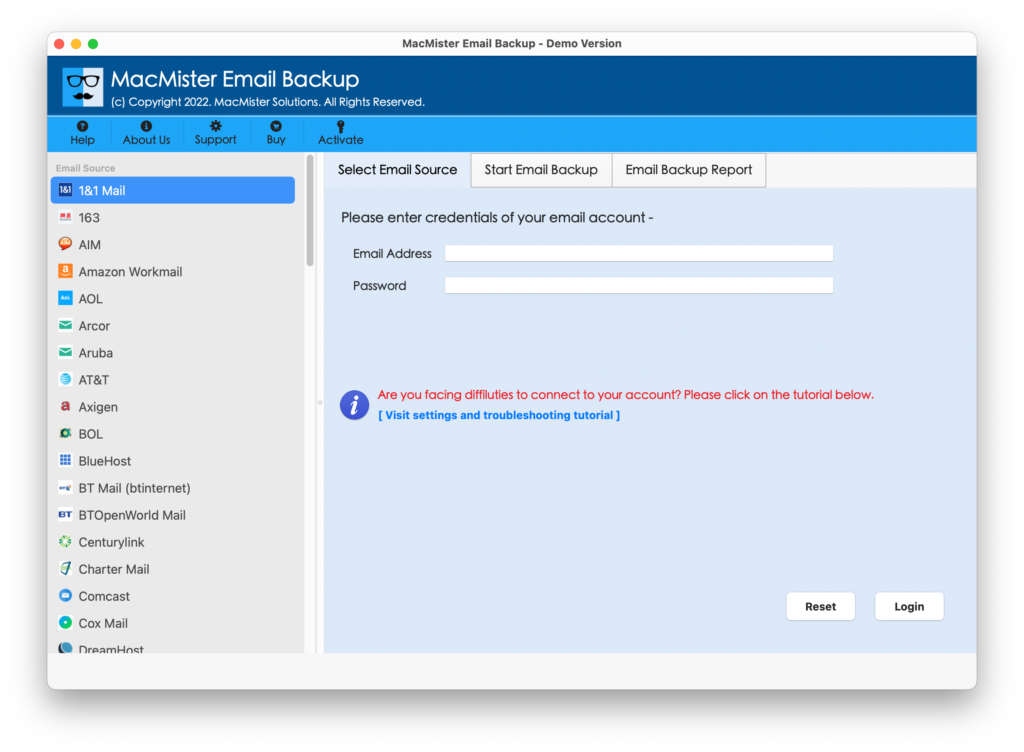
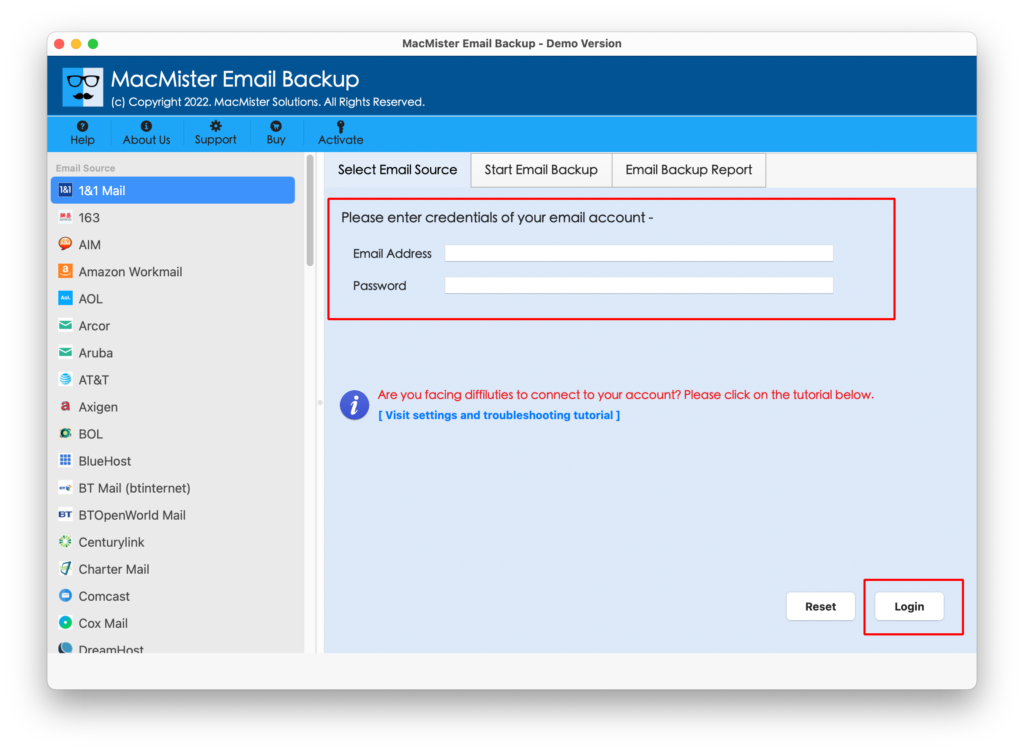
Step 2. Select the Zoho Mail webmail option from the list of sources appearing on the left. Enter Zoho Mail credentials and click the Login button.
Step 3. Zoho Mail account will connect and start listing all its mailboxes on the software pane.

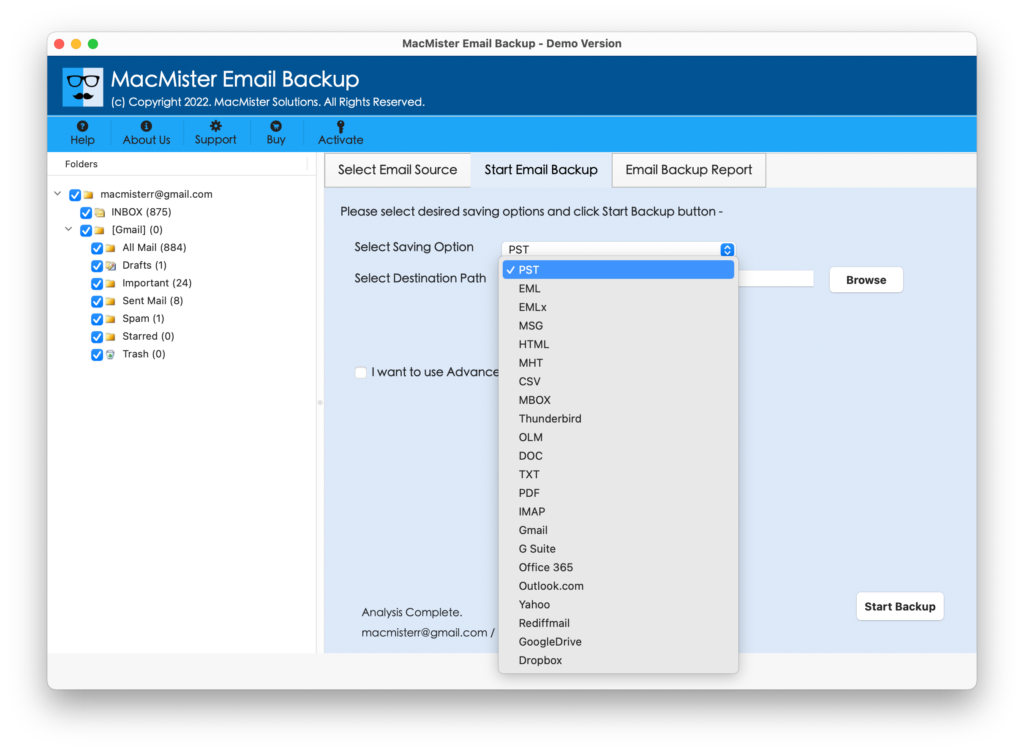
Step 4. Go to Select Saving Option and click its drop-down button. Pick IMAP option from the list.
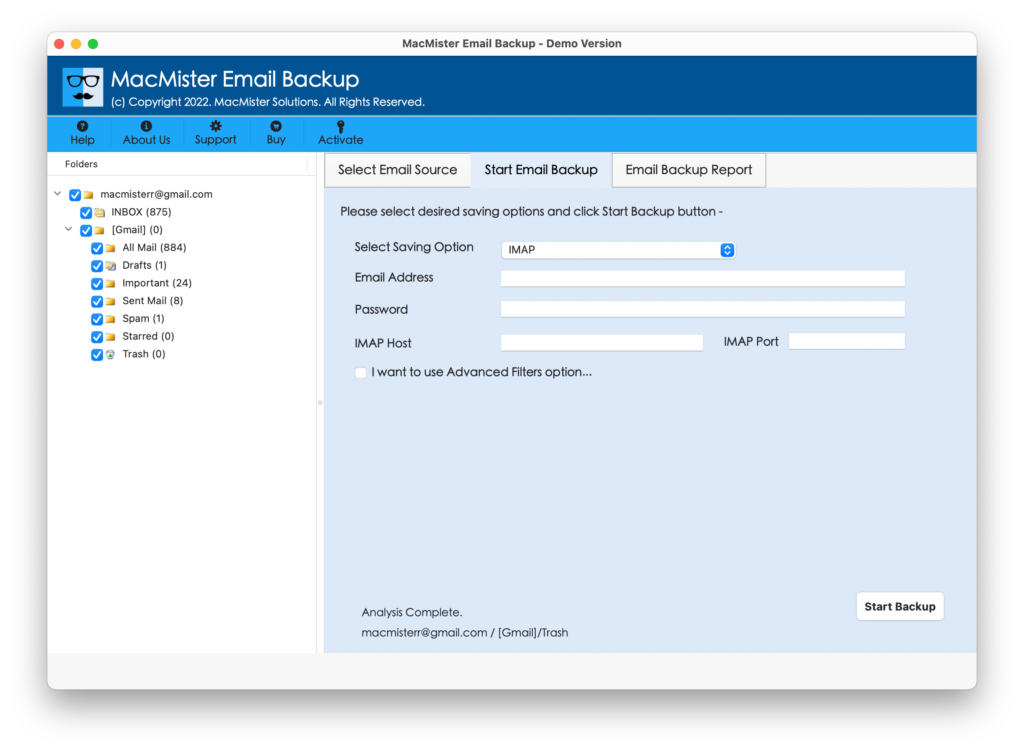
Step 5. Provide the necessary Spark account credentials with IMAP Host and Port Number. You can apply filters as well if you want to migrate specific Zoho Mail emails to Spark. Now, click on Start Backup button to start the process.
Step 6. Zoho Mail to Spark process will go live and the current migration will appear on Email Backup Report. With the help of the same, users can track the ongoing status of email migration.
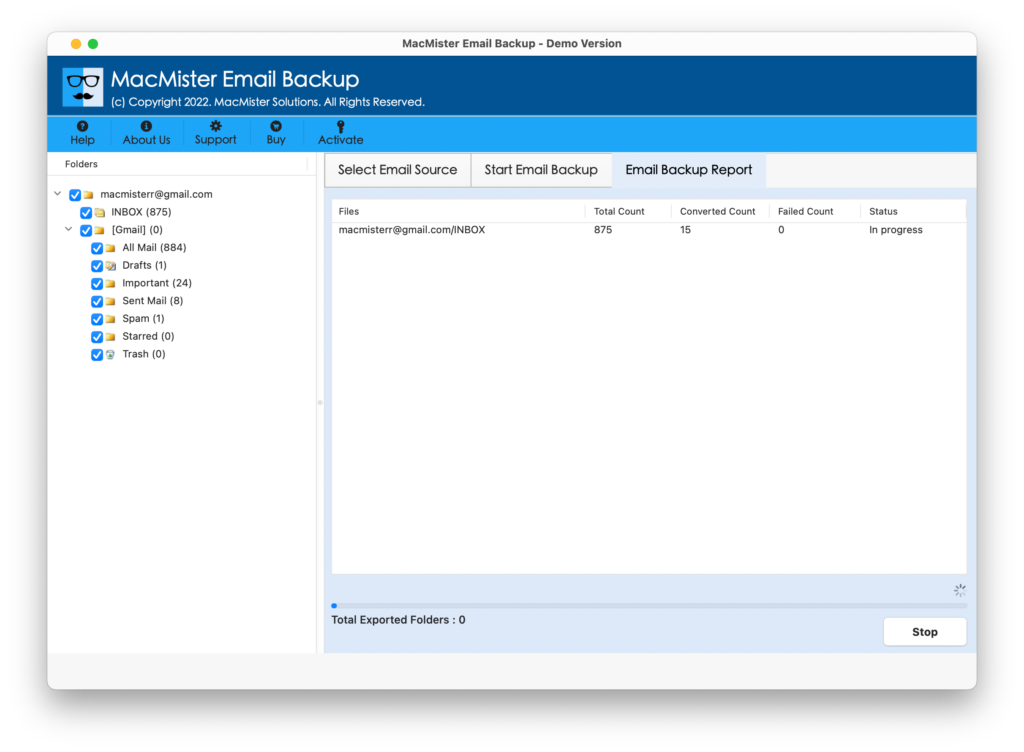
When the migration is end, users will get the confirmation through a notification that will show “Process Completed Successfully”. Click OK and navigate to Spark email application to check the migrated files. You can now open the required email and check the data accuracy. The content of email files and attachments remain as it is and the formatting properties will be preserved as well.
Why to Choose Zoho Mail to Spark App for Mac?
There are various benefits for choosing Zoho Mail to Spark solution for migration on Mac OS X and some of them are:
Batch Zoho Mail Emails to Spark
Zoho to Spark Tool is has a facility of migrating Zoho emails with attachments in a batch. With the help of the solution, users will be able to transfer the entire INBOX folder to Spark from Zoho at once. It will save the time and guarantees the accurate migration.
Avail Filters for Selective Procedure
Zoho Mail to Spark application has the section of Filters which users can adapt when they want to add selective Zoho Mail emails to Spark. It includes the options like date range, subject, to, from, etc. that one can choose and apply as per need to perform the migration of required emails.
Migrate Emails with Attachments
The Zoho to Spark utility implement the migration of Zoho emails with attachments. And, so you do need to take worries of that. Because if you have emails with attached documents, then the tool will make sure that it executes the migration with attached files as well.
Preserves Data Integrity of Emails
The Zoho Mail to Spark application will keep the data integrity of Zoho emails and attachments intact during the process. After the tool successfully performs the migration, users will see that content, hyperlinks, images, header, etc. is appearing without any alteration.
GUI is Uncomplicated and Intuitive
The Zoho to Spark application supports GUI that is friendly and easy to use. Anyone can operate the tool on their own as the steps are straight, short and simple. Moreover, users will not require paid experts to do the migration on their behalf.
Supports Migration on all Mac OS
Zoho Mail to Spark application implements the migration of Zoho Mail emails to Spark with attachments on all versions of Mac OS X. With the help of the tool, users can directly move Zoho emails to Spark on macOS Ventura, Monterey, Big Sur, etc.
Note. To know every software function, download trial edition now!
Epilogue
The article has mentioned a solution that is time-saving and quickly add Zoho Mail to Spark on Mac. The Zoho Mail Email Backup Software Mac is reliable, secure and verified. Mac users can use them without having a second thought and precisely move all Zoho emails to Spark at once. You can download the trial edition and add first 25 emails from Zoho to Spark for free. With the help of the same, you will be able to check the migration process and also gain the features insight of the application.