How to Migrate and Move from Gmail to ProtonMail?

Looking to move from Gmail to ProtonMail? Wondering how should I migrate emails from Gmail to ProtonMail! If yes, then continue further as here we are delivering an amazing approach to migrate Gmail emails to ProtonMail on Mac directly. But, before discussing about it, let us first know about Google Mail and ProtonMail.
Gmail is a widely used cloud-supported email client. It is simple, quick and easy to control. Users and organizations across the globe are using Google Mail service for managing daily personal information. It is a hub of productivity tools that helps in enhancing user’s workflow. ProtonMail, on the other hand is one of the most secure email communication provider introduced by scientist from CERN and MIT. It is also free and provide fast email delivery service. If, we talk about its interface, it is not complex and very slick. It is very simple and clean and focus only on the user messages. But, what are the reasons behind Google Mail to ProtonMail migration.
There are basically 5 reasons why users are leaving Gmail for ProtonMail. Let’s discuss them in detail.
Top 5 Reasons to Choose ProtonMail over Gmail
- With fast and free communication, it offers 500 MB free storage space. However, users can use premium subscription to exceed the storage limit. Moreover, create multiple addresses in a single account.
- ProtonMail is a Switzerland based. And, it will not ask to use specific browser or chat service or smart assistance when checking messages.
- Supports end-to-end encryption to safeguard user’s communication. Apart from this, there are other privacy options as well that help in protecting user’s private data.
- The advance Biometric security feature help users to lock the ProtonMail email app on phone.
- Both labels and folders are useful for message organization.
If we compare Google Mail and ProtonMail, then ProtonMail is a winner. It has so many secure features and options that users won’t able to resist and finally switch to ProtonMail email client from Gmail.
How to Migrate Gmail to ProtonMail with Mail Messages & Attachments?
Gmail Backup for Mac is direct and possess the capability of exporting emails from Gmail to ProtonMail directly. The attachments are also supported. Moreover, the GUI and operational steps of the tool are adaptive and due to this technical and novice users can easily use the application. There are total 3 main clicks and implementing them properly will transfer entire Google Mail email list to ProtonMail at once. In other words, the tool will take minimum time to perform the entire process.

The application is loaded with lots of features with the help of which users move from Gmail to ProtonMail according to their own demands. However, if a user wants to experience the practical working of the tool, then it can be done through a free demo.
Steps to Move from Google Mail to ProtonMail Email Client Server
Step 1. Run Gmail to ProtonMail Backup Tool on macOS.
Step 2. Choose Gmail option from webmail list that is appearing on left and enter Gmail Email Address and App Password. After this, click Login button.

Step 3. Gmail account will connect with the application. Its list of mailbox items start showing in a hierarchical structure on the software.

Step 4. Choose the saving option as IMAP Server from Select Saving Option menu.

Step 5. Provide ProtonMail credentials with IMAP Host and Port Number. Once entered, click on Start Backup button.
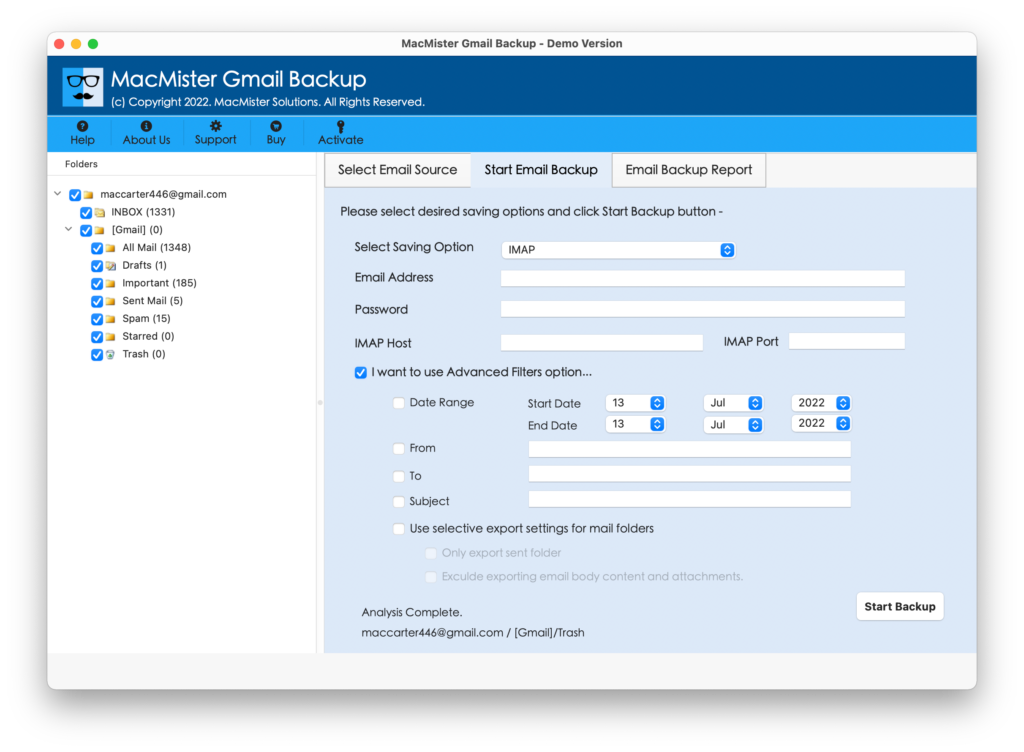
Step 6. Gmail to ProtonMail process is live and users can now use Email Backup Report screen to track the status of the process.

In few seconds process will end and users will get a message of “Process Completed” on their screen. Click OK and go to ProtonMail account to check the accuracy of resultant files. Their properties and content originality will be in an exact form. For any help, contact MacMister Support team.
Why to Choose Gmail to ProtonMail Software?
There are various benefits of choosing Google Mail to ProtonMail. And, here we are mentioning some popular ones:
Directly Export Gmail to ProtonMail
The application possesses the ability to migrate Gmail emails to ProtonMail with attachments directly on macOS. And, for this, the tool only require the credentials of both the accounts. Once, they are provided then the software start transferring emails from Google Mail to ProtonMail.
Batch Migration of Google Mail Emails
Gmail to ProtonMail Tool offers the in-built property that directly batch migrate Google Mail emails to ProtonMail at once. The software will pick up the complete INBOX folder of Gmail account and transfer its entire list of emails into ProtonMail in a single time without data loss.
Export Specific Emails of Gmail Account
The software has the option of Advance Filters that ease the process for those who need to transfer specific Google Mail emails to ProtonMail account. By applying the filter as per requirements, users will be able to transfer required Gmail emails to ProtonMail.
Quick, Simple and Stress-Free User-Interface
Gmail to ProtonMail application contains a user-friendly interface that is simplified and possesses fast processing. Any user and organization do not require help from an external source to operate the steps of the tool. It can be easily performed by individuals, professionals or admins.
Move Google Emails to ProtonMail on all Mac OS
The software has the ability to migrate from Google Mail to ProtonMail on any macOS. The tool effortlessly performs the migration of Gmail emails to ProtonMail on macOS Ventura, Monterey, Big Sur, and all previous versions.
Final Thoughts
The mentioned article has discussed the advanced solution to move from Gmail to ProtonMail with emails and attachments. The Gmail Email Backup Software Mac carries fast and simple steps. Moreover, the options of the tool help users in carrying out impressive output. Quickly download the trial edition and migrate Gmail emails to ProtonMail with attachments. It allows to move first 25 files from Google Mail account to ProtonMail free of cost.