How to Fix Error Code 451 in Outlook? – [Solved]
Summary:
Facing Microsoft Outlook error code 451 in Windows 7 or in any other Windows version? Wondering why this is happening and constantly searching for solutions to fix the same! So, in the following segment we are offering 6 solutions. You may try them or simply go with the guaranteed solution i.e. MacMister PST Converter for Mac.
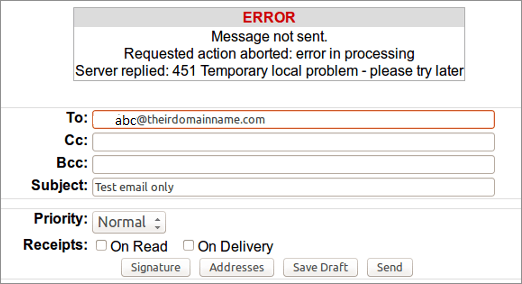
You need to urgently send some crucial emails but suddenly encountered an error i.e. Outlook 451 Error” is a temporary local issue, forcing you to schedule the communications.

How to Fix Error Code 451 in Outlook?
In the segment we will discuss solutions to fix error code 451 and understand briefly about emails as everyone is definitely not from technical field and well-versed in email architecture.
Brief Intro of Emails
Different Types of Emails
At the outset, highlighting once again that we have briefly explained about emails as email complexity is significantly greater than what is shown here.
Web Mail – Web Mail includes Google Mail, Yahoo Mail, Outlook 365, etc. They are accessible via browser and apps. A user needs an internet connection to manage emails. They do not save single data on a local server.
Client Mail – Emails are accessible through software installed on a personal computer or server. Outlook, introduced by Microsoft is one such email application. However, it is not the only option available. Other apps such as Apple Mail, Mailbird, or Thunderbird are also used. But those are not the focus right now.
Note. The distinction between webmail and email client is getting blurred gradually as Outlook.com and Gmail can also be set up with Outlook on PC.
What is SMTP?
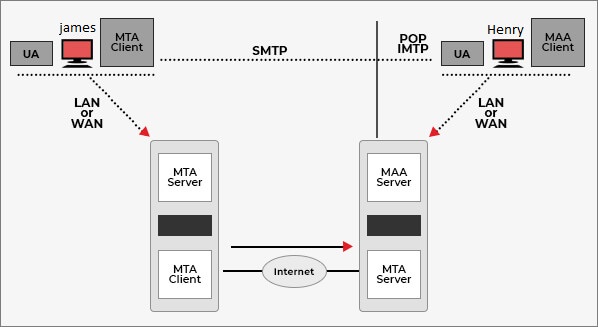
The internet works under particular regulations leading data traffic. For e.g. any content displayed by browser supports HTTP. It is a type of traffic rule that is meant for bits and bytes. An email system uses Simple Mail Transfer Protocol (SMTP) for sending mail and Post Office Protocol i.e. POP for accessing emails.
Email Architecture is built in two parts –
UA (User Agent) – Software that performs multiple tasks such as composing, sending, or receiving such as MS Outlook.
MTA (Mail Transfer Agent) – MTA assist the message between sending computer and receiving computer through SMTP.
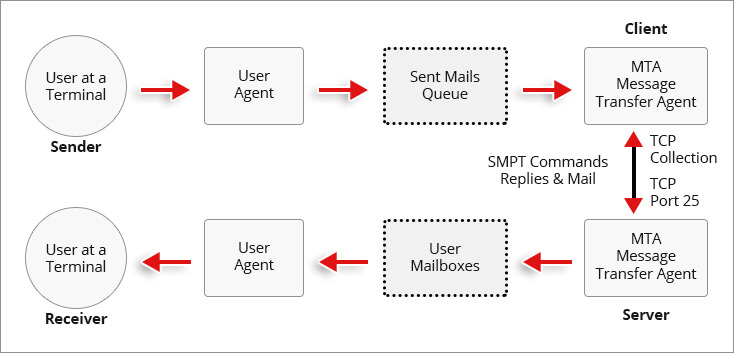
Several UNIX Servers make use of Exim, a Mail Transfer Agent developed by Cambridge University. Many servers are set up through UNIX or its more modern version i.e. Linux. Thereby, our description will be limited to Exim.
Other Mail Transfer agents include Eudora, MS Exchange Server, and Oracle Beehive offer paid services. Exim is free and as per experts it is more robust as compared to other agents.
Note. Emails will be received through POP and IMAP protocols.
What is Outlook Error Code 451?
Outlook error code 451 occurs when the messages are not delivered. The error is completely restricted to sending but not receiving.
Reasons behind receiving Outlook Error Code 451
There are few reasons for getting Outlook error 451 code, some of them are explained here –
- Sender’s IP blacklisted by the receiver. Mail isn’t allowed from sender’s system.
- DNS Issues
- Message Quota exceeded
- Incorrect server configuration
- SMTP errors at receiver’s end
How to Resolve Outlook Error Code 451?
Try after Few Minutes
At times receiver’s system is overloaded with emails causing the error. Outlook error code 451 is quite vague as it provides no clue about why it occurs. Thus, waiting for few minutes can clear some air.
Mail Quota Exceeded
When a sender utilizes an email server, a connection is established. Mail Servers restrict frequency of such connections. This measure is done to warn spam and misuse. You may receive Outlook error code 451 that contains a message signifying that email account is dispatching large number of messages.
Solution –
- Perform modifications in server limit to avoid error code 451. In Exim Server, go to “smtp_accept_max_per_host” parameter. You may search for it in exim.conf file. In case the value is low, then change it.
- Another possible way to solve the issue is by altering “/etc/exim/send_limits” file and generates individual limits per user.
- Go to MailEnable and correct “Limit SMTP usage” and raise the limit.
Temporary Server Issues
Internet systems usually work based on Domain Name Server i.e. DNS. It is like a phonebook for every server and a website. DNS issues can lead to error 451.
Solution –
- DNS MX sends email messages to a mail server and MX records need to be a part of “/etc/localdomains” file in cPanel Exim servers.
- Go through the file permissions across MailEnable and test database connectivity.
- Ensure MX records for domain are precise. The primary email server should have the highest priority of 0.
- Verification required for mail configuration files for permission and ownership.
Spam and AV Errors
Outlook error code 451 also happens due to installation of antivirus software or spam.
Solution –
- Update your Antivirus. This could modify the software’s performance.
- Set the Antivirus again and go through the email shield services setup.
- In case nothing works, disable the software for 10 minutes while sending emails.
Spam IP Address
At times, IP gets blocked due to privacy reasons. So, there is a possibility that client has encountered DDoS attack from the same range of IP you are using. It could be that they have set up a firewall and made a mistake.
Solution –
- Contact recipient and request for whitelisted. The recipient has the right to change exim.config file.
- Try new IP or a VPN. In case a mail is hosted on a web hosting service which might not be possible always.
Problem encountered in Outlook
Outlook could have issues reaching email servers that are causing error code 451. At times Outlook can cause problems due to corrupt files.
Solution –
- You may try Outlook inbuilt repairing tool and try to repair the issue.
- Or, use MacMister PST Export Tool to implement the process.
Why to Use MacMister Solutions PST Converter App?
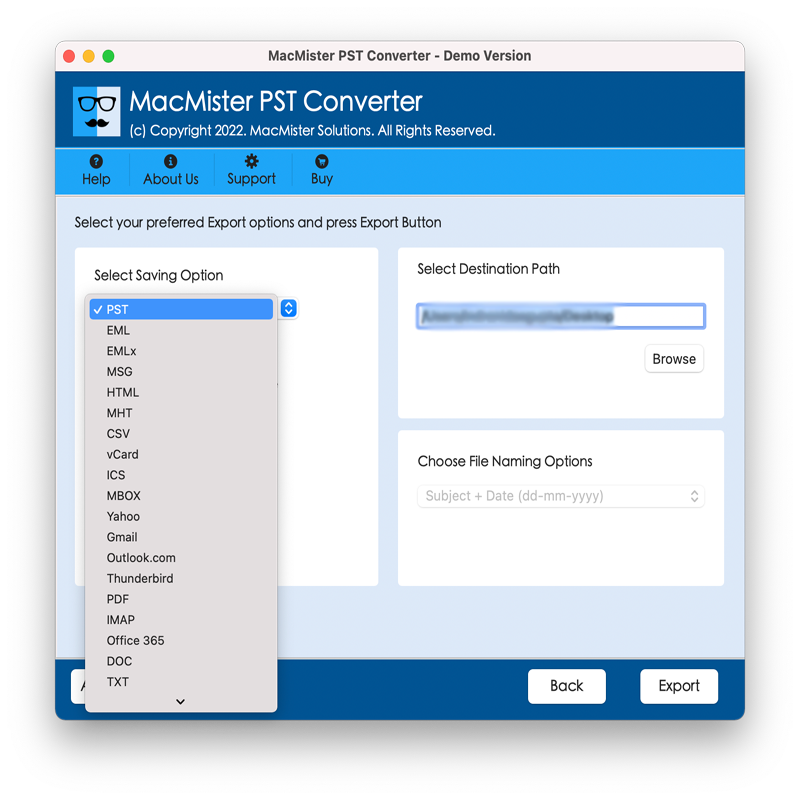
Making use of Microsoft Outlook has become simpler in newer versions. One needs to worry about Exim Servers or MTA. But one problem will remain with Outlook. The entire data it maintains can cause error if they are corrupt or missing. Or in case its storage capacity exceeds. So, to prevent the error, it is beneficial to utilize MacMister PST Converter for Mac. Its GUI is user-friendly and easy to use. Technical and non-technical users can perform the operation without any trouble and take backup of PST file with ease. Also, with the help of the app, one can save PST file data into 15+ saving options.
It is programmed with exceptional features that one may take help of to obtain necessary results. And to experience the process in detail, download free demo version of the app that allow users converting 25 PST files for free.
Epilogue
In the write-up, we have offered different approaches to fix error code 451 in Outlook. You may go through them and opt for the one that looks more suitable to your requirements. For any queries, contact MacMister Support.