How to Import MSG File to Thunderbird on Mac?
Did you receive MSG files from a colleague on a Mac OS X? Not able to access its data and dealing with an error message? Using Thunderbird email client for data management and want to import MSG file to Thunderbird on Mac? If you are facing all such issues, then not to worry anymore as MacMister Solutions is here to help you out!
MSG is a popular file extension which is created by known Microsoft Outlook for Windows. Users can create MSG file by simply dragging the desired email message from Outlook and dropping the same at desktop. However, the file is only accessible on Windows. In case Mac user receives it from a colleague or a friend, then it could become quite challenging for them. Because Mac has a different set of file types that are designed according to its own requirements and specifications. In other words, there are some Windows supported file format whose data cannot be extracted on Mac platform. Thus, if a Mac user with MSG files working on email clients such as Airmail, Thunderbird, Apple Mail etc. then it would be necessary to perform the conversion process. In this case, users need to import MSG files to Thunderbird email application.
Mozilla Thunderbird is a widely used cross-platform open source email service provider. It works on both Windows and Mac OS without any issues. Many Mac users are currently using the same email application to manage the personal information and the data they receive daily. Therefore, it is essential to export MSG files to Thunderbird to access MSG data in the desired email program.
How to Import MSG File to Thunderbird on Mac?
To import MSG file to Thunderbird on Mac in an easiest way, you can make use of Mac MSG Converter application. The wonderful solution will deliver the friendly GUI to technical and non-technical users. They can instantly operate and import MSG files to Thunderbird directly. However, the application offers Thunderbird as a saving option that one can select from Select Saving Option menu and transfer the list of required MSG files into the same without more ado.

The three step procedure of the solution will complete the entire migration in minimal time. Even the features of the application gives the desirable outcome. You will get the opportunity to test each and every function of the tool. The trial edition will help you to explore the complete conversion process free of cost.
Steps to Import MSG File to Mozilla Thunderbird Mac
Step 1. Run MSG to Thunderbird Tool on Mac
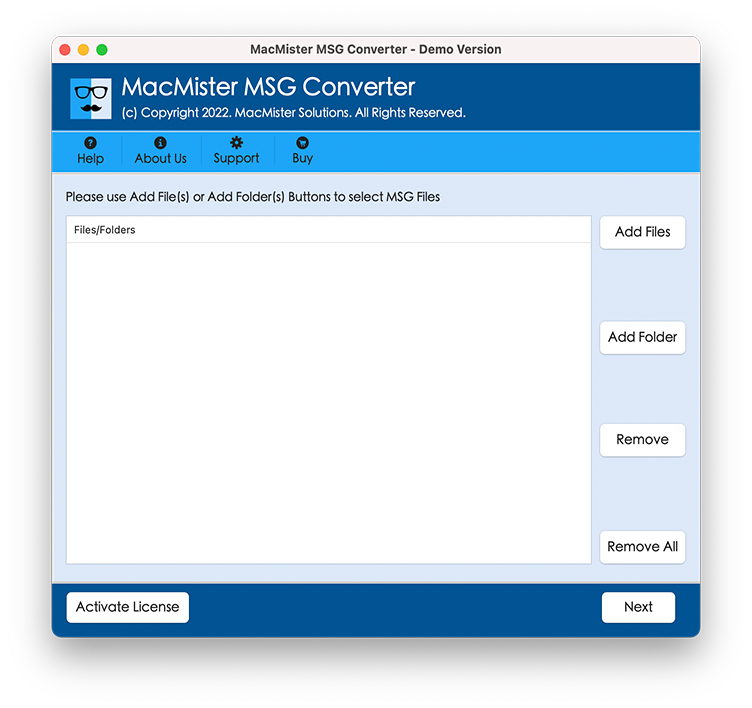
Step 2. Upload required MSG files or folder on the software by taking help of Add Files and Add Folder buttons. Click Next.
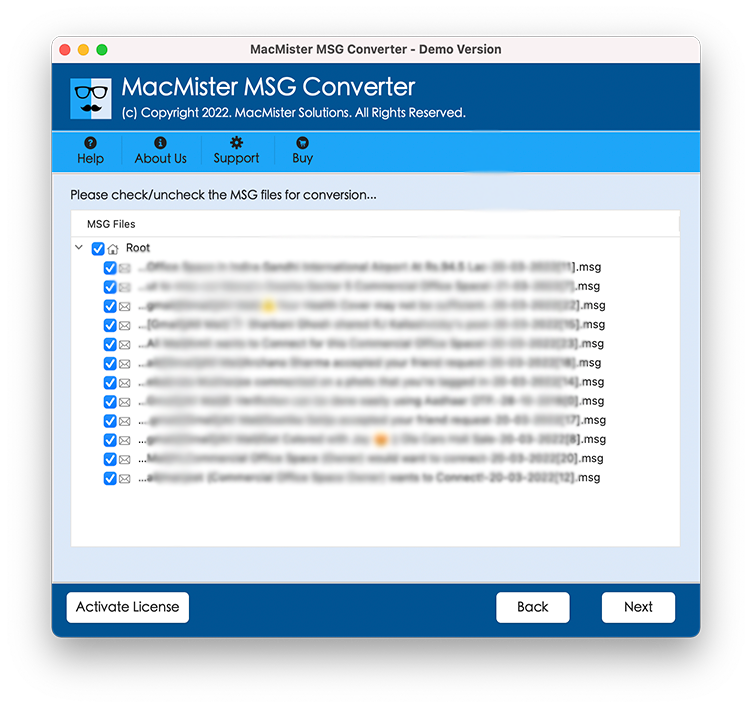
Step 3. Selected MSG files list will be shown with checkboxes and all will be selected by default. You can do the selection accordingly. Once done, click on Next.
Step 4. Choose Thunderbird from Select Saving Option menu.
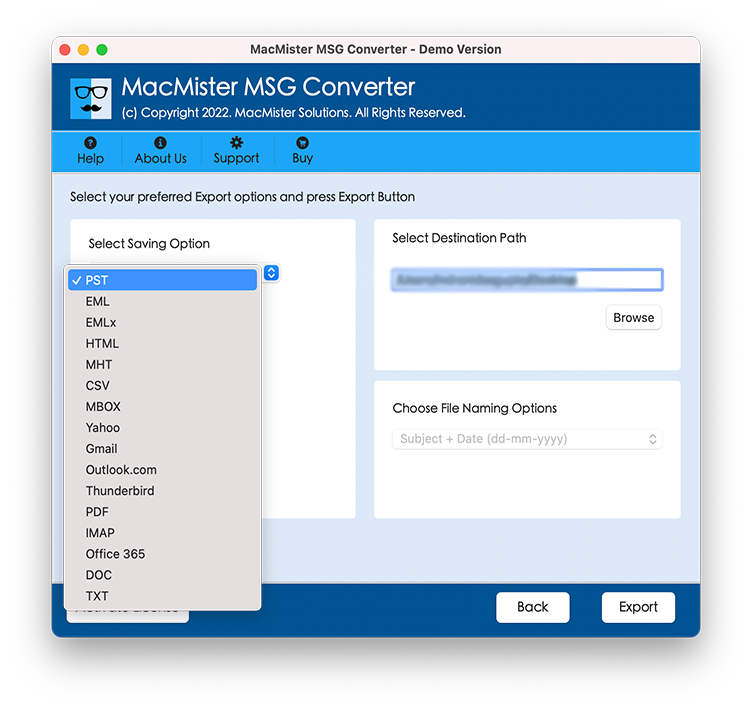
Step 5. Apply the other options of the Mozilla Thunderbird and click on Export.
Step 6. Check the status of MSG file to Thunderbird process through Live Conversion report as shown–
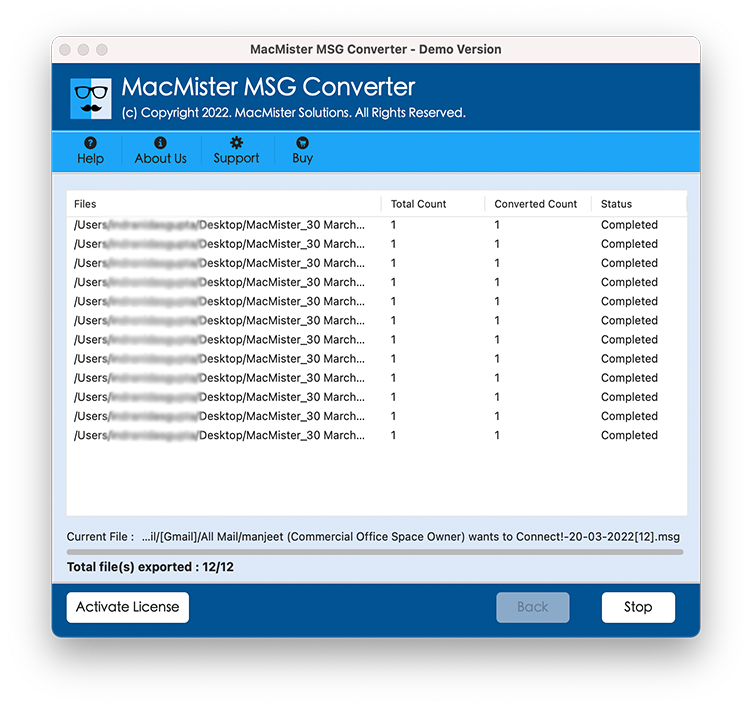
Now, the tool will end the entire procedure and displays the confirmation message with OK button. Click on the same and the tool will show the auto-generated file on the screen displaying the entire information of MSG file to Thunderbird procedure. It includes saving option, saving path, start and end time process, total items converted etc. After verifying all the details, go to the resultant data location to check the exported files. The output will be accurate and the tool will preserve the formatting properties of MSG email messages during the process. However, if you find any issues or need any assistance, you can contact MacMister support team any time.
Superb Traits of MSG to Thunderbird for Mac
Batch MSG files to Thunderbird
The application delivers the functionality to import MSG files to Thunderbird in batch. By using Add Folder button, users can upload a folder containing unlimited MSG files folders and export the same all at once without data loss.
Direct Conversion is supported
MSG to Thunderbird Tool for Mac has Thunderbird as a saving option. By choosing it from Select Saving Option menu, users can directly import MSG files to Thunderbird. The entire process will be completed in minimal time and gives the output with 100% accuracy.
Completes Process in Three Steps
The software is equipped with three operational step procedure. By simply loading, selecting and exporting, Mac users will be able to access MSG files in Thunderbird easily. It will save the essential time of users as well.
Easy and Adaptable User-Interface
MSG to Thunderbird Tool for Mac has been programmed with a user-friendly and intuitive interface. The easy operational clicks are accessible by all home and professional users. Moreover, no technical assistance is necessary for implementing the process.
Migration on all Mac OS Versions
With the help of the tool, users can export MSG files to Thunderbird on all Mac OS versions. Users have a total freedom to download and use the tool on Mac Monterey, Big Sur, Catalina, High Sierra etc.
Last Words
The segment here offered the remarkable technique to import MSG files to Thunderbird on macOS. The MSG to Thunderbird Converter for Mac is a direct technique that is secure and performs the process by operating just three simplified steps. The application believes in providing desirable output. And, this you can check by downloading the trial edition. With the help of freeware version, you can access 25 MSG files to Thunderbird free of cost.