MSG to Office 365 Migration Made Easy
Are you looking for a reliable way for MSG to Office 365 migration task on your Mac? MSG files, although useful for saving individual Outlook messages, may not meet the requirements when it comes to portability and sharing multiple emails. In this article, we will guide you through an easy procedure using the MacMister MSG Converter for Mac tool, which enables you to import MSG to Office 365 with just a few simple steps. Let’s first explore the reasons why users choose to import MSG files into Outlook 365.
Why Users Migrate MSG Files into Outlook 365
There are several compelling reasons why users seek to import MSG files to Office 365 account:
- Accessibility: Office 365 allows users to access their data from anywhere as it stores all information in the cloud.
- Portability: Unlike MSG files, Outlook PST files offer greater portability, making it easier to manage and share information.
- Time Efficiency: Sharing information one by one using MSG files can be time-consuming, prompting users to find a more efficient solution.
Having understood the reasons behind this migration, let’s address common user queries and provide a solution to import MSG into Outlook (Office 365).
How to Open a .MSG File in Office 365
When it comes to converting or migrating MSG files to Office 365, there are two approaches: manual and professional. After researching both methods, it was determined that there is no manual solution available. However, we have identified a professional solution that is highly recommended for a smooth MSG to Office 365 migration process. Please follow the steps below carefully, as this may be the only viable solution for your migration needs.
Automated Solution to MSG to Office 365 Migration Process
The most effective way to import .msg files to Office 365 is by utilizing the MacMister MSG Converter Mac Tool. This software provides a 100% risk-free process and enables you to eliminate duplicate file items during the conversion.
Experience the Power: Demo and Pro Editions Unveiled
Unleash the full potential of our software as we present you with two compelling editions: Demo and Pro. Our Demo edition, available free of charge, grants you the ability to effortlessly import MSG files to Office 365 on Mac. However, please note that this edition comes with certain limitations.
Are you ready to explore the boundless horizons of our software? Elevate your experience by upgrading to our Pro version, which offers a comprehensive range of features and functionalities. Unlock the true potential of MSG to Office 365 migration by securing a license key for the Pro edition. Take control of your migration journey and embrace the full power of our software with confidence and convenience.
Follow Given Instructions for MSG to Office 365 Migration
To begin the MSG to Office 365 migration process, follow these professional steps:
Step 1. Install and Launch the Mac MSG Converter software by MacMister, begin by installing the software on your Mac system.
Step 2. Select the MSG Files: Choose the MSG files you wish to import from your Mac system and click “Next.”

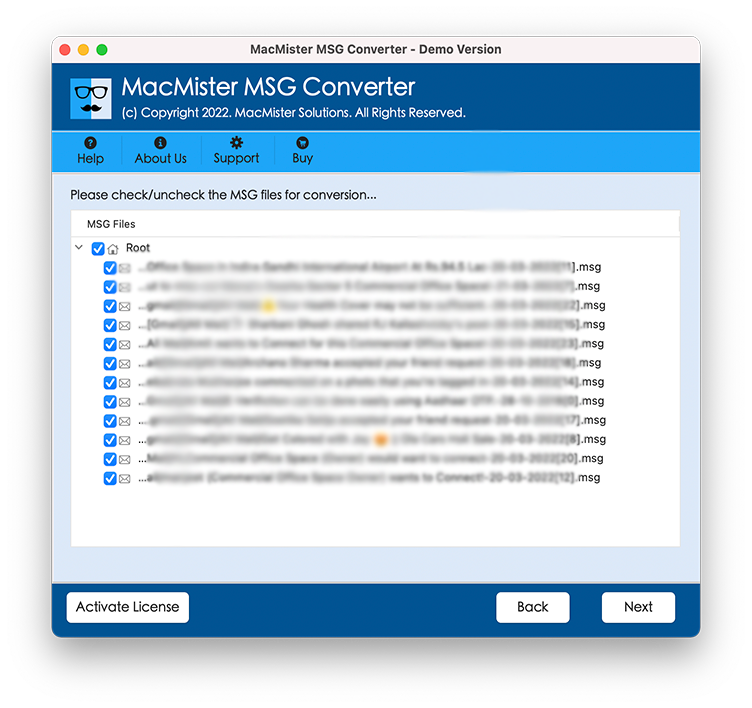
Step 3. Software will start listing your selected “MSG” files or folders data, Checkboxes are available, use them as per your need.
Step 4. Time to select “Office 365” option as the destination and login with your credentials : select it from the given menu list.
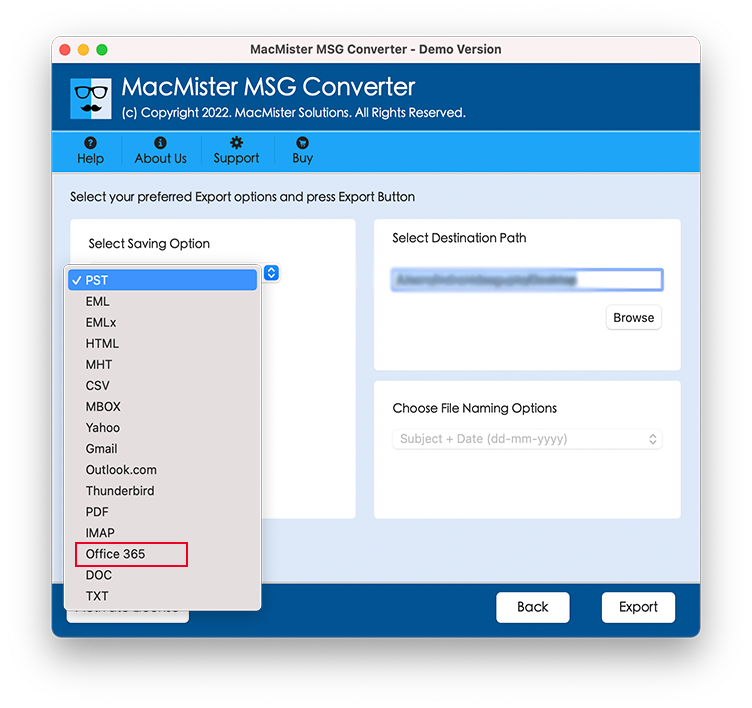
Step 5. Choose the given Additional Features: Select any additional features you want to include in the migration process.
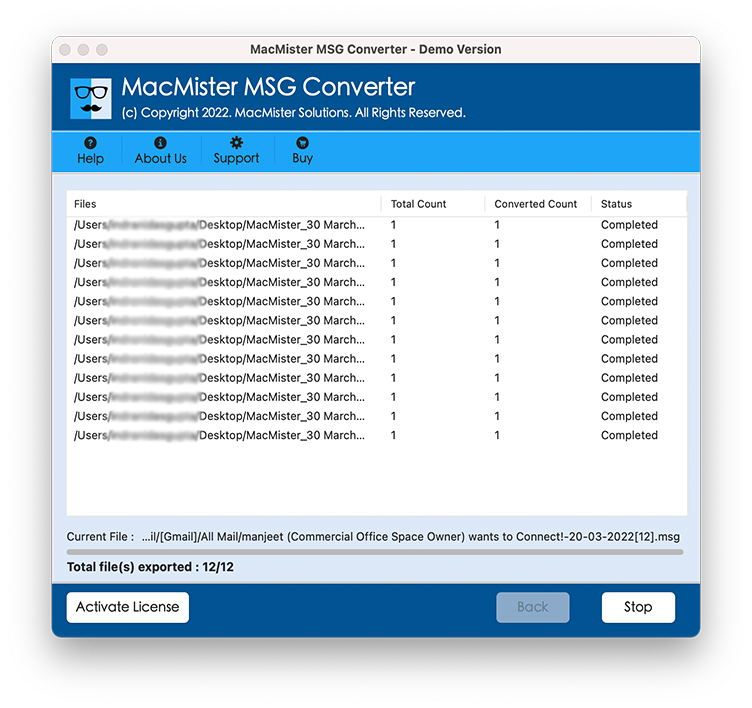
Step 6. Click the “Export” button to import MSG into Microsoft 365 account, exporting process will show in the given “Conversion Screen”.
Before concluding, let’s take a look at some notable features of the MacMister MSG Converter software:
Key Software Features for MSG to Office 365 Migration Task:
- Multiple File Format Conversion: This software allows you to convert MSG files into various formats, including PDF, PST, DOC, HTML, CSV, TXT, MBOX and more.
- Direct Migration to Email Clients: : You can directly migrate MSG emails to popular email clients such as Gmail, Yahoo Mail, Thunderbird, IMAP Server as well as convert MSG files to PDF, HTML, EML, MBOX, CSV, TXT and other file formats too.
- Efficient Batch Import: The utility supports batch-importing MSG files into Outlook 365, ensuring a swift migration process.
- Flexible Attachment Handling: You have the option to convert MSG files with or without including attachments, and even save attachments in a separate folder on your Mac machine.
- Selective Migration: The Mac O365 backup software facilitates selective MSG to Office 365 migration, allowing you to choose specific files or folders for migration.
- Supports All Mac Versions: It supports to work with all Mac OS / OS X versions such as; Mac OS X 10.0, Mac OS X 10.5, Mac OS X 10.6, OS X 10.9, macOS 13 (Ventura), macOS 12 (Monterey) and more.
Sum-Up Words
In conclusion, this article has provided a comprehensive guide on how to migrate MSG files to Office 365 on Mac. While no native method is available for this conversion process, opting for a professional solution has been widely recommended by both clients and experts. The professional solution ensures a quick and accurate MSG to Office 365 migration process by keeping the complete email details safe and secure.