How to Import, Migrate, Forward Gmail to Migadu Email?
Switching to Migadu Email from Google Mail webmail service due to official reasons but scared of losing emails stored in Gmail account! Wondering how can I forward Gmail to Migadu Email in seconds? Constantly looking for a direct, safe and effective approach to implement the same? Not to worry at all, just go through the write-up and you will find a solution that will directly and securely forward Gmail to Migadu email account with 100% accuracy.
Gmail is a popular commonly used online email service offered by Google itself. It is known for its understandable and friendly GUI, good storage capacity, and integration with multiple Google services. The service allows sending/receiving of emails, managing contacts, and provide accessibility of different Google products in a single login such as Drive, YouTube, and Calendar.
Migadu webmail, on the other hand is a simple and effective email service provider that delivers privacy, flexibility, and unlimited storage. It offers a model based on pay-for-what-you-use makes it inexpensive, especially for ones who need to moderate amount of emails and require multiple domains or mailboxes.
Why Users are choosing Migadu Email?
Migadu is highly focused on privacy as well as security. The company performs the operation outside the power of large corporations, making sure that user data is handled with appropriate care and confidentiality. As a result, Migadu allow users to uphold full control over their communications. There are several reasons for choosing Migadu as compared to other email services –
- Migadu’s pay-for-you-use model makes email service an affordable platform to manage emails online. This is specifically beneficial for users who have a requirement of multiple domains or addresses but have average email needs.
- Migadu email allows creating many email addresses and domain as required, providing scalability for enhancing businesses or individuals handling multiple projects.
- The email service is highly focused on maintaining users’ privacy. It is based in Switzerland and mainly prioritizes users’ data protection. Migadu does not utilize ads, data mining, or any type of unnecessary tracking, making it a safe choice for businesses and individuals who value secrecy.
- Migadu is user-friendly and easy to configure. And it does not matter if you are tech-savvy professional or a beginner, you can get started with minimal effort.
- The service is flexible; users can easily switch services or integrate other tools, if required.
Overall, Migadu delivers pioneering approach to email hosting by focusing on the things that are really important such as cost-effectiveness, simplicity, privacy, and scalability. Now, let us explore how to migrate Gmail to Migadu email service.
How can I Import, Migrate, Forward Gmail to Migadu Email?
The direct process to import Gmail to Migadu email service is MacMister Gmail Backup Tool Mac & Windows. The application is simple, easy to use, and advanced. It securely establishes connection with Gmail account and performs the migration within seconds. The tool has over 15+ saving types but one may choose IMAP from the Select Saving Options menu, add Migadu credentials and other required details, apply filtering (if needed), and then tap Start Backup button. In few seconds, the tool will migrate Gmail to Migadu email account with precise emails and attachments.
Furthermore, the application has incredible features that help users forwarding Gmail emails to Migadu email account according to the requirements. However, it is advised to download the freeware version of the tool to understand the software detailed process for free.
Know Step-by-Step Software Tutorial to Migrate Gmail to Migadu Mail on Mac
Step 1. Download and operate the software on any Mac OS machine.
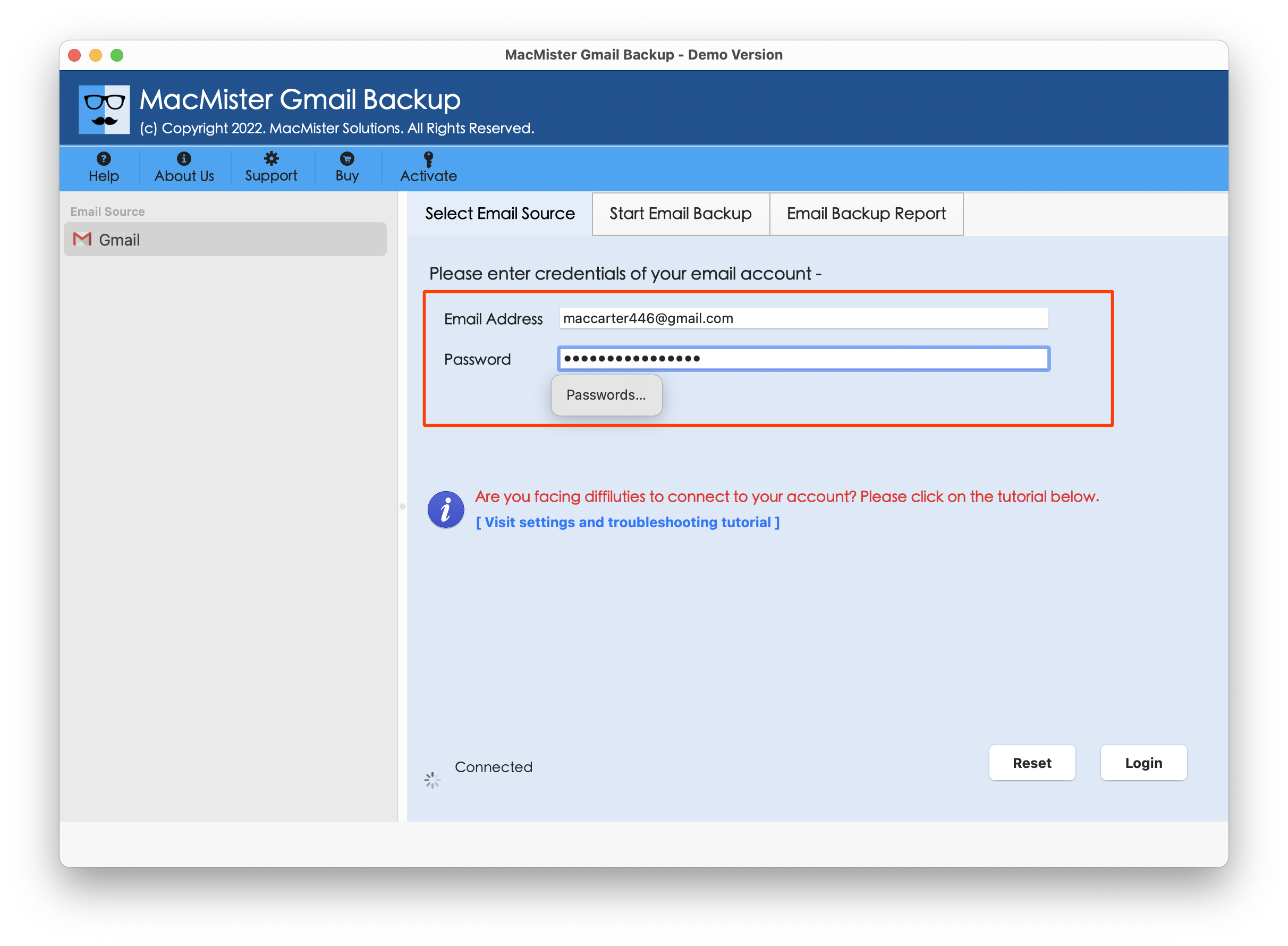
Step 2. Add Gmail login details such as email ID and app password. Then tap Login button.
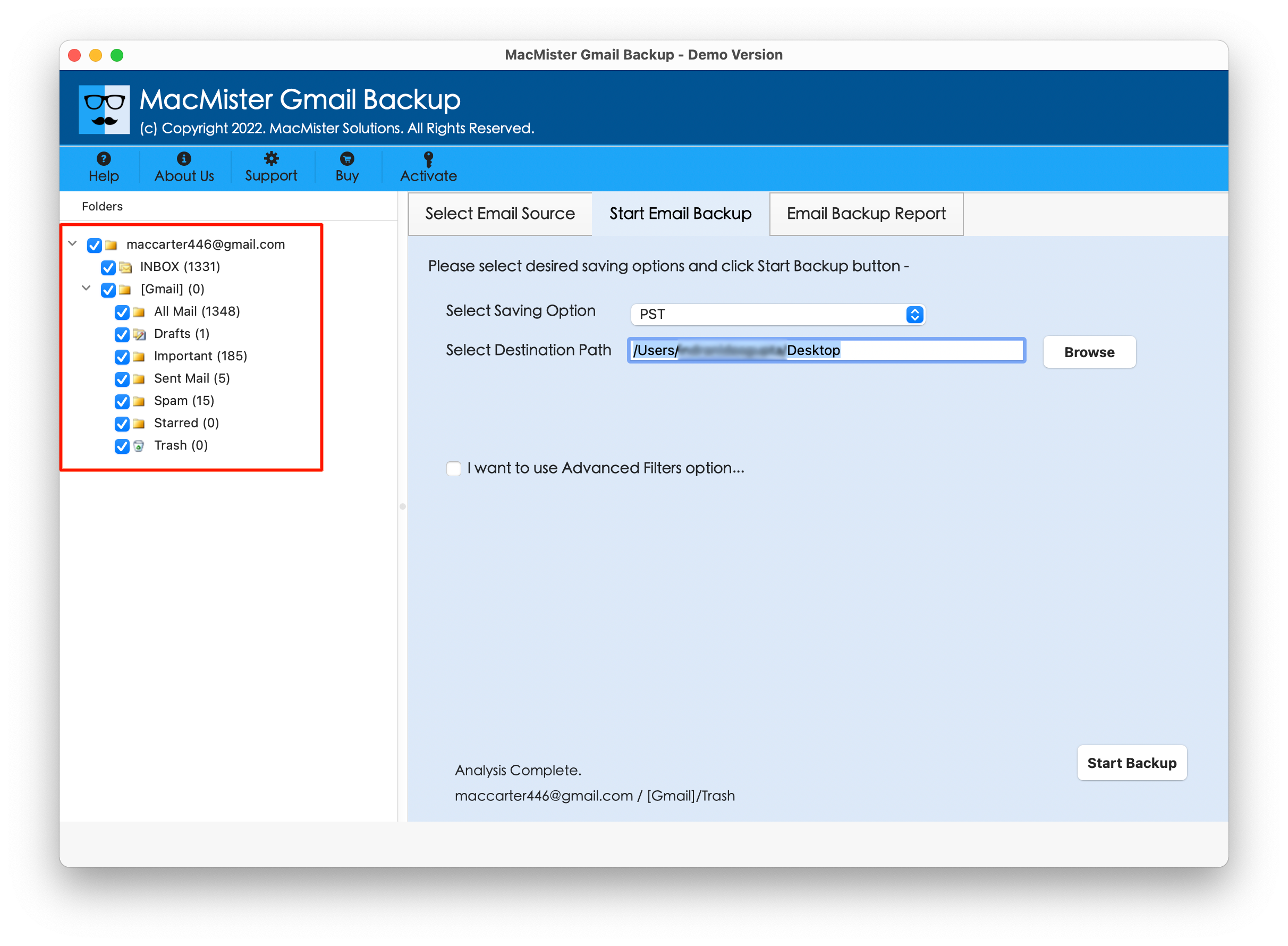
Step 3. Once the Gmail account is connected with the tool, then its folder items start to display on the left pane of the software.
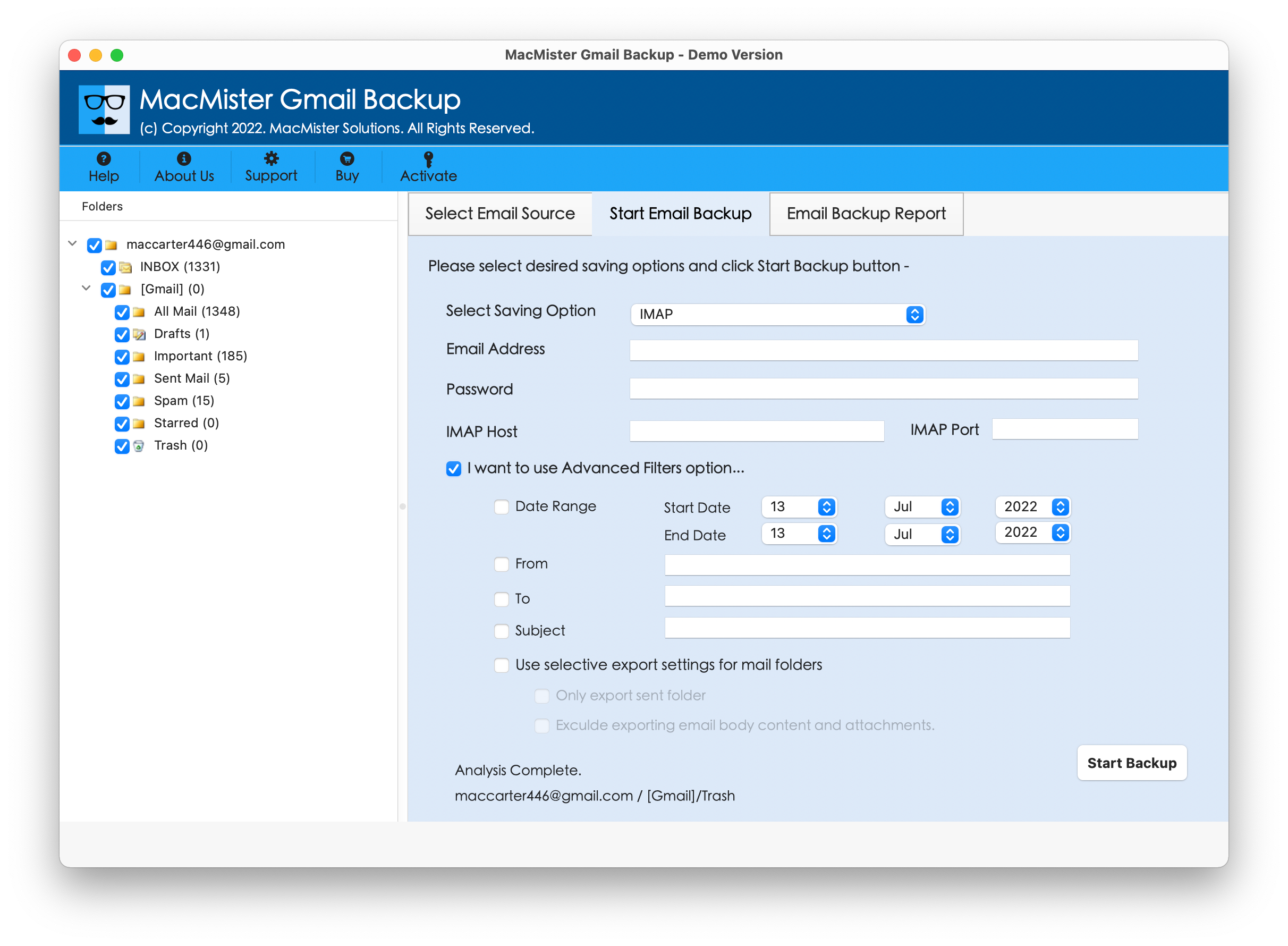
Step 4. Go towards the right-pane of the app, click Select Saving Options, and choose IMAP saving type.

Step 5. Add Migadu credentials with IMAP host & port number, then use the desired filter option (if required) and tap Start Backup button.
Step 6. The tool displays Email Backup Report screen which provide the count of total Gmail files migrated into Migadu email account, files left for migration, and migration status.

The entire task will end within seconds and then “Process Completed” notification will appear on the screen. Click OK button, then login to specified Migadu email account to verify resultant files. After viewing the desired email message of Gmail in Migadu account, you will see that the content is appearing correctly. Also, the data integrity is displaying without any changes.
Overall, the steps are easy to implement and will help in migrating Gmail to Migadu email account within seconds.
Benefits of choosing MacMister Gmail to Migadu Email Migration Tool
- Directly forward Gmail emails to Migadu account with attachments.
- Protects the original credentials of Gmail account as the tool asks to provide the app password of Gmail not the exact one.
- Provides different filter types such as date range, subject, to, etc. in order to migrate specific Gmail emails to Migadu email account.
- Able to migrate Gmail to Migadu email without altering the originality of Gmail email content and its metadata properties.
- Supports wide range of saving options other than IMAP such as PST, PDF, MSG, EML, OLM, HTML, DOC, CSV, Yahoo, Office 365, and more.
- User-friendly interface will make the process simple for technical and novice users.
- Allow users to import Gmail to Migadu email on Mac OS Sequoia and earlier version.
- Available in Windows version as well (supports all editions).
Epilogue
The write-up here provided a great approach to fix how to import, migrate, forward Gmail to Migadu email account with complete accuracy. The MacMister Gmail to Migadu Email Backup Software Mac & Windows is secure and reliable. It is designed with an easy and simplified environment so that all types of users can gain benefit from the same. Additionally, the application has plentiful features which will help users forwarding Gmail emails to Migadu email service according to the requirements. However, a freeware version is also present that is helpful in experiencing the detailed import process of Gmail to Migadu account for free. It also allows to import 25 Gmail emails to Migadu free of cost.