How to Batch Convert OLM to Text/TXT on Mac & Windows?
The article here has covered one of the easiest, safest, and reliable approach to convert OLM to Text file format. Therefore, if you are finding a perfect solution to convert OLM to TXT, then you are at the correct destination.
OLM is a popular file format of Mac Outlook that is known for storing the critical data items of users account such as emails, contacts, calendars, etc. The email platform is widely used among Mac professionals and thus, sometimes due to unavoidable circumstances they have to convert OLM format into .txt. A TXT file, on the other hand is a simple plain-text file format that contains data in an unformatted text. Also, users can access files of such format in any text editing or word processing application.
In other words, OLM is quite dependent format. Users need Outlook for Mac email client application to access the data of OLM file. And, Text file can be opened easily with the help of any text editor. It does not require the installation of any email platform to be viewed.
Some More Common Reasons for Converting OLM to Text/TXT
There are some more reasons due to which the conversion of OLM files into TXT format will prove beneficial for users. Some of them are:
- OLM are Outlook for Mac supported email client and so the format is compatible with the same email application. And converting OLM format to TXT will help users to open the data of OLM file into different applications.
- Converting OLM files into TXT is the best option to archive email messages for the long-term storage and so copying OLM data into Text file will help users to store the same on any hard drive or in cloud.
- One can instantly search Text files as compared to OLM. So, if in case you have large archive emails, then converting them into text will easily manage them and will help to find specific messages immediately.
- Text file data can be modified by any text edition whereas OLM requires the support of Outlook Mac email application for the same.
- The conversion of OLM to Text makes the sharing process easier for those who want to send some important OLM data to a client who do not use any email platform.
How to Convert OLM to TXT/Text in a Bulk on Mac & Windows?
With the help of MacMister OLM Converter for Mac & Windows, users can batch convert OLM files into .txt format at once. The software performs the conversion with correct emails and attachments. Moreover, the utility is programmed with an interface that is friendly and can be effortlessly used by all technical and novice users. Even, its three working steps will help users to convert OLM to Text format in just three seconds.
The best thing about the advanced conversion application is that it is built-up with several powerful options with the help of which users can convert OLM files into TXT according to their requirements. The software also includes free demo facility through which users can check the working of the tool for free.
Woking Steps to Convert OLM to Text on Mac
Step 1. Download, launch, and open MacMister OLM to TXT Converter on macOS.
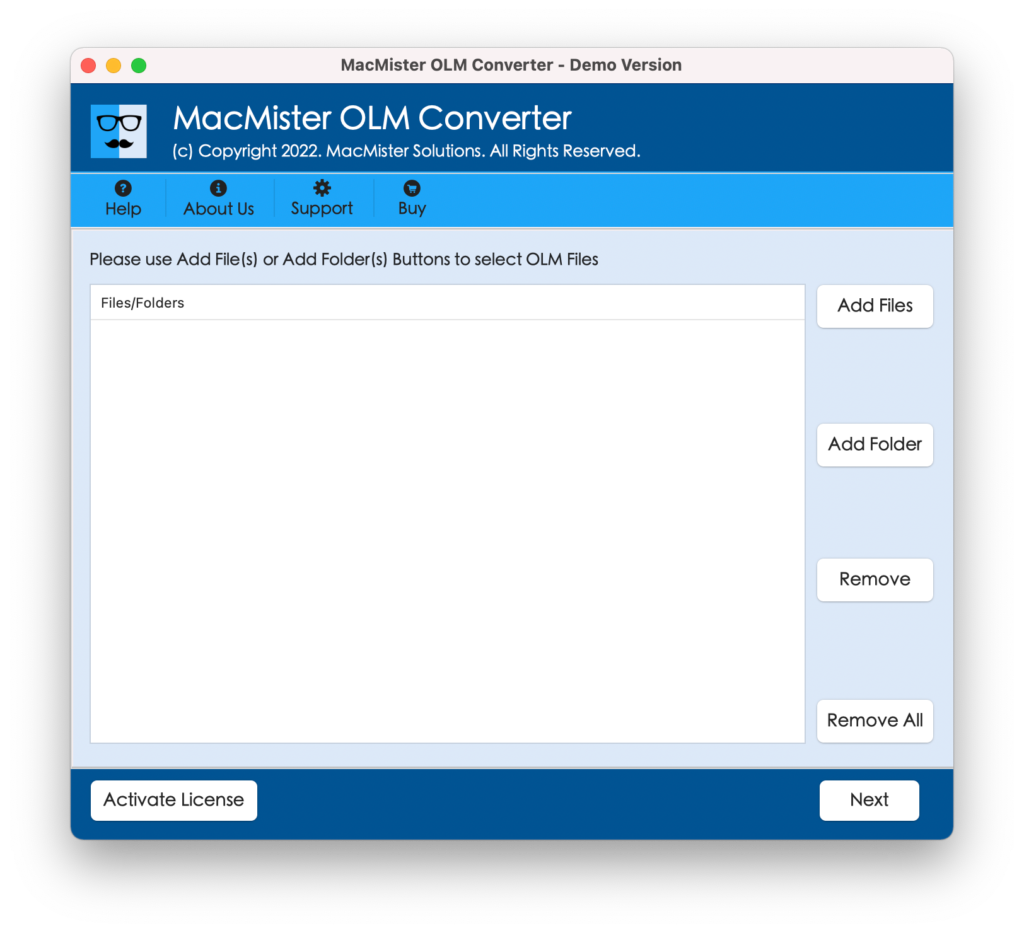
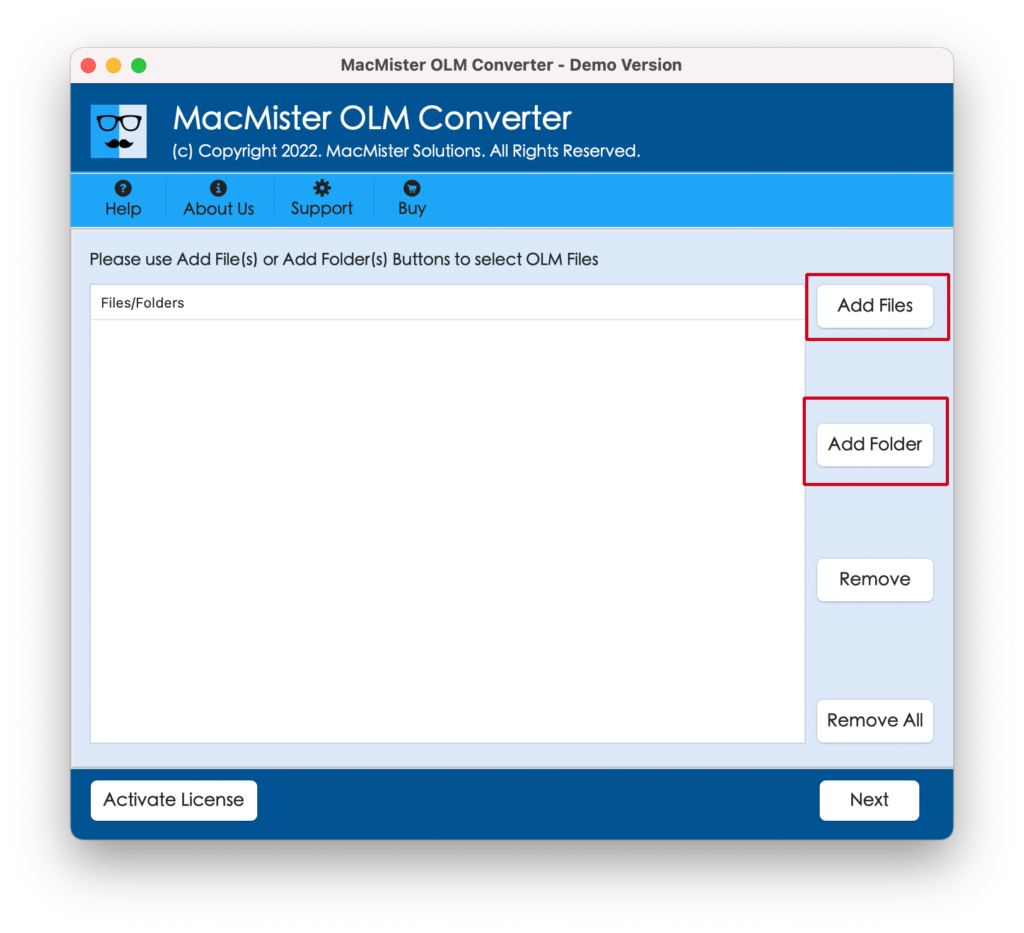
Step 2. Add OLM files on the application pane by using dual options i.e. Add File(s)/Add Folder buttons. Click Next.
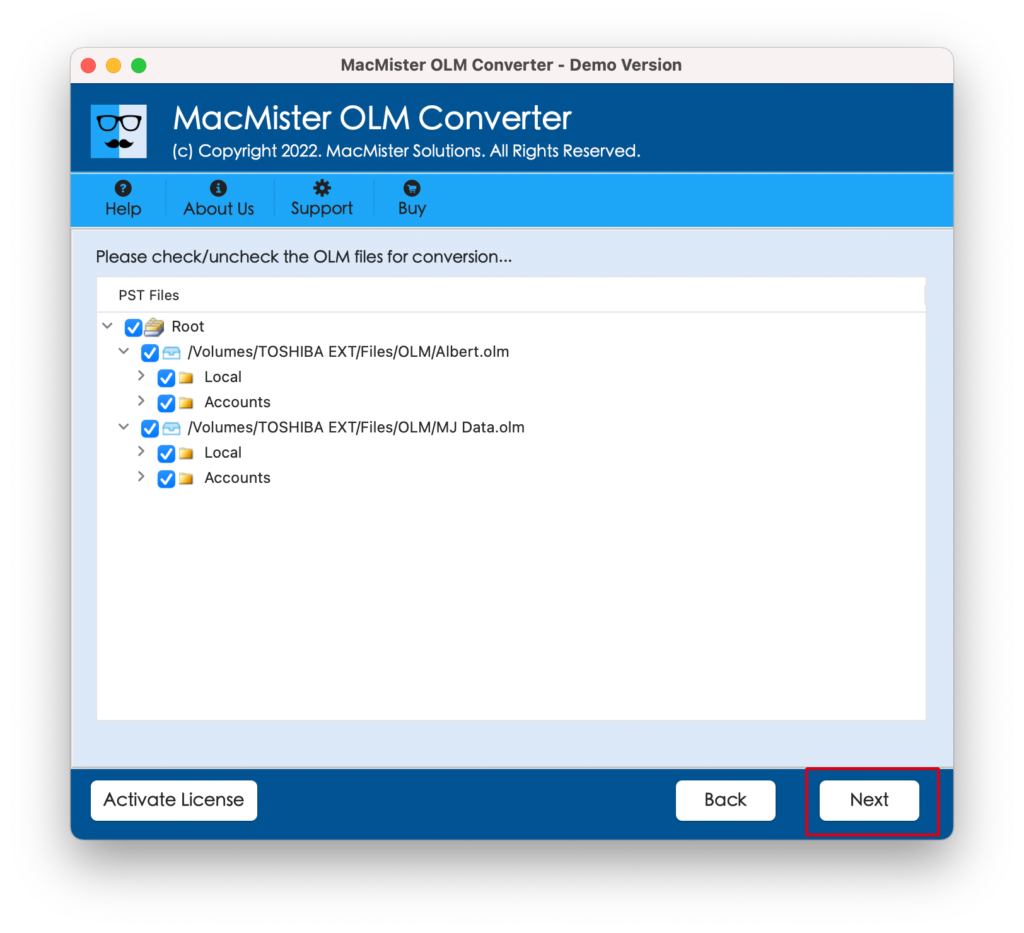
Step 3. The tool will scan the selected files and list them with checkboxes on the software screen. Quick Note. The checkbox will help those who wants to convert selective OLM files into TXT. Click Next.
Step 4. You can click Select Saving Options and choose TXT format from the menu.
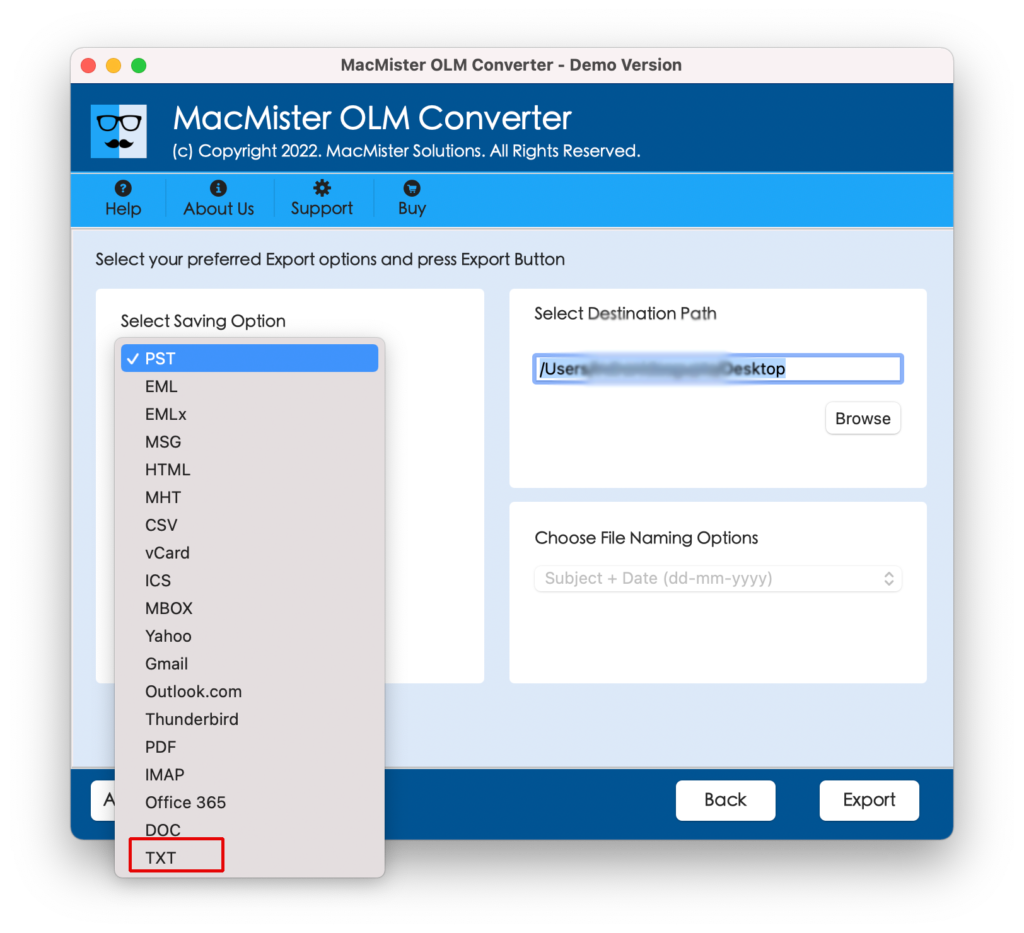
Step 5. Set the sub-options appearing under TXT format as per the requirements and click on Export button to start the conversion process.
Step 6. The process of OLM to Text will be live and the tool will display Live Conversion window on the screen.
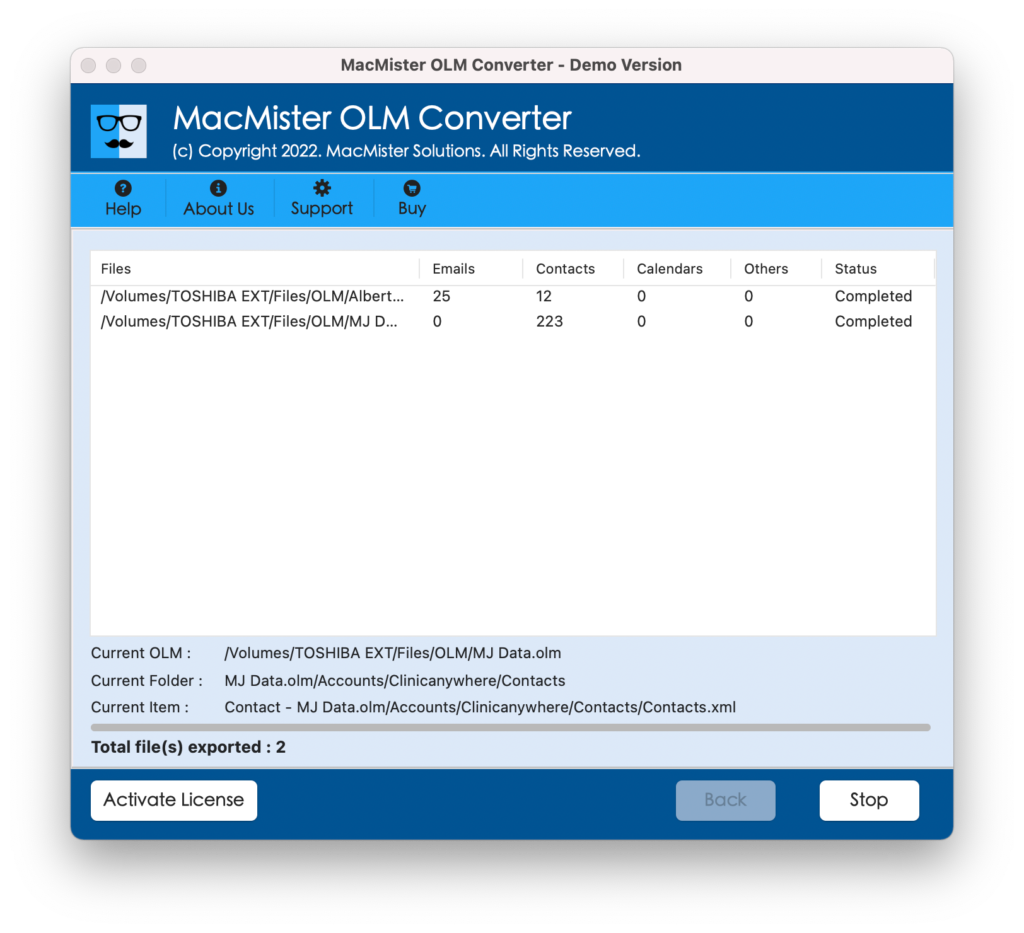
The entire task will be finished in few seconds and then the message will appear on the screen that will show “Conversion Completed”. You need to click on the OK button to dismiss the message. After that go to selected location to check the result. Now, you can open the required TXT file and verify the output. However, you will see that the data is accurate and appearing with correct data integrity.
Why MacMister OLM to TXT Solution is Beneficial?
MacMister OLM to TXT Tool is a solution that has the ability to precisely convert OLM files into .txt format on Mac & Windows. And, so the features in the application will prove beneficial to those who wants smooth conversion of OLM to Text. Some of the wonderful options of the tool are:
Batch OLM File to Text Files
The software provide the option to batch convert OLM files to TXT format at once. The application has Add Folder button that users can use to convert multiple OLM files to Text format. So, by clicking on the same, users can add a folder with unlimited OLM files and then convert all of them into .txt format at once with 100% accuracy.
Use Dual Options to add Files
The OLM to Text Tool is introduced with dual options i.e. Add File(s) and Add Folder buttons. The Add File(s) buttons helps to quickly add necessary OLM files on the tool and Add Folder button has the ability to add a folder with unlimited OLM files on the software for conversion.
Sub-options under TXT Format
The OLM to TXT utility will see multiple options after choosing TXT format as a saving type. However, users can use and set those options according to their requirements and convert OLM files to TXT format as per their specific preferences.
Simple Interface with Three Steps
The OLM to Text application is designed with simple interface and three-operational steps. Anyone (professional or non-professional) users can quickly operate the utility and convert OLM files to TXT format in just three seconds without facing any difficulty.
Download on all Mac & Win OS
The OLM to TXT software offers two download versions – one is compatible with Mac and another for Windows. So, Mac users can download the tool and convert OLM file into Text format on macOS Ventura and earlier Mac OS versions. Whereas, Windows users can utilize the app on Windows 11, 10, 8.1, 8, etc.
Quick Note – Download FREE DEMO and Know More Software Options
Epilogue
The blog has discussed the direct approach to convert OLM file into TXT format. The MacMister OLM to Text Converter is an application that is secure, proficient, and cost-effective. And, most importantly, delivers accurate output in less time. However, the application offers trial edition which will help users to check the process for free. They can also convert first 25 OLM files to TXT format free of cost.
Quick Note. You can use the solution to convert OLM to MBOX, PST, PDF, MSG, EML, EMLx, MHT, HTML, DOC, CSV, and more.