How Users can Open MSG File into Gmail on Mac – [SOLVED]
Have you recently received MSG file from a Windows user and now wants to import it and open in Gmail webmail on macOS? If yes, then we are here to help you out! The MacMister guide has introduced an exceptional technique that will directly transfer unlimited MSG files into specified Gmail account easily.
MSG is a single email message file type that only opens in Windows Outlook. In other words, Mac users will find difficulty in reading the MSG file data on Mac OS X. Yes, Outlook also works on Mac platform. But the email client is programmed with different configuration and uses a different file format to store the account folders. MSG file is created by simply performing the drag and drop method. Users need to drag the required emails from Outlook profile and drop the same at desired location on Windows. And all the selected files will be saved with .msg extension.
Gmail, on the other hand is a globally used webmail service that does not require any supported platform to run and can be accessed from any location. It is one of the most widely used program as it is not just an email platform, it comes with loads of advance applications as well that manages the personal data of users appropriately. Google Mail is simple, effective and free to use. And, these days, it is continuously coming up with lots of updates and also enhancing the GUI quality for users who are using it on a daily basis.
More Reasons of Using Gmail Email Service
- Large storage space in Gmail attracts large organizations or users who wants to store their unlimited data on cloud.
- Runs independently, only good internet connection needed to access stored Gmail data.
- Zero maintenance charges, low cost and the cloud data storage service gives the flexible accessibility.
- Gmail business account can be directly synchronized with Microsoft Outlook, Android, Blackberry and iPhone and also familiar platforms that are mostly used by business professionals.
- The Google Mail business account is integrated with advance features such as IM storage & video chatting.
- Hotmail and Yahoo can easily connect with Gmail so that users can manage multiple accounts from a single place.
- Guarantees solid security of stored data.
How to Import MSG to Gmail Directly on Mac?
To import MSG to Gmail directly on Mac, make use of Mac MSG Converter solution. The secure, cost-effective and quick application which offers the user-friendly GUI and help technical and non-technical users to open MSG file in Gmail easily. The software needs three clicks and then all the required MSG files will directly transfer to Google Mail account. And, most important thing is Mac users do not need to take worries about data safety. The application is tested and guarantees trouble-free migration.

The features of the tool gives extraordinary result when applied wisely. However, the procedural steps can be checked by the users through free demo version.
Steps to Open MSG Files in Google Mail Account on Mac
Step 1. Run MSG Extractor Tool for Mac on Mac OS.
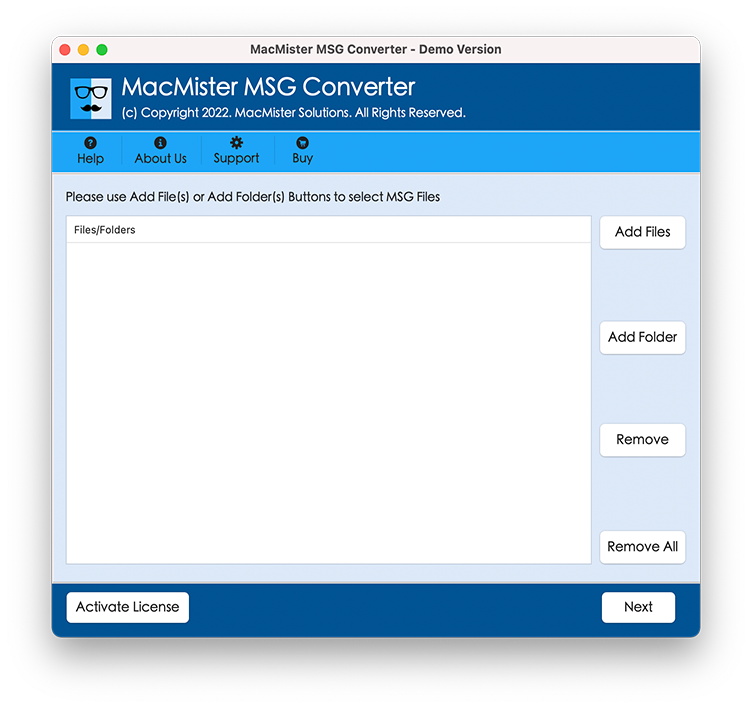
Step 2. Take help of Add Files and Add Folder buttons to load the MSG files that needs to be moved in Gmail account and click on Next.
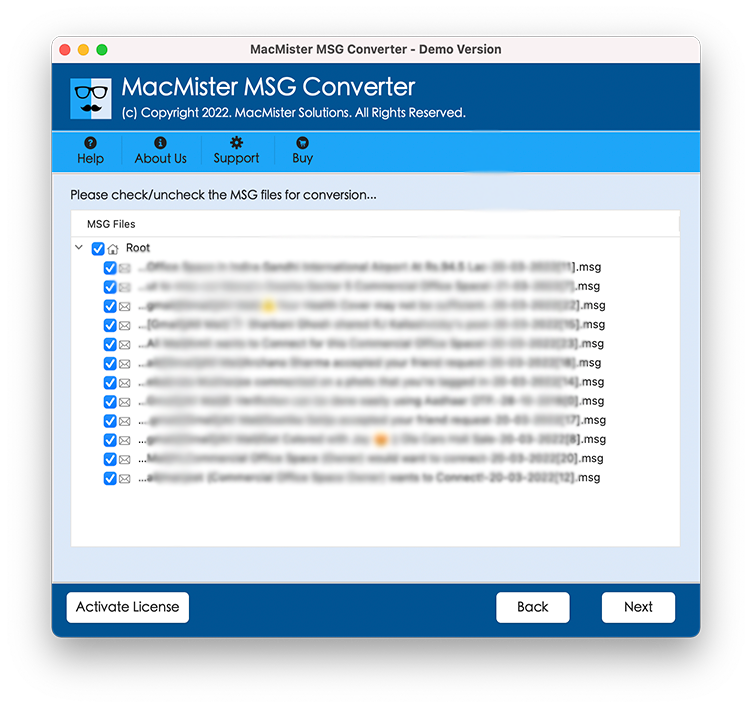
Step 3. Now, MSG files list will appear with checkboxes (all are chosen by default). However, you can do the selection of the MSG files checkboxes as per need for executing selective migration if needed otherwise continue clicking Next.
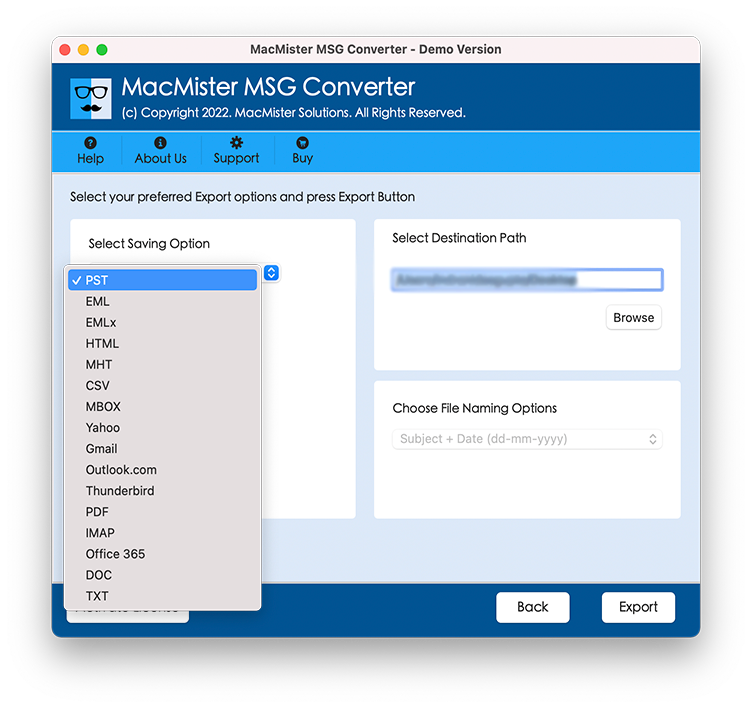
Step 4. Choose Gmail option by clicking Select Saving Option.
Step 5. Enter Google Mail credentials in which users need to move MSG file and click on Export.
Step 6. View on-going process through Live Conversion screen as shown. From here, users can verify the items converting, items left and status of conversion.
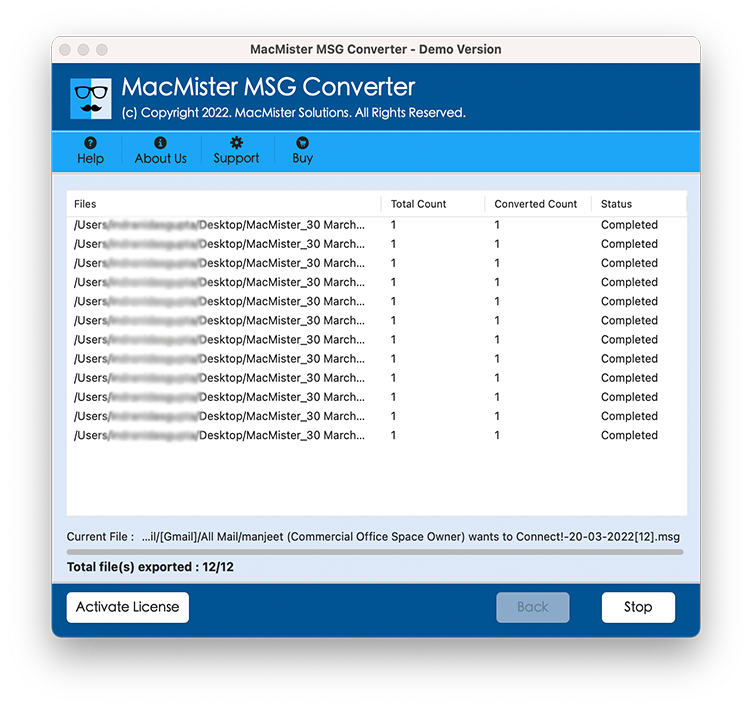
Tool will end the entire process in seconds and displays “Conversion Completed” message. Click on Ok and close the confirmation box. After this, check the entire details with the help of an auto-generated log report. It is created after the tool migrated all files successfully. It will display the saving option, start and end time process, count of converted items and etc. Once all details are verified, go to the specified Gmail account to check the exported MSG file. The data integrity will be the same even after the process.
What Users can expect from MSG to Gmail Tool?
The software provides spectacular features which makes the tool different and unique from other applications available on Google.
- Directly export unlimited MSG files to Gmail in a single time with mails and attachments.
- Batch MSG file to Gmail migration on Mac OS without data loss.
- Keeps the data integrity of MSG files intact during the conversion of MSG to Gmail.
- Able to open MSG file of all Windows Outlook editions in Google Mail account.
- In-built advance options provide ease to users who are looking to transfer selective MSG files to Gmail.
- Three simplified operable steps saves the time and efforts of users.
- The originality of MSG file data will remain unaffected throughout migration.
- Offers an intuitive surrounding that technical and novice users can access to effortlessly import MSG files to Gmail.
- Users’ login details of Gmail accounts will also be protected by the application.
- MSG to Gmail process is possible on Mac Monterey, Big Sur, Catalina and other Mac OS versions.
Last Words
The article here provided guidance on how to import MSG to Gmail on Mac. The highlighted technique will give the accurate output in less time. Also, it makes sure that user’s data remain protected and unaltered during the process. However, download the free demo of the software now and open 25 MSG files to Gmail free of cost.