Cloud Migration vs Cloud Backup: Key Differences and Best Practices
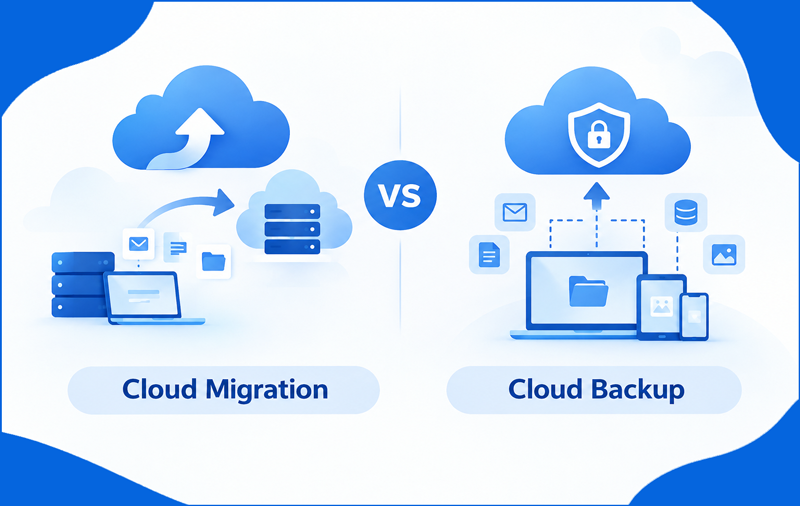
Cloud technology has changed how businesses store, access, and manage digital information. Organizations use cloud platforms to handle emails, documents, applications, and other business data. However, moving information to a new platform and maintaining copies for future recovery are two different processes. Understanding cloud migration vs. cloud backup helps businesses choose the right data management approach. Both methods serve important purposes, but their functions, procedures, and outcomes differ.
Businesses looking to protect their email data can also explore an Email Backup Tool for Mac to manage supported email backup requirements.
What Is Cloud Migration?
Cloud migration is the process of transferring data, applications, or digital resources from one environment to another. For example, a business may move its email accounts from one service to Microsoft 365 or transfer files from local servers to cloud storage.
The process can involve moving emails, attachments, folders, and other supported information. Cloud migration helps organizations adopt new platforms, modernize existing systems, and improve access to business resources. Proper planning is necessary to maintain data accuracy, check compatibility, and reduce disruptions during the transfer.
What Is Cloud Backup?
Cloud backup involves creating and maintaining copies of important data in cloud storage so that the information can be recovered when required. It helps protect against accidental deletion, hardware failures, cyberattacks, and other data-loss incidents.
For example, users can maintain copies of important documents and emails in a suitable backup location. If the original data becomes unavailable, these copies can support recovery, depending on the backup system and its capabilities.
Mac users who specifically need to preserve supported iCloud email data can consider the iCloud Backup Tool for Mac for their email backup requirements.
A reliable backup strategy includes regular backups, appropriate retention settings, access controls, and recovery testing. Simply storing information online does not automatically guarantee that an independent, recoverable backup exists.
Cloud Migration vs. Cloud Backup – Key Differences
Although both processes involve data management, their purposes are different.
| Comparison Factor | Cloud Migration | Cloud Backup |
| Main purpose | Move data to another environment | Maintain copies for recovery |
| Primary activity | Transfer information | Copy and store information |
| Common use | Platform changes and upgrades | Data protection |
| Destination | New platform or environment | Backup storage |
| Recovery role | Provides access to migrated data | Supports restoration after data loss |
| Frequency | Usually project-based | Often performed regularly |
Businesses can use both approaches together. Migration establishes the destination environment, while backup provides an additional layer of protection for important information.
Benefits of Cloud Migration
Cloud migration offers several advantages for organizations planning to update their IT infrastructure.
- Better accessibility – Authorized users can access supported cloud services from different locations.
- Platform modernization – Businesses can move from outdated systems to newer services.
- Centralized management – Information can be organized within the selected destination environment.
- Operational flexibility – Cloud services can support changing business requirements.
However, migration requires careful preparation. Compatibility problems, incomplete transfers, access restrictions, and downtime can affect the process if they are not addressed beforehand.
Benefits of Cloud Backup
Cloud backup focuses on protecting information against potential data loss. Its major benefits include:
- Data protection – Maintains additional copies of important information.
- Recovery support – Helps restore data following accidental deletion or system failure.
- Business continuity – Reduces reliance on a single copy of critical information.
- Flexible storage – Supports different backup schedules and retention requirements.
Backup also has limitations. Incomplete backup jobs, compromised accounts, insufficient retention, and untested recovery procedures can reduce its effectiveness. Businesses should regularly verify their backup status and restoration capabilities.
Which One Does Your Business Need?
The right choice depends on the organization’s objectives.
Choose cloud migration when transferring email accounts, changing service providers, moving applications, or shifting data to a new environment. Before starting, confirm destination compatibility, account permissions, storage availability, and data integrity.
Choose cloud backup when preserving important files, protecting email records, or preparing for accidental deletion and unexpected system failures. Establish a suitable backup schedule and verify that saved information can be restored.
For Gmail users working on a Mac, the Gmail Backup Tool for Mac is a relevant option to explore for supported Gmail backup and email export requirements.
Many businesses benefit from both approaches. For instance, an organization moving its mailboxes to Microsoft 365 may also maintain separate backups of important email data. Migration moves supported information to the new platform, whereas backup provides additional recovery options. Neither process automatically replaces the other.
Best Practices for Cloud Migration and Backup
Following practical data management measures can improve the reliability of both processes.
1. Assess your data – Identify the emails, attachments, documents, and folders that need to be transferred or protected.
2. Verify compatibility – Check whether the destination platform or backup service supports the required data types and structures.
3. Protect access – Use strong authentication, suitable permissions, and secure transfer methods.
4. Check data integrity – Verify that migrated information is present at the destination and that backup jobs have completed successfully.
5. Test recovery – Restore selected backup items periodically to confirm that the recovery process works as expected.
6. Maintain documentation: Record migration settings, backup schedules, retention policies, and recovery procedures.
These measures help organizations manage information more systematically and reduce avoidable data management problems.
Role of Email Backup and Migration Tools
Email management often involves transferring messages between platforms or preserving copies for future reference. Manual methods can be suitable for small tasks, but larger mailboxes and multiple accounts may require additional planning and repeated actions.
MacMister offers email backup and migration tools for supported email services and file formats on Mac & Windows. Using the software, users can access features such as batch processing, attachment support, and filtering options, preserving all data details. These capabilities help organize email-related tasks and reduce repetitive manual work. You can also evaluate the working efficiency of the software by free demo and also clear any doubt regarding the backup or email migration.
Conclusion
Cloud migration and cloud backup are essential parts of effective data management, but each serves a different purpose. Migration helps businesses transfer information to a new platform, while backup keeps additional copies of important data for future recovery. Choosing the right approach, you can save your data safely & easily for further use. By selecting the appropriate MacMister solution for their requirements, users can simplify email management, organize important data, and handle supported backup or migration tasks more efficiently.