Direct Method to Import EML to Yahoo Mail on Mac OS X?
Are you having EML files that you want to shift in your Yahoo Mail account? No worries, because MacMister blog will provide a verified technique that directly import EML to Yahoo Mail with emails and attachments on Mac. So, continue and explore the methodology which is safe, effective, and accurate.
EML is a single email file format that is supported by multiple email service providers. Many applications such as Thunderbird, Gmail, Shaw Mail, Canary Mail, RoundCube, Outlook, Apple Mail, and more use EML extension to download or save single emails from a user’s account. It is easy to carry and use. However, the main issue associated with the EML file is that it will not open without the supported email client. Users need to make sure that the application which supports EML files is installed on the system before opening it. And, nowadays, most users and organizations are moving to Yahoo Mail environment for easy email management.
Yahoo Mail is a popular webmail service that offers a cloud-supported data management facility to users. The interface of Yahoo is easy to access and manage. And, also one can utilize it using a standard web browser. With the new Yahoo, users get the option to use yahoo.com as the email suffix. Previously, it was using suffixes as ymail.com or rocketmail.com. Yahoo’s spam policy, filters, and greylisting are some powerful in-built features that help in protecting users from unrecognized activities.
Why Yahoo Mail is a Better Webmail Service?
Yahoo Mail has innumerable features that make the webmail better as compared to other webmail sources. However, the main reasons for choosing Yahoo Mail as an appropriate email service providers are listed below:
- Allows to attach up to 10 MB of files with every message.
- Enables to set up folders for storing and managing messages.
- Provides Yahoo Mail accessibility by simply navigating to https://mail.yahoo.com.
- Keyboard shortcuts such as pressing the “n” key will help to create new messages quickly.
- Spam and Security will detect the spam message and automatically send them to a spam folder and keep the user account secure.
- Yahoo Mail for mobile will help users to access their Yahoo accounts on mobile devices as well.
How to Import EML to Yahoo Mail on Mac Directly?
EML Converter for Mac is a safe and reliable solution with an easy user-friendly interface. The tool allows users to batch-import EML files to Yahoo at once with accurate emails and attachments. Moreover, the one benefit that is making the application more demanding is its attractive GUI. It has been designed in a way that technical and novice users can utilize it effortlessly & import EML files to Yahoo Mail.

Moreover, the application is very much secure and delivers plenty of solid options that users can apply according to specific demands to get the desired result. Download the software free demo to evaluate and analyze the entire software working steps for free.
Steps to Import EML to Yahoo Mail on Mac
Step 1. Run EML to Yahoo Mail Migration Tool on macOS.
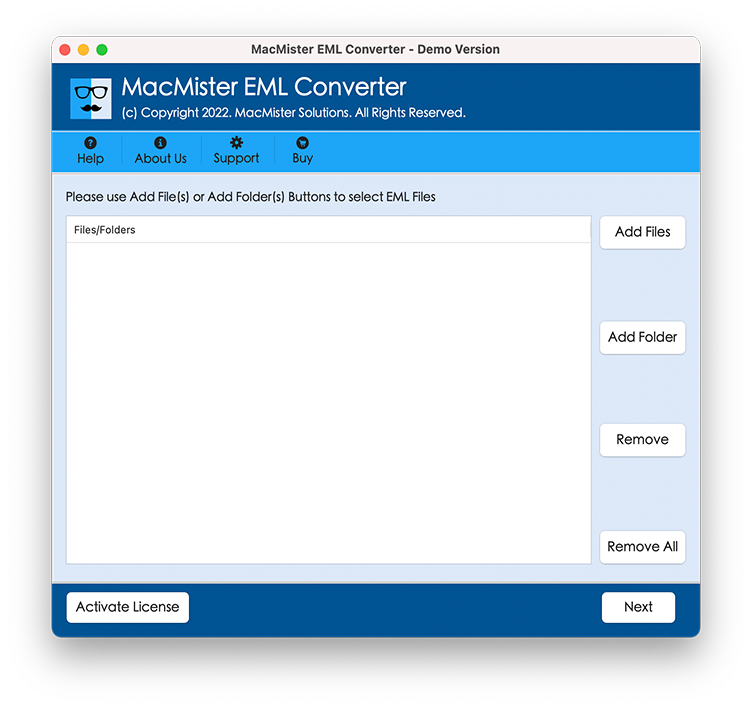
Step 2. Add the essential EML files/folder by utilizing Add File(s) and Add Folder property. Click Next.
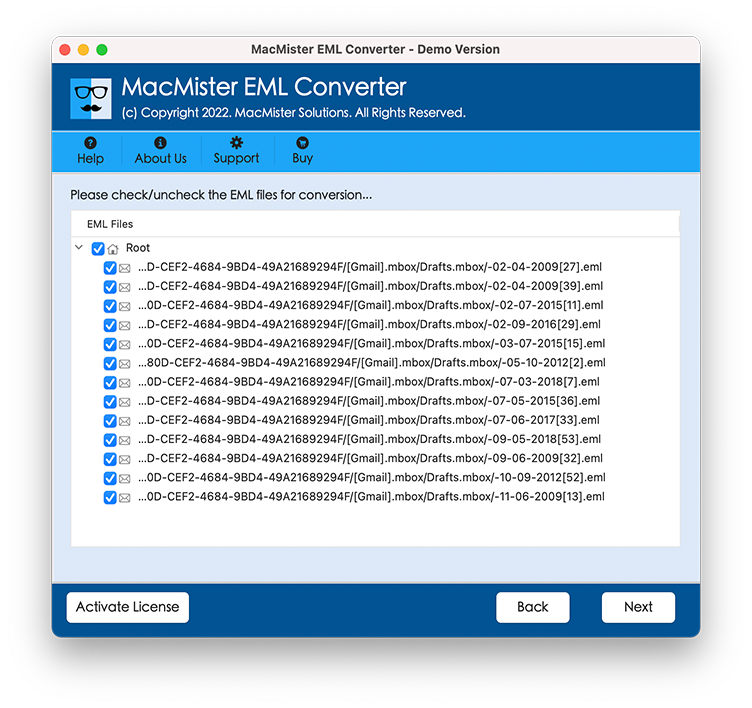
Step 3. Cross-check the selected files that are listing one-by-one on the application. After verifying them, continue by clicking Next.
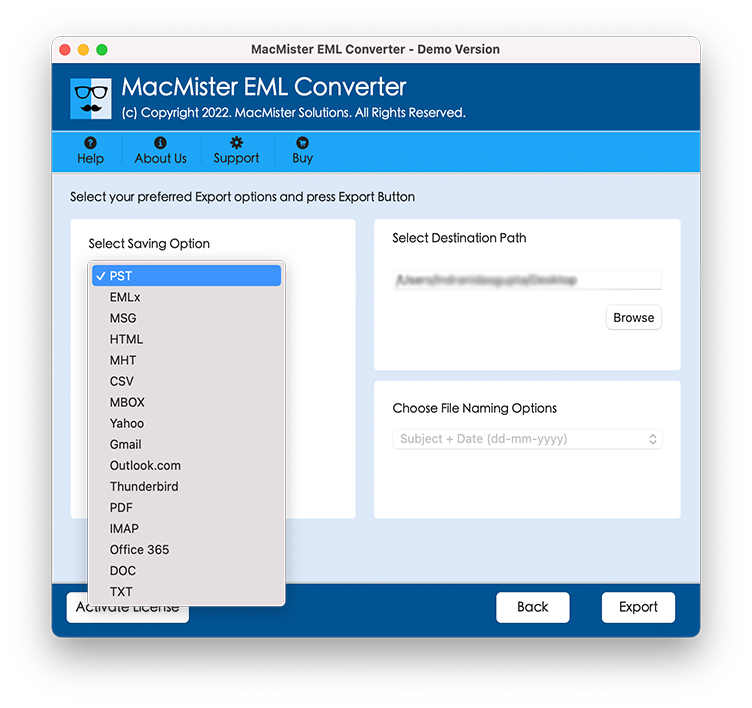
Step 4. Now, select Yahoo saving type by clicking Select Saving Option.
Step 5. Enter Yahoo Email ID and App Password in which one wants to import EML files. Once done, click Export.
Step 6. EML to Yahoo Process is Live & it will appear on Live Conversion Window through which users can track the entire on-going migration status.
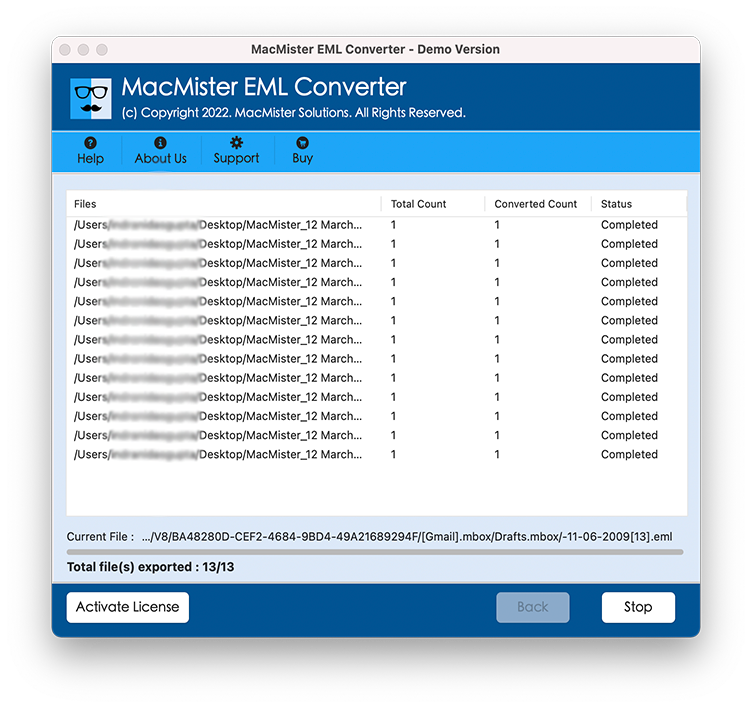
The process will end by displaying a “Conversion Completed” message on the user’s screen. Now, log in to the specified Yahoo account to check the output files. You will that the content of the resultant files is original and will appear with accurate formatting properties.
Why EML to Yahoo is a Best Migration Solution?
EML to Yahoo has many benefits and some of them are discussed below:
Direct-conversion utility:
The application provides the opportunity to directly import EML files to Yahoo on Mac. In order to implement the process, just add EML files on the tool and choose Yahoo as a saving type from Select Saving Option. Enter Yahoo Email ID and App Password and click Export. Now, the tool will directly start to import EML files to Yahoo.
Support multiple MBOX files conversion:
Using batch option of the software you can convert multiple EML files to Yahoo Mail account in one process. This option is very helpful for users who wants to save their crucial time that could have lost in selecting and exporting them one by one. With batch option, users will be able to perform the desired task in few minutes only.
Supported application is not required:
When using EML to Yahoo utility, there is no need of EML supported client like as Thunderbird, Apple Mail, Opera Mail, Eudora, Entourage, SeaMonkey, The Bat!, etc. for EML files conversion. Users can easily convert their EML emails into required Yahoo account straightaway.
Maintains email properties:
During the EML files conversion, all the email attributes and properties like Meta Data (to, bcc, cc, subject, received/sent, date), Formatting (links, font size, font style, background, etc.), messages content, images, etc. will be efficiently preserved by the utility.
Mac Operating Systems compatibility:
All Mac OS editions are well-suitable for EML to Yahoo applications. Users can easily run the application on any Mac operating system edition such as – Mac OS Ventura, Monterey, Big Sur, Catalina, High Sierra, etc.
Note. To explore more software options, download the freeware version of the tool now!
Epilogue
The blog has explained a powerful and direct approach to import EML to Yahoo on Mac OS. The software discussed in the article is totally secure and guarantees precise migration of unlimited EML files without data loss. Anyone can use and manage the tool on their own. Download the free demo of the software and understand the practical steps of the tool by importing 25 EML files to Yahoo account for free. If you have any queries regarding migration, contact MacMister support team.