Mac MBOX to HTML Converter to Open MBOX File Online in Chrome
Are you having plenty of MBOX files on the Mac system that you want to convert into HTML format? Unable to find a suitable & safe solution to convert Mac MBOX to HTML on Mac OS X! If yes, then continue with the MacMister blog because here we have explained a powerful methodology that will help to open MBOX file in Chrome online with accurate results.
Performing the conversion of files from one format to another is quite complicated. The data stored in files cannot be opened easily on the system just by renaming the file extensions. Users need to adapt the conversion strategy and then only one will be able to see the content of a particular file. But, the challenge is how to convert MBOX to HTML. Because Mac machines are programmed with highly secure configuration settings and it will not allow any application to be downloaded on macOS easily. Thus, the task becomes very hectic for users who urgently wants to open MBOX file online. The process is challenging and needs a mindful approach. Therefore, here we are providing a verified application that is completely safe to use and delivers the facility to convert MBOX to HTML directly on Mac.
How to Convert Mac MBOX to HTML to Open MBOX File in Chrome?
Mac MBOX Converter is a best solution to convert MBOX files to HTML on Mac OS. The application is reliable and programmed with a secure algorithm. However, Mac users can utilize the tool safely and perform the conversion without a doubt. Moreover, the GUI and working is far from complexities. So, users can download and utilize the tool effortlessly and convert MBOX files to HTML within seconds.

The features of the application are simply solid and wonderful. Users can apply the provided options accordingly and convert Mac MBOX to HTML as per specific requirements. Download the demo edition to test the working of the tool for free.
Working Guide to Convert Mac MBOX Files to HTML
Step 1. Run MBOX to HTML Converter on Mac OS.
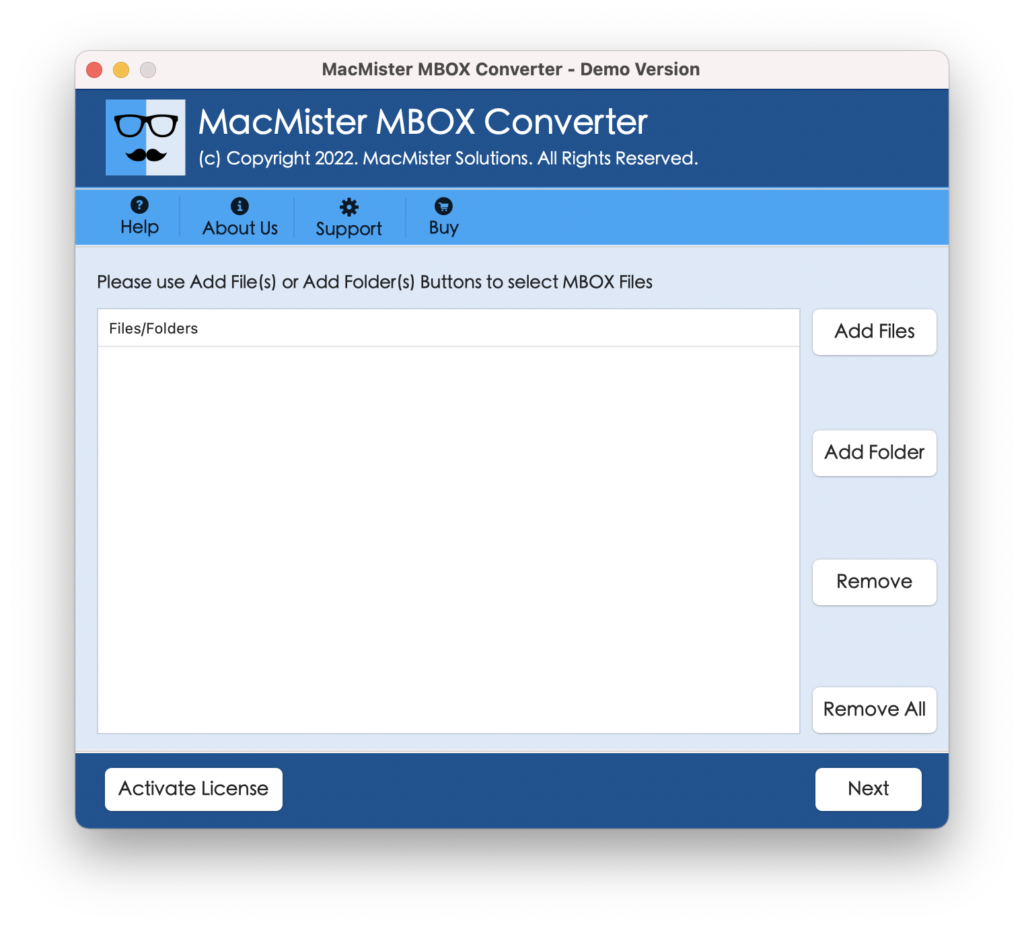
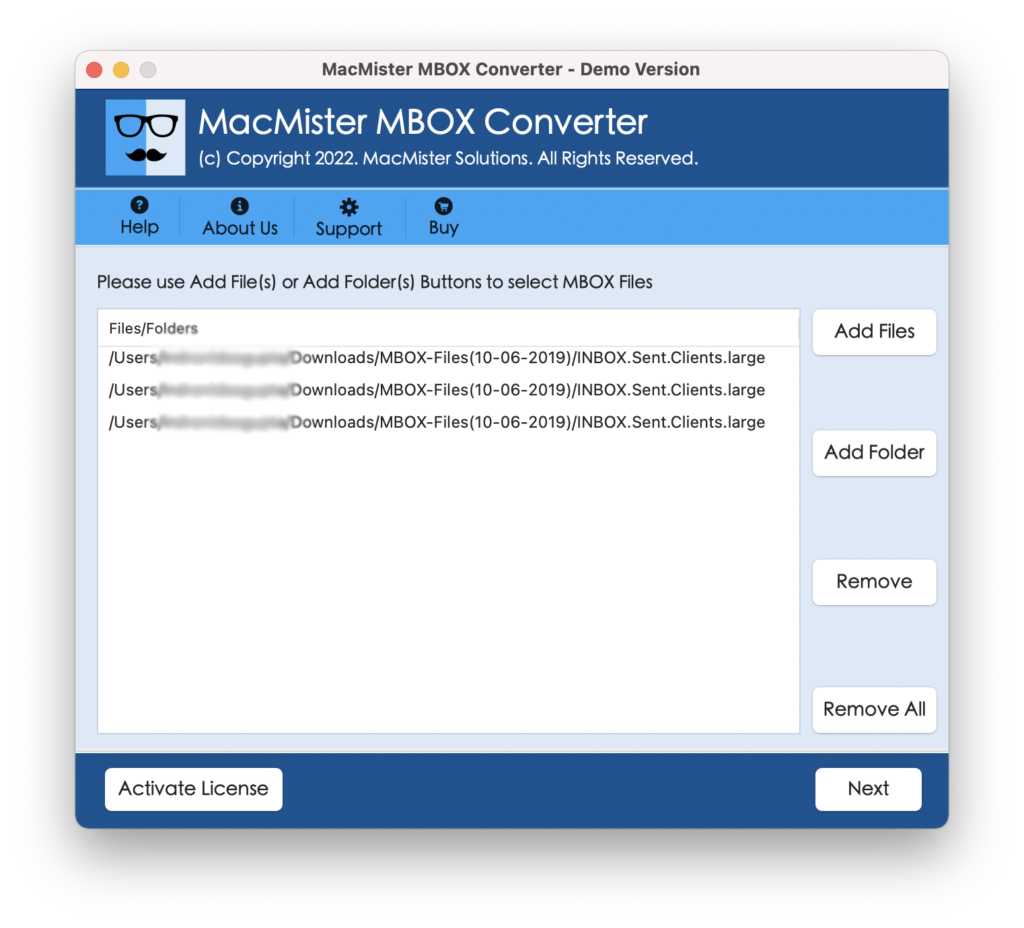
Step 2. Add important MBOX files or folder by clicking Add File(s) and Add Folder buttons. Click Next.
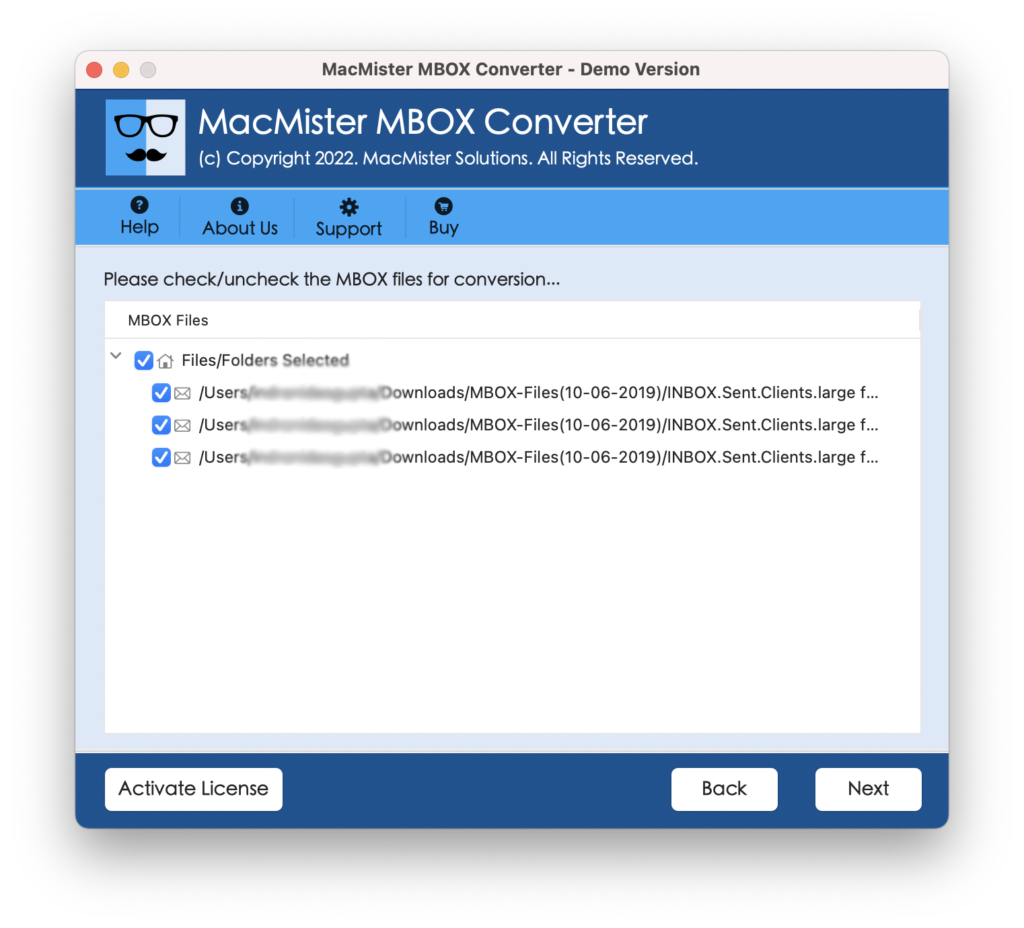
Step 3. MBOX mailboxes will start to list with checkboxes. By clicking the required checkbox, users will be able to convert the necessary MBOX files to HTML. Apply the selection as per need and proceed by clicking Next.
Step 4. Select HTML format from Select Saving Options menu.
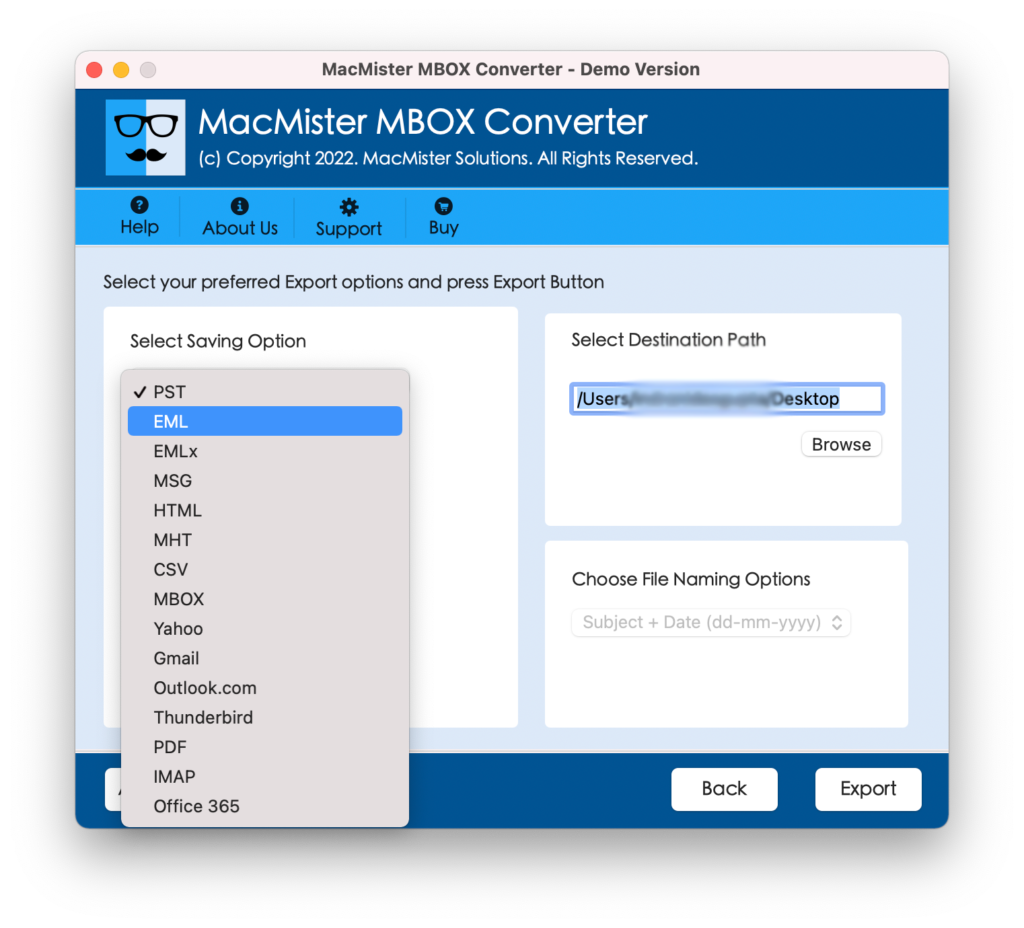
Step 5. Provide the sub-options of HTML and continue by clicking the Export button.
Step 6. Mac MBOX to HTML Conversion Process is Now Live and the tool will show the same by making the Live Conversion window appear on the system screen.
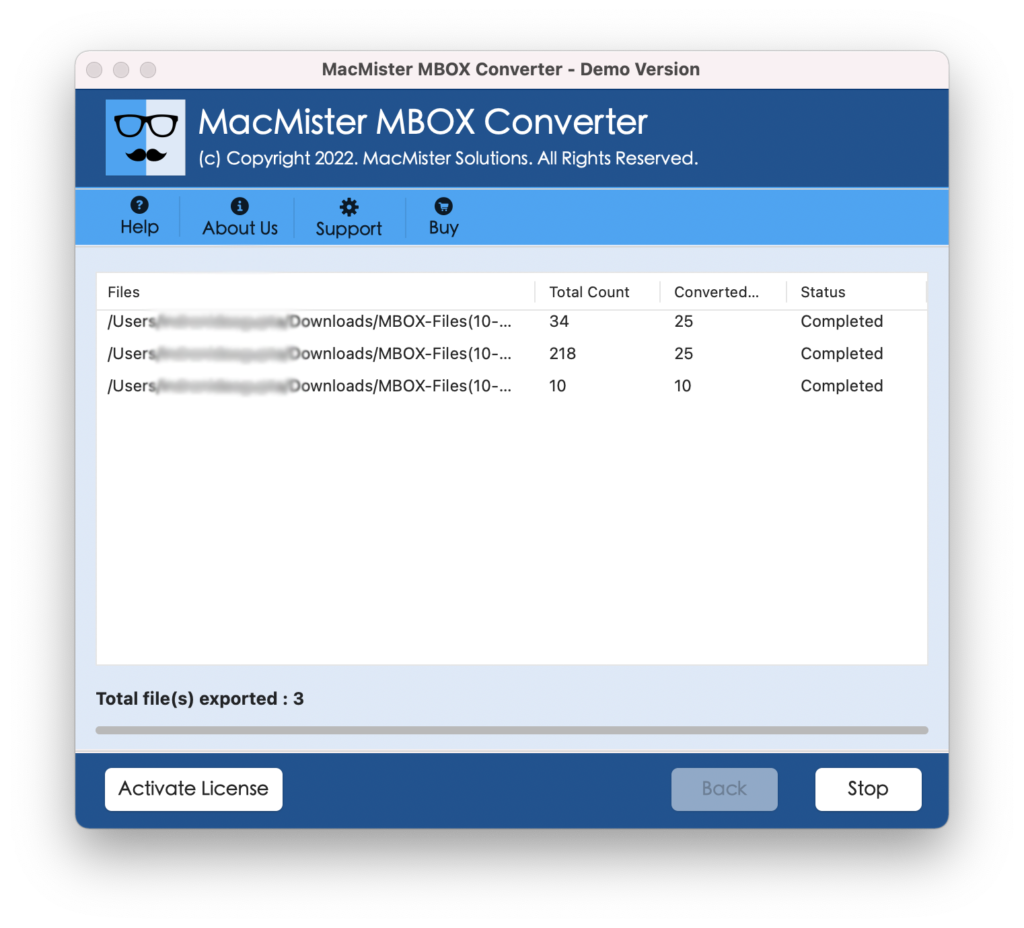
The procedure will terminate in seconds and show a “Conversion Completed” message on the screen. After this, users will receive a log report which will show the entire report of the conversion process. It will include the count of total files converted, start and end time process, saving location, etc. Users can save the file at desired destination path if required for the future otherwise continue by navigating to the location chosen earlier to save the resultant HTML file. Now, double-click on the same and open the MBOX file in chrome. The file will be accurate and show the unaltered data to users. Even, the formatting properties will also appear exactly the same as before.
Why to Choose MBOX to HTML Converter?
The software has been developed with plenty of smart options and some of them are:
Batch MBOX File to HTML Conversion
The application has a batch mode function which will play an important role to batch convert MBOX file to HTML at once on Mac. The process will be achieved through Add Folder button that will appear on the software launch screen. Users can click the required option and load a folder containing multiple MBOX files folders/sub-folders. The tool will read and list them. After this, users can choose the required saving option and convert all MBOX files to HTML at once. Once this is done, users will be able to open MBOX file online.
Dual Options to Add MBOX Files/Folder
The MBOX to HTML Converter Tool has the Add File(s) and Add Folder options. The Add File(s) option allows to upload the important MBOX files on the tool that are few in number. And, the Add Folder button will help users to load the complete folder having large amount of MBOX files on the system. After this, users can continue with the conversion and open MBOX file in chrome.
Designed with Easy GUI and Three Steps
The software is programmed with a simplified design and three basic operational steps. The GUI is friendly and contains a simple structure that technical and novice users can easily navigate and perform the operation. Moreover, the steps are short and very basic. It will save users time and help them in carrying the bulk conversion within seconds.
Convert MBOX Files to HTML Accurately
The MBOX to HTML Converter is not only capable of converting unlimited MBOX files to HTML but also provide the assurance of accurate result. Users can convert innumerable MBOX files and every time the result they will receive by the tool will be accurate and shown with precise content & formatting properties.
Supports all MBOX Based Email Clients
The software supports the entire range of MBOX supported email applications. Users can transfer Thunderbird, Apple Mail, Eudora, Entourage, Pocomail, The Bat and other email client MBOX files to HTML effortlessly. Users can test the result by double-clicking the HTML file that will open MBOX file online.
Provide the Facility of Live Process
The MBOX to HTML Converter offers the Live Conversion screen when a user clicks Export button to start the conversion process. With the help of Live Conversion window, users will be able to track the count of total files converted, total files left and export status.
Implement the Conversion all Mac OS
With the help of the tool, users will be able to convert Mac MBOX to HTML on all Mac OS versions. One can operate the software on Mac Ventura, Monterey, Big Sur, Catalina, High Sierra, etc. So, the tool is free from compatibility issues and delivers a trouble-free experience.
Final Thoughts
The article mentioned an incredible approach to convert MBOX files to HTML on Mac OS X. The MBOX to HTML Converter is simple and time-saving. Large organizations can utilize the software and convert a large amounts of MBOX files to HTML at once. Moreover, they will be able to open essential MBOX files in chrome easily. Quickly, download the software free demo and convert the first 25 MBOX files to HTML free of cost. For any queries, contact MacMister Support.