Authentication Failed Outlook Mac! – Know Top Ways to Fix
In case you are constantly encountering authentication failed Outlook Mac issue and not sure how to resolve it with ease! Then no worries, here you will discover top techniques that will help in fixing the error “can’t authenticate Outlook Mac” without any issue. To take care of the issue, we will make use of manual techniques as well as automated solution for the same. The manual procedure requires technical knowledge about Mac Outlook and its settings to fix authentication failed Outlook Mac error. Additionally, the manual methods are susceptible to human errors, possesses lengthy and complex steps, and risk of data loss.
If you instantly want to resolve the error without encountering any technical glitches, then take help of tested, certified, and recommended automated approach. It is secure, reliable, and has the ability to deliver precise results within seconds. Whether you unable to manage sending/receiving of emails or the account is permanently locked accidentally, then it is advised to utilize automated solution. It is more dependable method over manual procedure.
Quick Tip:- Try MacMister PST Converter for Mac & Windows to preserve Windows PST files into 15+ saving options. Get its free demo now and save first 25 PST files for free.
Opting freeways failed to resolve the error sometimes, and not workable when OLM file is corrupted and only fix the errors temporarily. However, if you still need to use manual workarounds then utilize it to discard the error in Outlook Mac temporarily.
Resolve Authentication Failed Outlook Mac Error Manually
In the guide, we will go through three different manual procedures to resolve “can’t authenticate Outlook Mac” error. First, attempt to update password, then access the profile on Outlook web by using the same account credentials. Afterwards, we verify and set server settings on Outlook Mac. So, go through the listed steps below to fix authentication issue in Outlook Mac for free.
Method 1. Resolve Authentication Failed Outlook Mac error by updating Password
- Run Outlook on a Mac machine.
- Go to Outlook option, select Preferences and tap Accounts.
- Choose email account showing authentication error.
- Verify username and password.
- In case the password is changed recently, then update the same in Outlook right away.
- Enter Correct Password and tap Save to save the changes.
- Last, close and start Outlook app again on your device.
- The failed authentication in Mac Outlook will be resolved.
Method 2. Solve “Can’t Authenticate Outlook Mac by using Web Login
- Open Safari or Chrome on a Web Browser.
- Search Outlook.com and navigate towards login page.
- Enter credentials such as Email and Password and tap Sign-in.
- If the login is successful, then it means that the account is operating properly.
- Now, restart Outlook Mac and check if it is working perfectly.
- In case you face any issue, then reset the account password from mentioned recovery options.
- Once web login is successful, open Outlook Mac and enter updated credentials in Outlook if needed.
Method 3. Fix Outlook Mac Authentication Failed Error using Server Settings
- Run Outlook Mac.
- Go to Outlook option, then Preferences, and tap Accounts.
- Choose the email account having authentication issue and tap Advanced Settings/Server Settings option.
- Cross-check the mentioned details – IMAP/SMTP Server addresses, port numbers, and SPA (Secure Password Authentication).
- Last, tap Save button.
- Now start Outlook Mac again and check if the issue is solved.
Limitations of a Manual Approach
- The methods are only helpful if the issue is associated with server or corruption. They won’t able to resolve the password related errors.
- In case account’s keychain data is corrupted, then password update won’t be helpful.
- One may encounter error if the account is restricted or locked by an email provider.
- To use the manual approaches, it is important to have technical knowledge of SMTP/IMAP Servers and Outlook Mac.
- The second method won’t help in discarding the error, it will only diagnose the issue.
Fix Authentication Failed Outlook Mac Error Directly
Manual methods can fix “can’t authenticate Outlook Mac” error but they hold some limitations that can cause challenges for novice users. Moreover, the methods are suitable for account corruption, corrupted OLM file, and application error. In such a situation, you may try a solution that is secure and able to protect Outlook for Mac data from any type of misshapen. MacMister OLM Converter for Mac & Windows is an application that preserves OLM files into 15+ saving options. With the help of the tool, users can save OLM database into TXT, EML, HTML, PST, PDF, MSG, CSV, IMAP, Thunderbird, Yahoo, and more. The tool has the ability to transform OLM files in bulk at once. Meanwhile, the app will take care of data originality and folder structure.
Follow the below steps to fix Authentication Failed Outlook Mac using automated solution –
Step 1. Download and run the app on a Mac system.
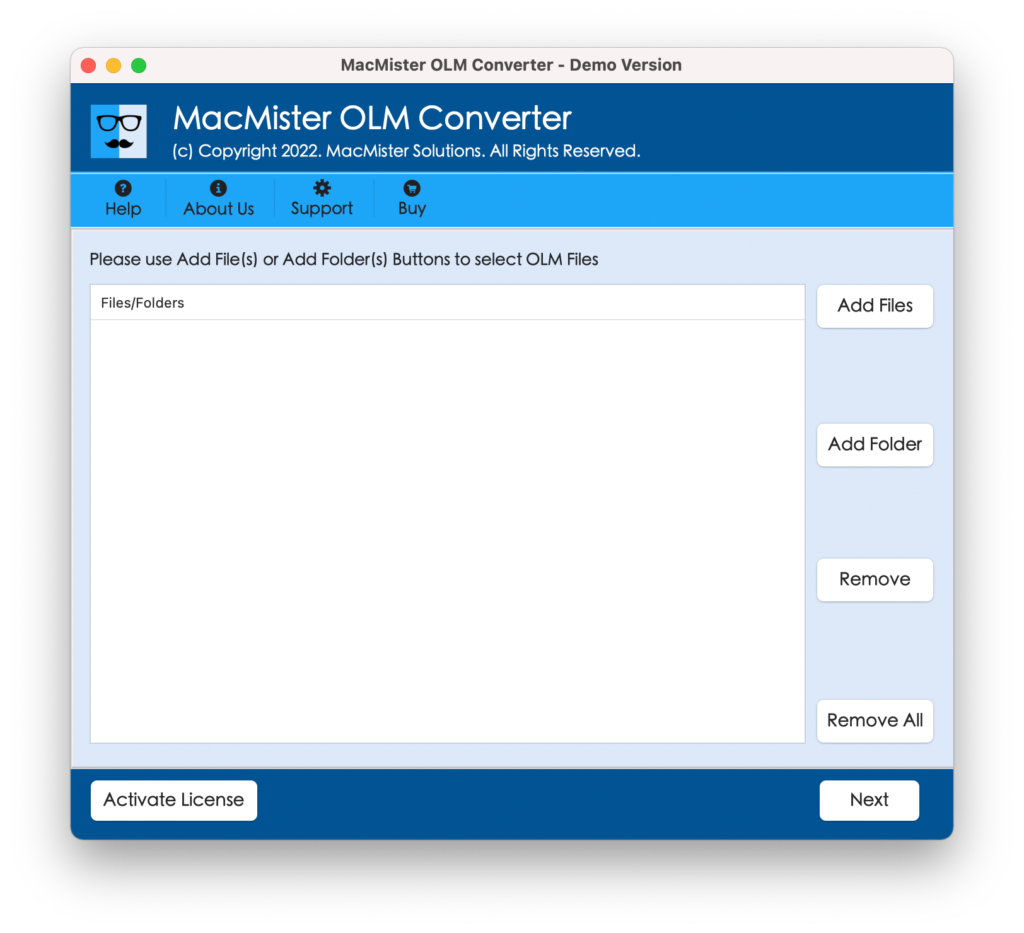
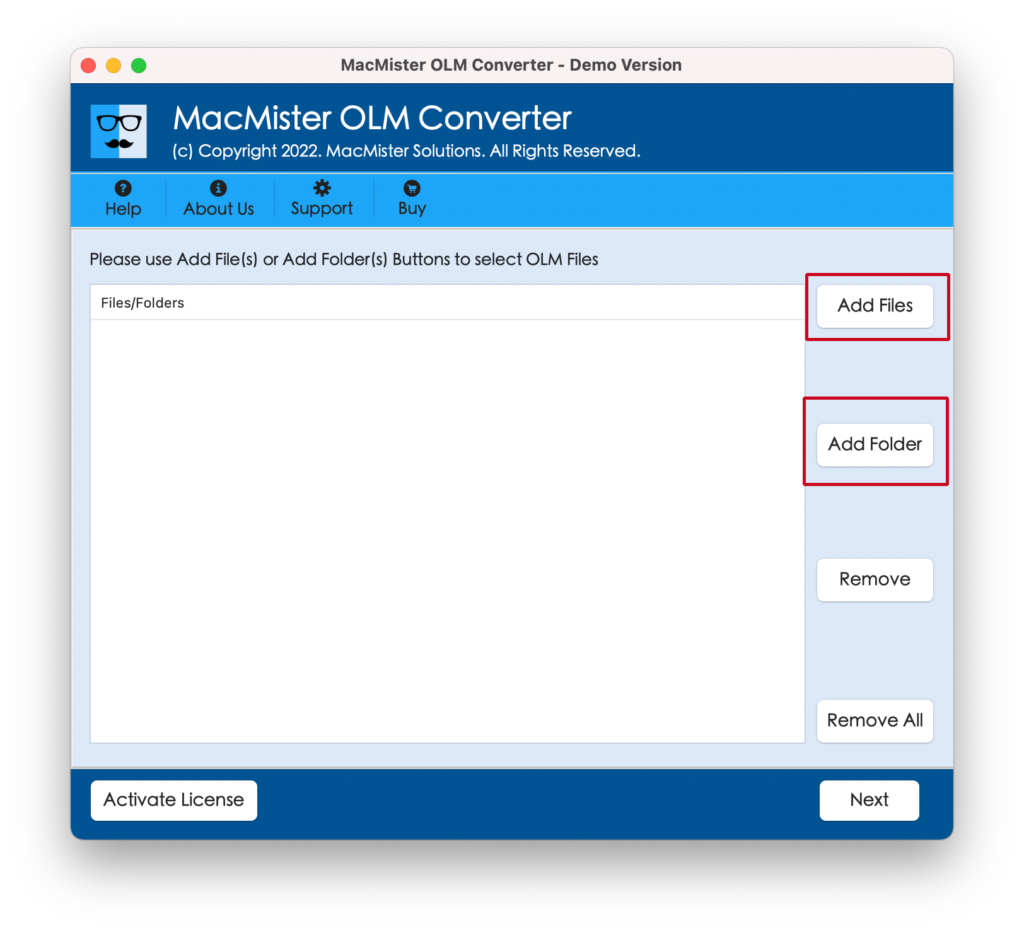
Step 2. Upload OLM files with the help of dual buttons i.e. Add File(s)/Add Folder and tap Next.
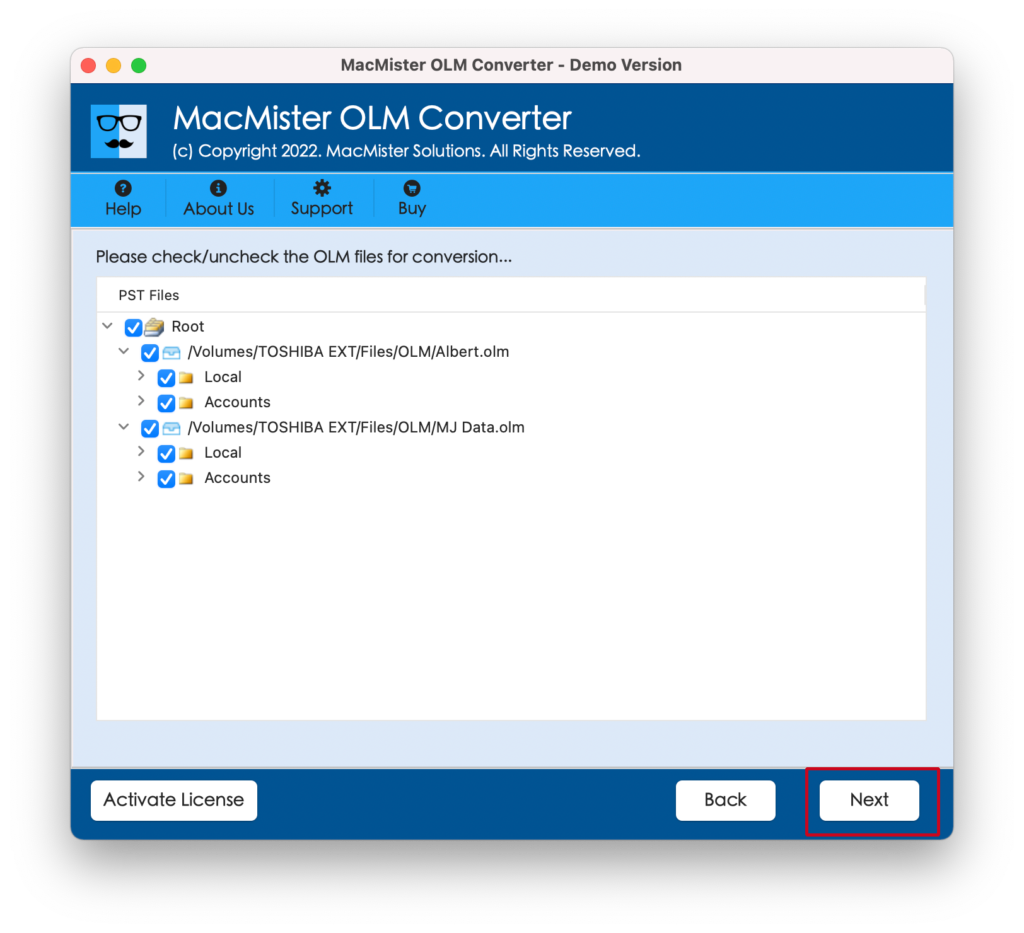
Step 3. Once the files are listed, verify them, use the checkboxes for selective conversion if needed and press Next.
Step 4. Choose required saving type from Select Saving Options and tap Next.
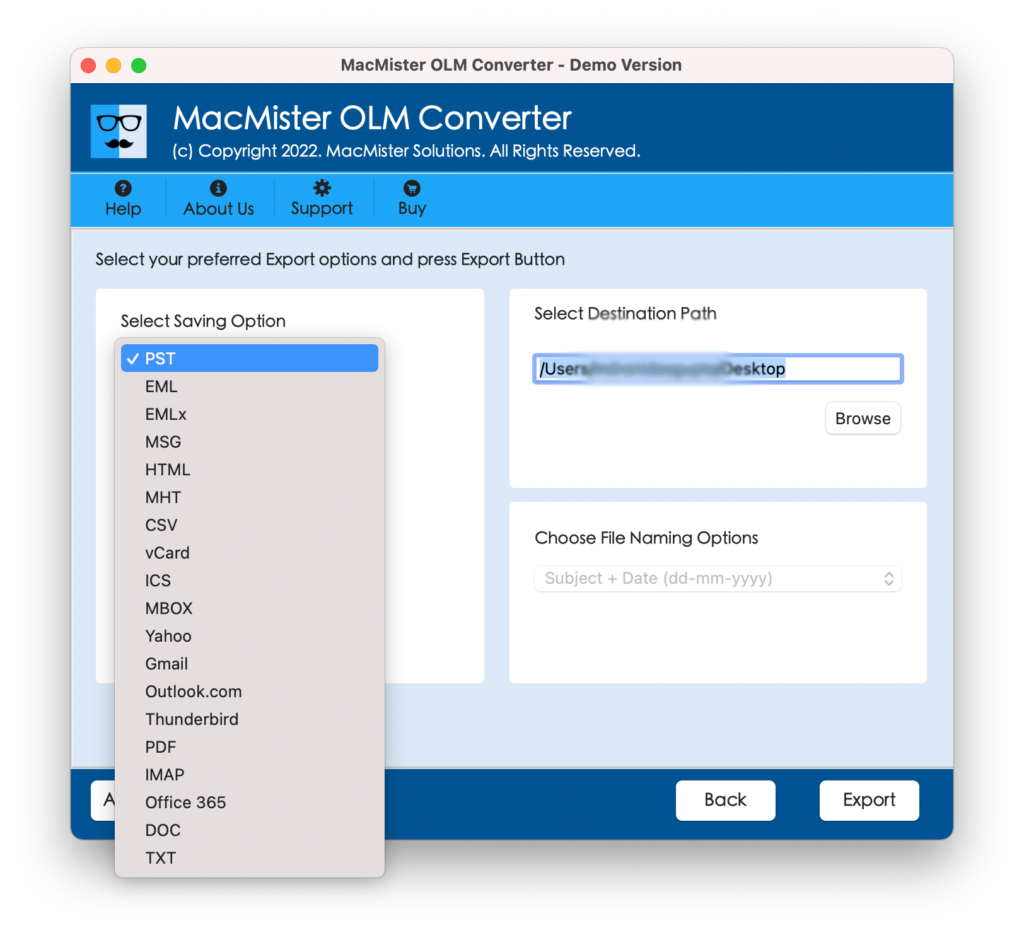
Step 5. Set sub-options according to the requirements and tap Export.
Step 6. The Live Conversion Report will open showing the live transformation process of OLM files to users.
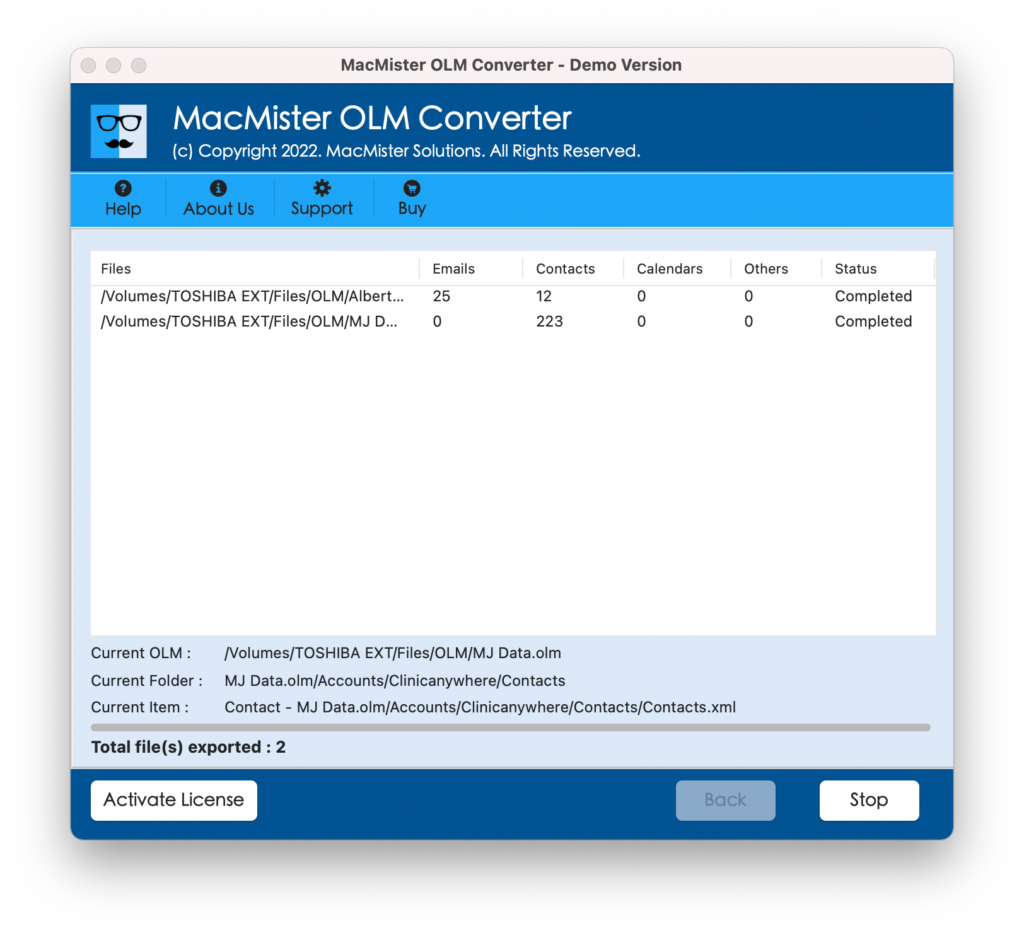
Within seconds, the task will end and then “Conversion Completed” notification will appear. Tap OK and then go to the specified destination to check resultant files.
Benefits of using Automated Approach
- Supports batch conversion of Outlook Mac OLM files at once.
- Keeps the database safe and secure during the process.
- Ensures the safety of folder structure while converting OLM files.
- Equipped with 15+ saving types such as EML, PDF, MSG, HTML, Thunderbird, Yahoo Mail, Gmail, Office 365, IMAP, and more.
- Friendly interface will ease the conversion for technical and novice users.
- Live Conversion Report help users tracking the live conversion of OLM files.
- Available in Mac & Windows OS versions (all editions are supported).
Epilogue
In the write-up, we have provided different techniques to resolve authentication failed Outlook Mac error. The first three methods are manual. They are free to use but are more suitable for corruption related errors than password related error. The second method is automated approach. It is highly recommendable as it is secure, effective, and easily manageable. Anyone can operate it and implement the conversion with ease. Also, it has a free demo that enables users converting 25 OLM files for free.