How to Convert Multiple MSG Files to PDF Manual Guide

In this article, we are going to understand how to convert MSG files with attachments to PDFs. managing various file formats can be a daunting task. Among the commonly used file types, MSG (Outlook Mail Message) files are prevalent in professional settings. However, there are instances when converting multiple MSG files to PDF becomes necessary, whether for archival purposes, easier document sharing, or legal requirements. In this comprehensive guide, we will walk you through the step-by-step process of manually converting multiple MSG files to PDF, Guide you to efficiently handle your digital files. So, let’s dive in!
Why Convert MSG Files to PDF?
PDF (Portable Document Format) is a widely used file format that retains the original content, formatting, and layout, regardless of the software, hardware, or operating system used to view it. Converting MSG files to PDF offers several advantages, including:
Universal Compatibility: PDF files can be accessed and viewed across different platforms, ensuring unified sharing and collaboration.
Formatting Preservation: By converting .msg with attachments to pdf, you ensure that the content, images, and formatting of the original email are maintained, eliminating any chances of data loss or misinterpretation.
Security Enhancement: PDF files allow you to apply encryption, password protection, and digital signatures, providing an extra layer of security for sensitive information.
Reduced File Size: Converting multiple MSG files to a single PDF file helps optimize storage space while maintaining document integrity.
Step-by-Step Guide to Manually Convert Multiple MSG Files to PDF
Step 1: Prepare Your Workspace
Before embarking on the conversion process, it is essential to create an organized workspace. Here are a few preparatory steps to follow:
Create a New Folder: Designate a specific folder on your computer to store all the MSG files you wish to convert. This will help streamline the process and avoid confusion.
Rename Files Appropriately: Consider renaming the files according to a logical naming convention, such as a combination of date, sender, or subject, to make them easily identifiable.
Step 2: Export MSG Files from Outlook
To Convert MSG files to PDF, you first need to extract msg files from your Outlook application. Follow these steps:
- Open the Outlook application on your computer.
- Navigate to the folder where your target MSG files are stored. Select the files by holding down the Ctrl key and clicking on each file you want to convert.
- Right-click on the selected files and choose the “Save As” or “Export” option. Select a location to save the exported files, preferably the folder you created earlier.
Step 3: Convert MSG Files to PDF
Now that you have exported the MSG files, it’s time to convert them to PDF format. To accomplish this, follow these instructions:
Choose a Reliable Conversion Tool: There are various third-party tools available that can convert MSG files to PDF with attachments and here we recommend using a reliable MacMister MSG Converter tool.
Install and Launch the Conversion Tool: Download and install the MSG Converter software on your Mac computer.
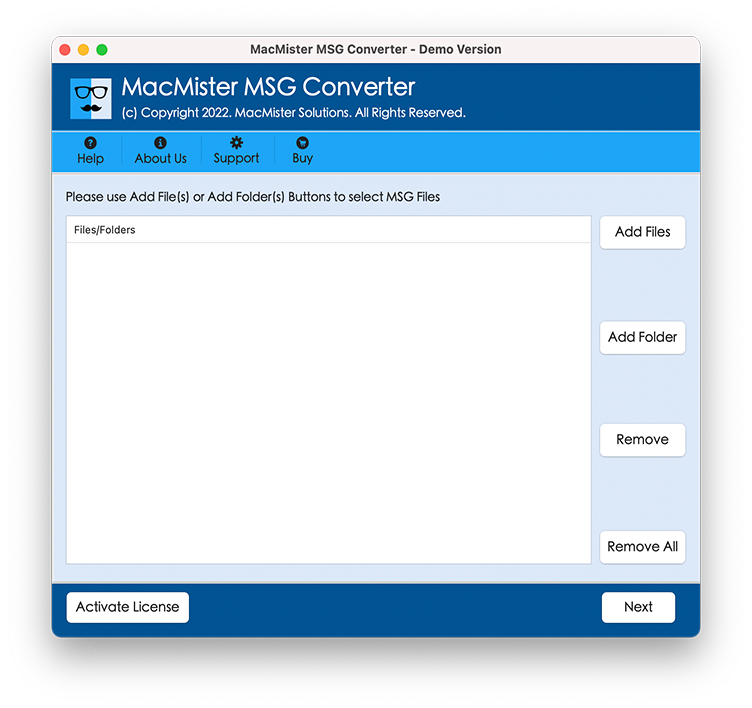
Import the Exported MSG Files: Add Exported MSG Files within the conversion tool. Select the PDF from the Saving option and click on the “Import” button.
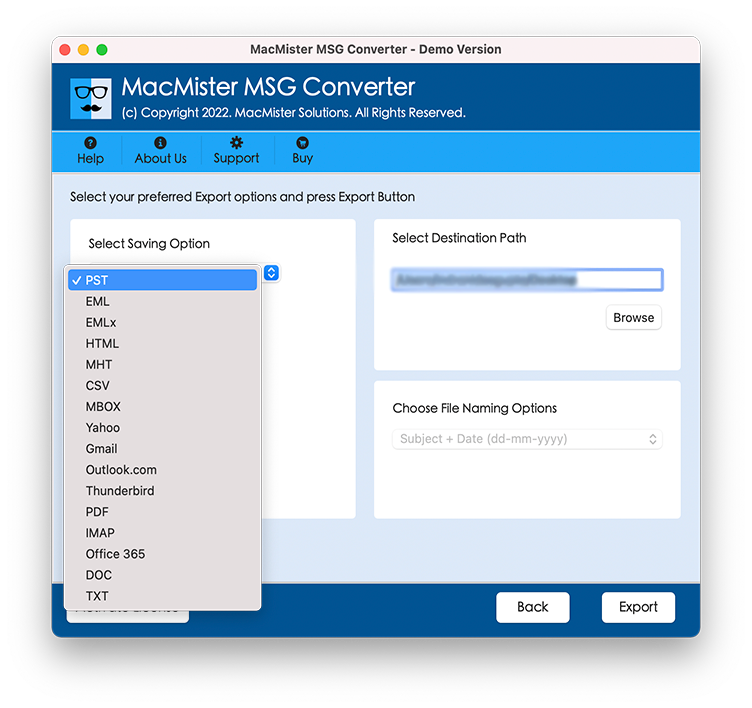
Initiate the Conversion: After configuring the desired settings, initiate the conversion process by clicking on the “Convert” or “Start” button within the software. The conversion tool will convert each MSG file to PDF format.

Save the Converted PDF Files: Once the conversion process is complete, the software will prompt you to specify a destination folder for the converted PDF files. Choose a location and click on the “Save” or “Finish” button.
Why MacMister MSG to PDF Converter?
MacMister MSG to PDF Converter is a specialized software designed to convert MSG files to PDF format with ease. It is a dedicated solution for users who frequently deal with MSG files and need to convert them into a universally accessible PDF file format. The software ensures accurate conversion while preserving the original email properties and attachments.
How can I convert MSG to PDF online for free?
Download the free trial version of MSG to PDF Converter and convert MSG to PDF for free. It will allow you to convert the first MSG files from each folder to PDF format with attachments. This is how you can convert .msg files with pdf attachments.
Key Features of Tool
Easy Conversion of MSG Files to PDF – With this tool, converting MSG files to PDF is a simple and straightforward process. The user-friendly interface allows users to quickly import MSG files and convert them to PDF with just a few clicks. Even users with minimal technical knowledge can easily navigate through the conversion steps.
MSG File Conversion with Attachments – The tool has the ability to convert MSG files to PDF along with their attachments. Whether it’s images, documents, or any other type of attachment, the software ensures that all attachments are accurately preserved in the resulting PDF files.
Bulk Conversion – If you are dealing with a large number of MSG files, Batch MSG conversion capability is crucial to saving time and effort. MacMister MSG to PDF Converter allows users to convert multiple MSG files to PDF simultaneously. This batch conversion feature automates the process and ensures efficient handling of large volumes of email data.
Retains Email Properties – It preserves the original email properties and maintains the integrity of the data. Tool retains crucial email properties such as sender, recipient, subject, date, and more.
Customizable Conversion Options – To cater to diverse user requirements, The Tool offers customizable conversion options. Users have the flexibility to specify the desired output settings, including page layout, Attachment management, file naming conventions, and more.
Cross-Platform Compatibility – MacMister MSG to PDF Converter is designed to be compatible with various platforms. Whether you are using a Mac PC or a Windows, you can utilize the software to convert MSG files to PDF.
Conclusion
Converting multiple MSG files to PDF manually is a straightforward process that empowers you to effectively manage your digital documents. By following the step-by-step guide provided in this article, you can confidently convert your MSG files to PDF format, ensuring universal compatibility, preserving formatting, enhancing security, and optimizing storage space.
MSG File to PDF Converter with Attachment is a reliable and feature-rich solution for converting MSG files to PDF format with attachments. Its user-friendly interface, attachment preservation, and efficient conversion process make it an ideal choice for users to streamline their email data management.