Fixed : Mac Application Can’t be Opened because Apple cannot Check it for Malicious Software
Stuck in a situation where your Mac application can’t be opened because Apple cannot check it for malicious software. Well, you have reached the correct place because here you will get the best methods to fix Apple cannot check it for malicious software issues. To keep staying on this blog and read it till the end. But first let’s check some user queries to know more about this error and how they are dealing with it.
User Queries
I recently downloaded a software from registered link. The installation was also successfully finished, but after that a message window popped up showing the message that File can’t be opened because Apple cannot check it for malicious software. After repeated installation and uninstallation, the same message is appearing repeatedly. Can anyone please help me in resolving this issue as I urgently need to open this application on my machine.
– Greta
Yesterday I download free trial edition of MBOX Converter. After successfully installing the demo version of the software, an error message flashed on my screen – MBOXConverter.pkg cannot be opened because Apple cannot check it for malicious software. This software needs to be updated. Contact the developer for more information. Why this error is appearing on my machine? How to get rid of this error?
– Joe Mark
Why Users Encounter “Can’t Open Because Apple Cannot Check it for Malicious Software” Error
Have you ever encountered this error while opening a newly installed application on Mac? But don’t know the reason for the same. Don’t worry, here you will get all answers to your questions. The primary reason for users encountering this error is due to the security feature of the present iOS edition of their Mac Machine. The warning message is appearing only due to the security reasons. The installed software is not malicious or corrupt. And installing the same will not put your system on risk. The application is completely safe to use and the system is free from any virus attack.
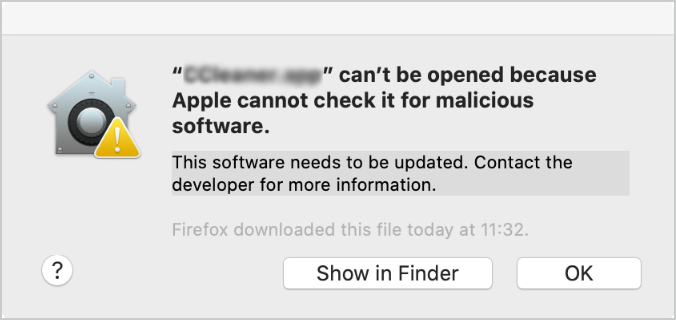
Mac shows this message when the downloaded application is not the registered one. Now follow the next section to
Fix “Mac Application can’t be Opened because Apple cannot Check it for Malicious Software”
There are two different methods to fix this issue. Lets us find out more about them, one by one.
Method 1 : Change Security Preferences
- Click on Apple Icon appearing on the left corner of the system. Select choose system preferences.
- Tap on Security & Privacy >> a new pop-up window will open.
- Choose “App Store and identified developer” showing under Allow apps downloaded from.
Method 2 : Open the application via Finder
Follow the below mentioned steps to fix the issue and open any software in hassle-free manner. Carry out these steps to get rid of this warning message :
- Navigate to Finder and search for the application that you need to start.
- Right-click or control-click on the application and select Open.
- Once again Open option will appear for second time, click on it.
Try 100% Secure Software Solutions:
Conclusion
Through this blog we have tried our best to help you fix Mac application can’t be opened because Apple cannot check it for malicious software. There are numerous other solutions available on the internet too. You can opt for any of them, but if you are not sure about them and are unfamiliar to their technical aspects, then go ahead with the methods discussed here. These errors appear more in older Mac OS versions and your chances of encountering these errors in updated mac systems are slim. However, you have a solution to get rid of this error and help you get out of messy situation, in case you encounter one.