How do I declutter my Yahoo Email?
If you are constantly searching a solution for how do I declutter my Yahoo email, then this write-up is definitely for you! Here, you will go through the important steps to declutter Yahoo inbox, delete emails proficiently and preserve a clear Yahoo email environment.
Yahoo Mail Inbox Hygiene: Essential Principles
Yahoo Mail provides 1 TB of free storage that makes it a preferable choice for many users. Yet, maintaining an organized inbox is important for efficiency and productivity, despite the wide capacity available.
Here are some guidelines specially designed for Yahoo Mail users:
Check Yahoo Storage Space: While 1TB is enough, attachments such as photos and documents have the ability to fill the space faster than anticipated. Regularly, verify your storage use to prevent unexpected issues.
Standard Maintenance and Review: Take few minutes daily or weekly to sort through new emails and clear out inappropriate drafts. A reliable habit can make a significant difference.
Maximize Filters, Folders, and Search: Use Yahoo’s custom filters to sort out emails efficiently. The search function can be swift to locate specific messages, saving you from manually sifting through your inbox.
Unsubscribe & Restrict Notifications – Minimize the inflow of unnecessary emails by unsubscribing from rarely-read newsletters. Update settings of connected apps to your Yahoo Mail to minimize unnecessary notifications.
Utilize Backup tools – Tools such as MacMister Yahoo Backup Tool for Mac & Windows can be used to backup Yahoo emails into 15+ saving options.
Fight Spam Proactively – Regularly review spam folder, marking genuine emails as “Not Spam” to improve filter’s accuracy. This practice guarantees that important communications are delivered to your primary inbox while efficiently getting rid of unwanted spam.
What is Archive in Yahoo Mail?
The “archive” feature of Yahoo Mail is an appropriate way to clear inbox folder, making it focused and organized environment. Additionally, archiving Yahoo Mail emails allow users to transfer unnecessary or obsolete messages to a concealed folder instead of erasing them. The archive folder can be considered as a special cabinet allowing keeping less essential messages to declutter the inbox view.
Instead of erasing emails, archiving them will be smart approach to organize or always keeping the mailbox uncluttered. Here are the main reasons listed why picking up Yahoo Mail archive is important for Yahoo inbox management.
Enhanced Yahoo Inbox: Archiving Yahoo email messages delivers several benefits, especially when creating a less crowded and smooth inbox preview. Moreover, decluttered inbox facilitates simple management and easy accessibility of emails, thereby enhancing overall productivity.
Better Search Results: Conquering the techniques of archiving Yahoo emails enables to search for the messages quickly and easily. It surely improves the search results and will help in saving the time and energy of email management.
Find Yahoo Emails Anytime: Many users view deletion as a permanent action, but it is advised to use the archive feature that helps in preserving the previous messages for future reference. It is a perfect approach to benefit from a smooth or clean Yahoo inbox without eliminating data.
Quick Note. After going through the benefits of archiving features, it is equally important to understand that Yahoo only possesses 1TB of storage. And if the mailbox is full, then it is necessary to understand how to archive Yahoo Mail emails to manage storage space of email account.
How to Archive Yahoo Email Messages on Desktop?
In the following segment, we have discussed a perfect guide on how to archive Yahoo Mail email messages locally using the web interface, let’s explore the steps for the same –
- Open Computer, go to Yahoo Mail using the web.
- Select the required emails and tap Archive icon appearing in the toolbar.
- After Yahoo emails are archived, go to Archived folder to check them.
How to Archive Yahoo Email Messages using Android Mobile?
In spite of the web interface, if you operate Yahoo Mail app, then implement the below steps to archive multiple Yahoo emails on your Android mobile. Here are the how-to steps:
- Open Yahoo Mail app in Android Phone.
- Choose the required email thread to archive and open it.
- From More option, click Archive button.
Tip: Use the above steps archive Yahoo email messages on iPhone & iPad devices. To un-archive them, go to Yahoo Mail app, navigate to Inbox folder, click Inbox icon and tap Archive option. Lastly, select required emails, click Move and then Inbox. With this, one can easily retrieve archived Yahoo email messages in the inbox.
How to Auto-Archive Yahoo Email Messages?
Archiving email manually requires a practical regular habit of transferring unused messages to the archive folder in order to make inbox clean and flexible. Instead of going with the manual process, try to manage your tasks with another remarkable feature of auto-archive Yahoo emails.
It prevents from messages recurrence and keeps the emails in a Yahoo archived folder. Here the steps listed for archiving Yahoo emails automatically by generating particular rules at once.
- Open Yahoo Mail account, go to Filter tab.
- Set the rules, navigate to Archive and tap Save.
Opting for Yahoo Mail archive option is not the crucial solution to declutter Yahoo inbox. Instead, take the support of backup utility that is one of the most reliable and safe approach to manage Yahoo storage offline.
Note. Archiving can free up the space is definitely a myth. Archiving feature do not delete or remove your emails from an email account, it just transfers them into archive folder. To organize Yahoo inbox, utilize automated solution to manage and update inbox easily.
How to Archive Yahoo Emails using Automated Solution?
With the help of MacMister Email Backup Software Mac & Windows, one can archive Yahoo emails into 15+ saving options. The tool basically possesses 30+ webmail options, but users may choose Yahoo Mail, select required saving option and archive the entire Yahoo Mail inbox into desired saving type with ease. Its interface is easily manageable. Any user can utilize the tool and perform the process effortlessly. Additionally, the three operational steps will complete the process in few seconds.
Moreover, the application is equipped with many powerful features with the help of users can archive Yahoo Mail emails according to the requirements. Besides, a trial edition of the tool is also available that users may download on any macOS to analyze the software processing for free.
Working Steps of the Tool to Archive Yahoo Emails on Mac
Step 1. Download, launch, and run the software on any Mac OS.
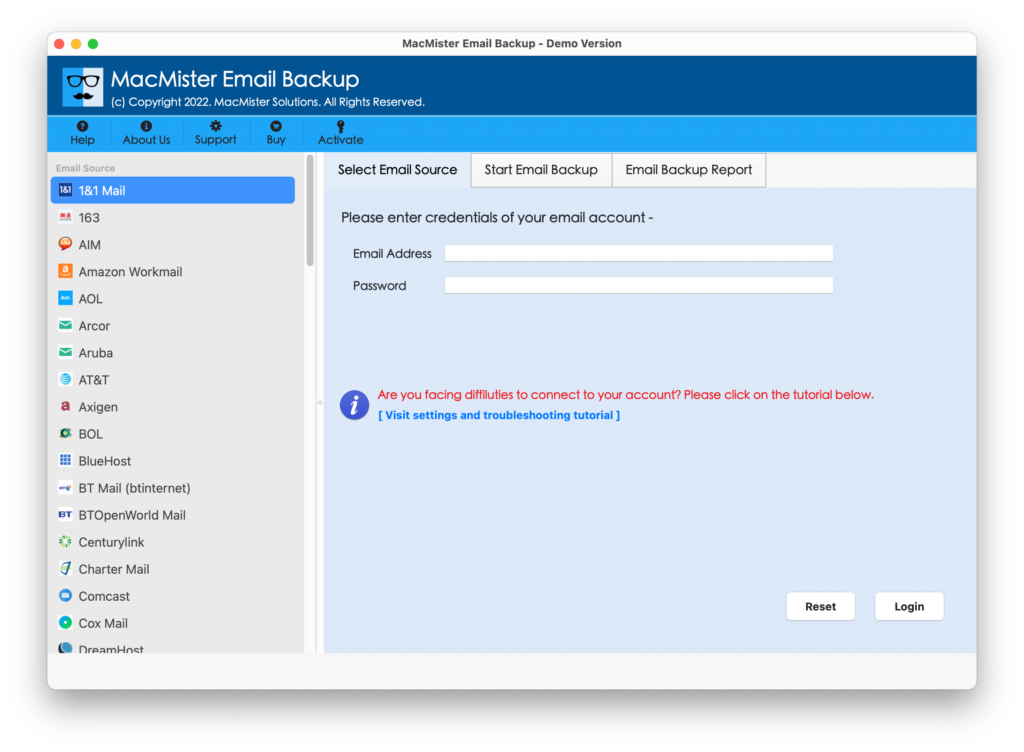
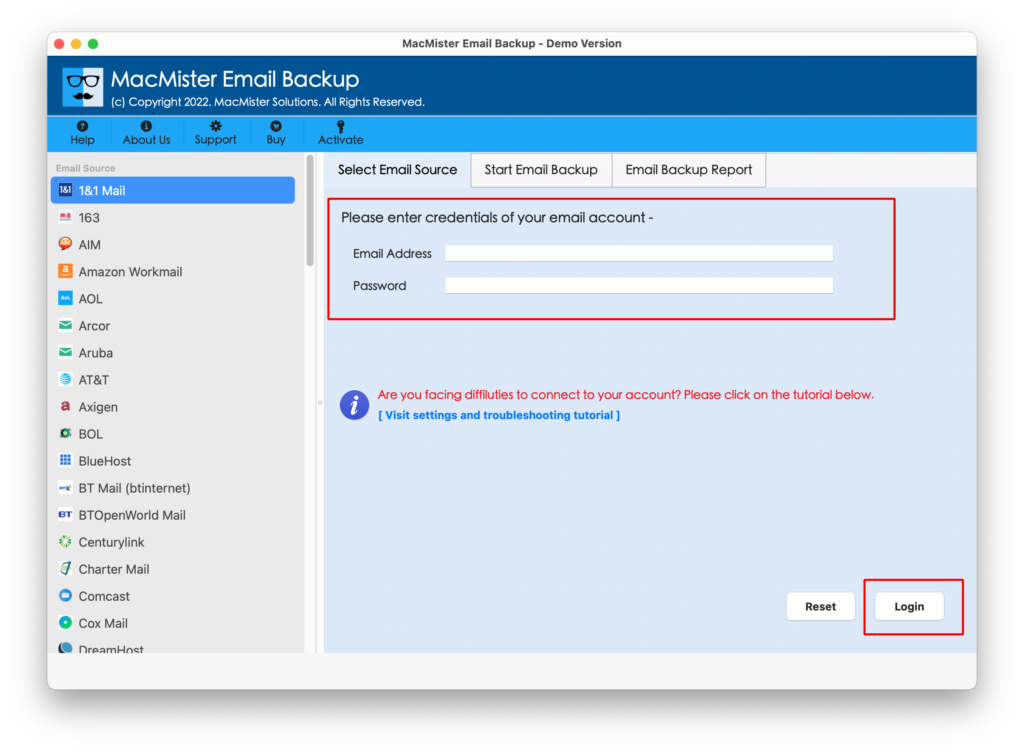
Step 2. Choose Yahoo Mail from the left. Add Yahoo Mail credentials. Click Login button.
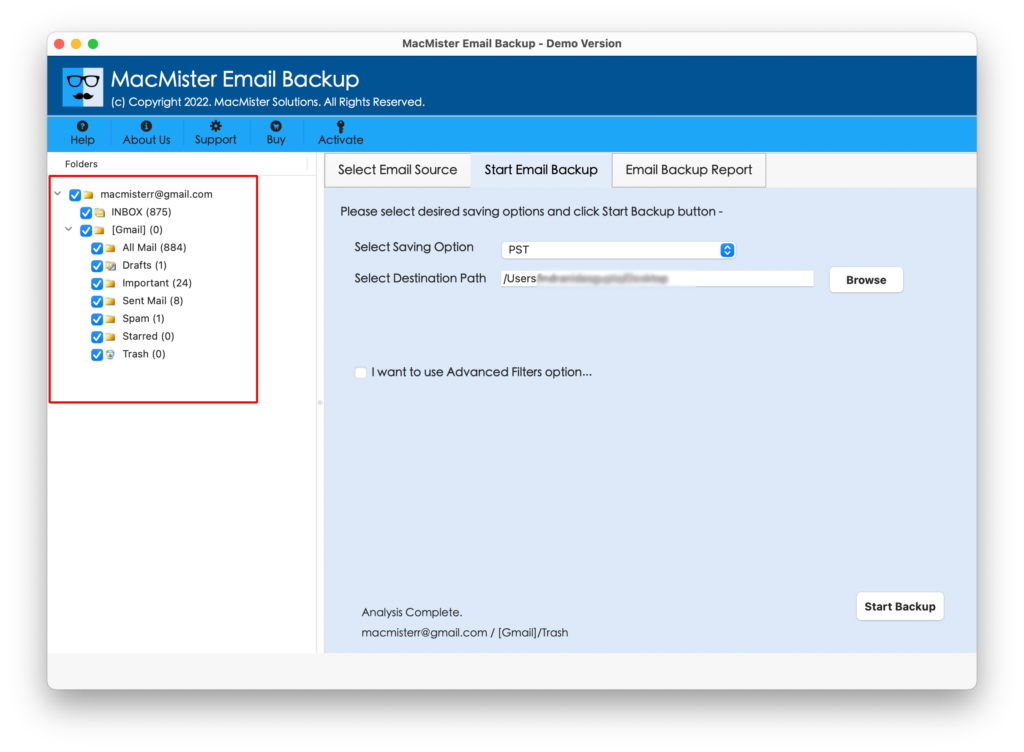
Step 3. Yahoo Mail account will connect with the tool and its mailboxes start to appear on the left pane.
Step 4. Go to the right-side of the app, click Select Saving Options, and choose the desired saving type from Select Saving Options list.
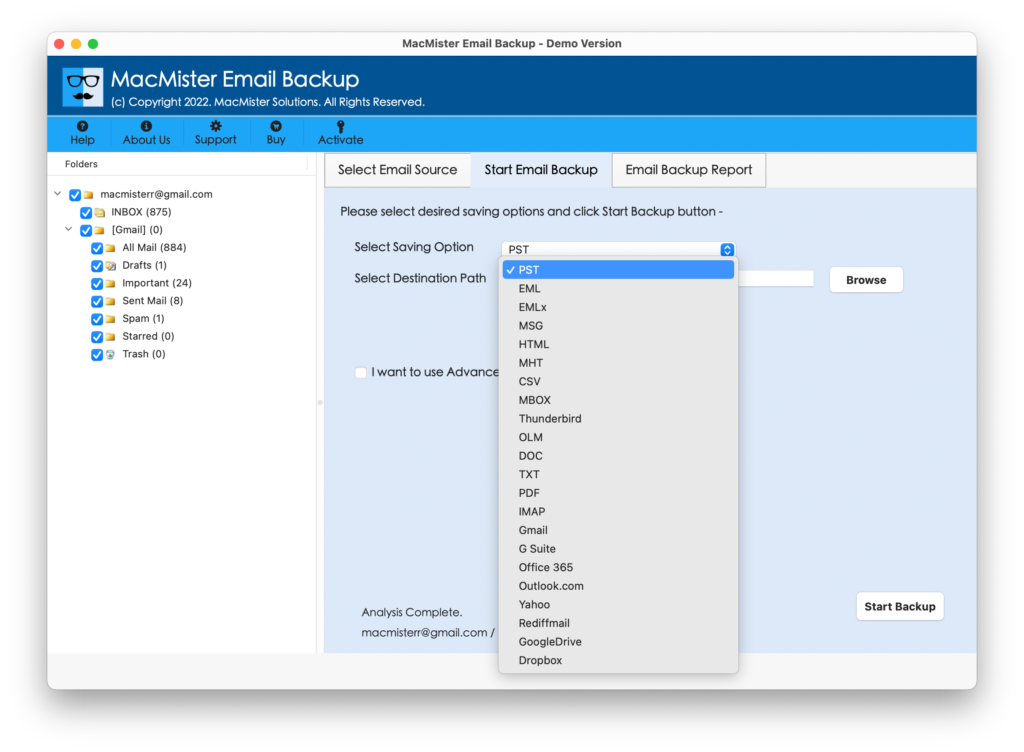
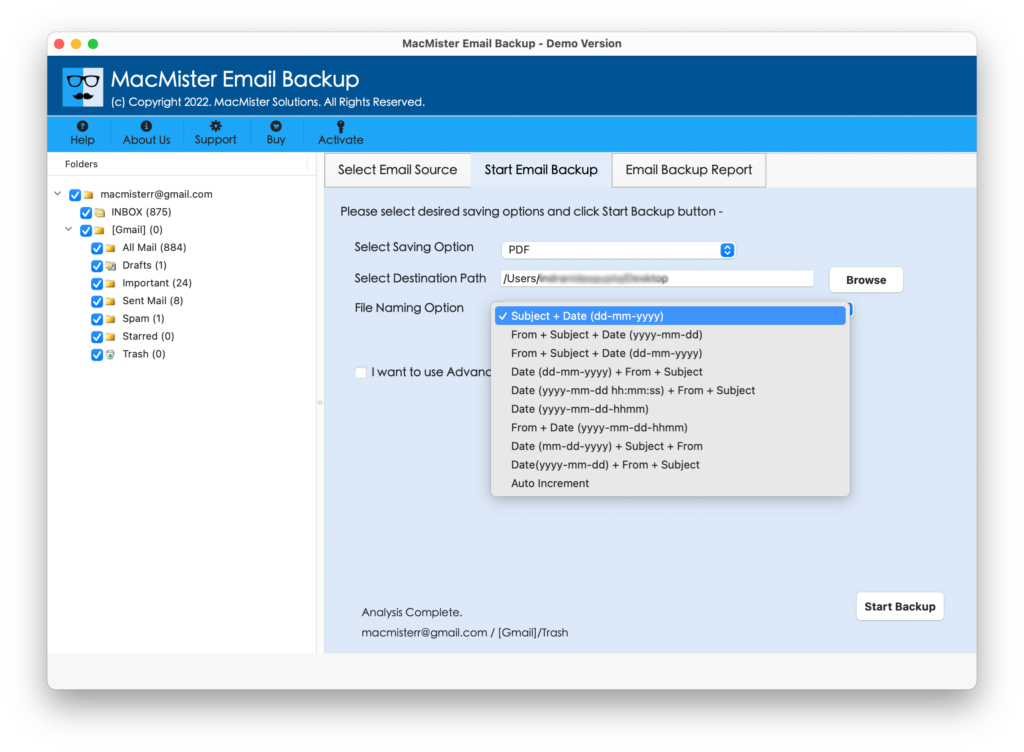
Step 5. Set the sub-options and simultaneously set necessary filter to archive specific Yahoo emails, if needed and click Start Backup button.
Step 6. The Email Backup Report screen will open which shows the live backup progress of Yahoo Mail emails.
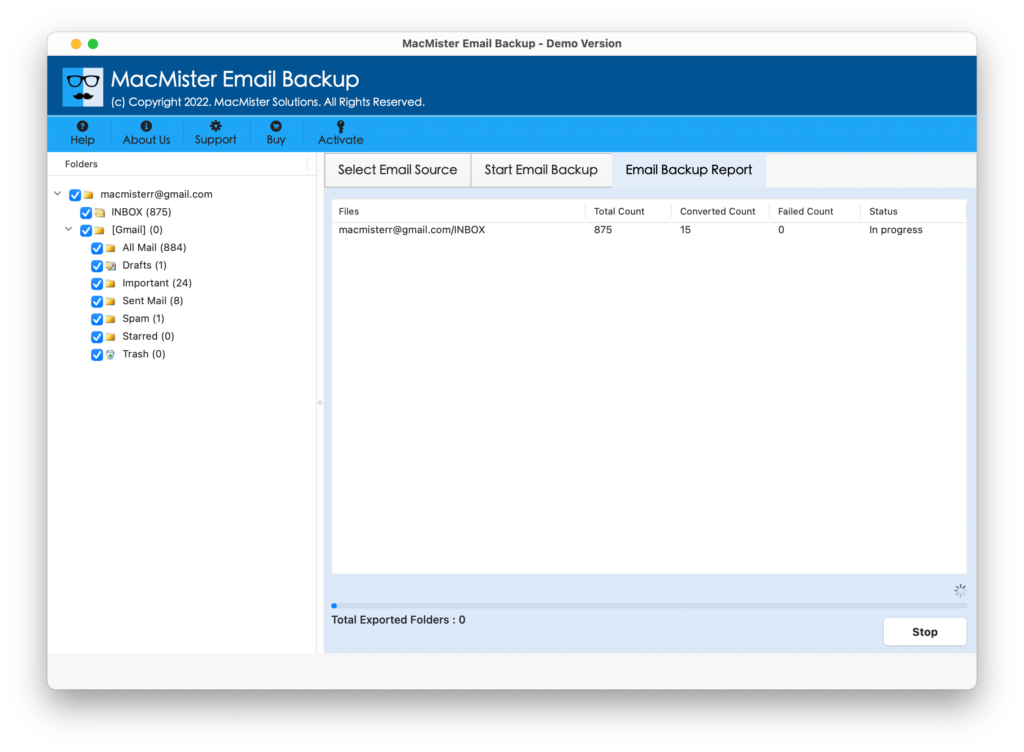
In few seconds, the process will finish with a notification message confirming migration is completed successfully. Click OK and then go to the destination path to check resultant files. You will see that the application has accurately implemented the process. The emails, metadata properties, and email structure will remain correct and precise.
Epilogue
In the write-up, we have highlighted methods on how do I declutter my Yahoo email. With the help of the mentioned methods, one can move their emails into archive folder, however it has been considered as one of the best way to clean Yahoo inbox view. Additionally, one can look for automated solution to archive Yahoo Mail emails locally on the system.