How to Export Thunderbird Emails to Betterbird on Mac without Data Loss?

Many Mac users are switching from Betterbird to Thunderbird because they want a familiar interface with additional improvements while keeping all their emails, contacts, calendars, and account settings intact. Since Betterbird is based on Thunderbird, the migration process is generally straightforward. However, users often worry about losing important email data during the transfer.
If you’re wondering how to export Thunderbird emails to Betterbird on Mac without data loss, this guide covers everything you need to know. In this guide, we will walk you through the manual migration process, highlight the challenges and drawbacks involved, and explore a reliable professional solution designed for users seeking a smooth and effortless transition.
Explore the Topic: How to Copy Thunderbird Profile from Mac to Windows?
Why Export Thunderbird Emails to Betterbird on Mac?
Betterbird is a Thunderbird-based email client designed to offer additional bug fixes, enhanced stability, and extra features that may not yet be available in Thunderbird releases. Many Mac users prefer Betterbird because it provides:
- Improved performance and responsiveness.
- Additional bug fixes released before Thunderbird.
- Better handling of large mailboxes.
- Enhanced search and indexing.
- Improved calendar functionality.
- Greater stability for daily email management.
If you’re planning How to export Thunderbird emails to Betterbird on Mac without Data Loss, preserving your existing mailbox structure and account configuration should be your top priority.
What Data Can Be Migrated?
Before starting the migration, it’s helpful to know what information can usually be transferred email messages, attachments, folder hierarchy, email accounts, address books, saved passwords, calendars, signatures, etc.
Since Betterbird uses a profile structure similar to Thunderbird, transferring the profile correctly helps retain almost everything.
Manual Method to Export Thunderbird Emails to Betterbird on Mac
The easiest manual approach is to copy your Thunderbird profile into Betterbird.
There is no need to migrate, copy, or import any data when moving from Thunderbird to Betterbird.
Step 1: Confirm the ESR Version
Before installing Betterbird, check that it matches the same Thunderbird ESR version you are currently using. Keeping both versions aligned ensures smooth profile compatibility.
Step 2: Install Betterbird
Download and install Betterbird on your system. There is no need to manually transfer, copy, or import your emails, settings, or profile data.
Step 3: Let Betterbird Find Your Profile
After installation, launch Betterbird. The software automatically identifies your existing Thunderbird profile and imports your email accounts, settings, preferences, and stored data for a seamless setup experience.
Step 4: Select Your Profile Manually (If Required)
If Betterbird does not locate your profile automatically, open it using the -p option to launch the Profile Manager. Select your existing Thunderbird profile from the available list.
Step 5: Manage Profiles Through Troubleshooting Information
You can also switch profiles by opening Help → Troubleshooting Information and selecting about.
Step 6: Start Using Betterbird
Once your Thunderbird profile is connected, Betterbird is ready to use. Open the application and continue accessing your emails instantly with your existing setup.
Professional Method to Export Thunderbird Emails to Betterbird on Mac
If you manage multiple email accounts or large Thunderbird mailboxes, the manual method of moving Thunderbird to Betterbird can be challenging due to hidden folders, profile errors, permission issues, lengthy transfer times, and the lack of selective migration options. It may also be difficult for non-technical users and carries a risk of data loss. To overcome these limitations, users can opt for the MacMister Thunderbird Converter for Mac solution that provides a simple, secure, and efficient way to transfer complete Thunderbird data to Betterbird without complications.
It allow users to back up Thunderbird emails into PST, PDF, MSG, EML, and multiple standard formats while preserving folder hierarchy, attachments, metadata, and message integrity. . It supports batch conversion, allowing users to process multiple Thunderbird profiles or mailboxes in a single operation, saving both time and effort. With its intuitive interface, users of all experience levels can perform email conversion without technical expertise. It works smoothly on all major macOS versions and ensures complete data accuracy throughout the migration process.

Although Betterbird can directly use Thunderbird profiles, exporting emails into universally supported formats can be useful for creating secure backups or migrating selected mailboxes before importing them into Betterbird. Test the software with the free trial, allowing you to save up to 25 items from your preferred folder for free.
Simple Steps to Use Mac Thunderbird Export Solution on your system
Follow these straightforward steps to export your Thunderbird mailbox data on a Mac system:
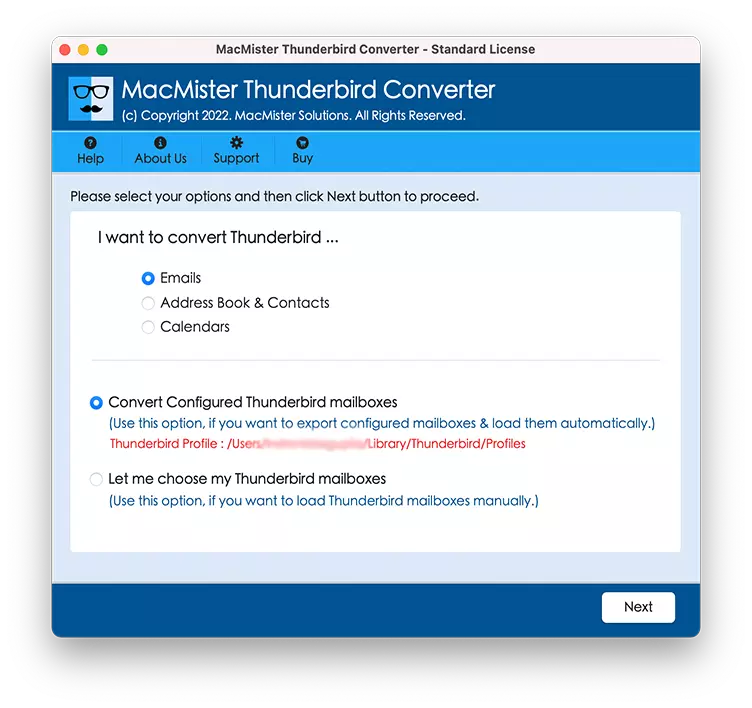
1.Install and open the Mac Thunderbird to PDF Converter Solution on your Mac device and allow the software to detect your Thunderbird profile automatically, or manually select the profile location using the available options.
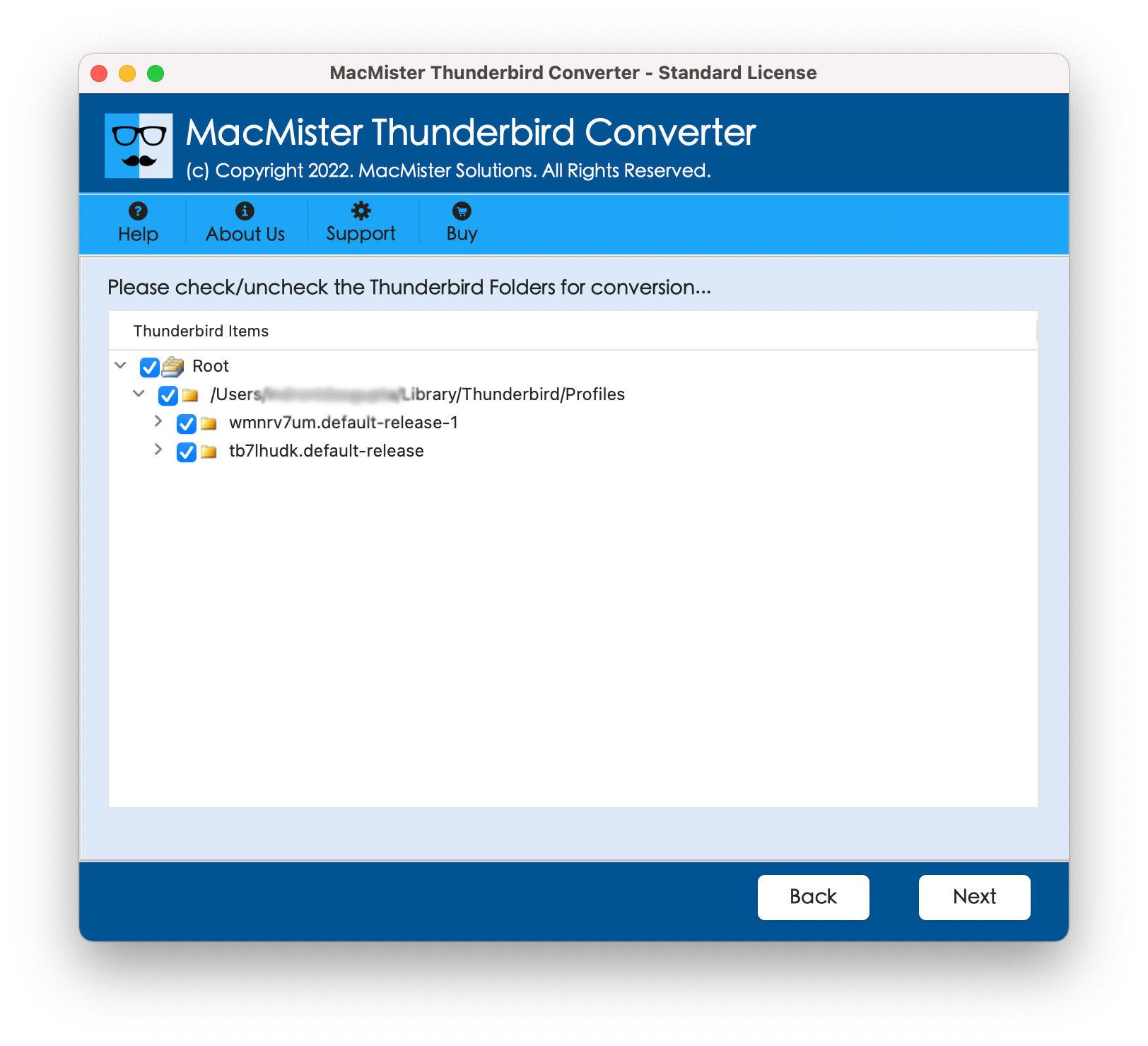
2. Once the profile is loaded, browse through the mailbox folders and preview the available email data. And select the specific folders you want to export or back up according to your requirements.
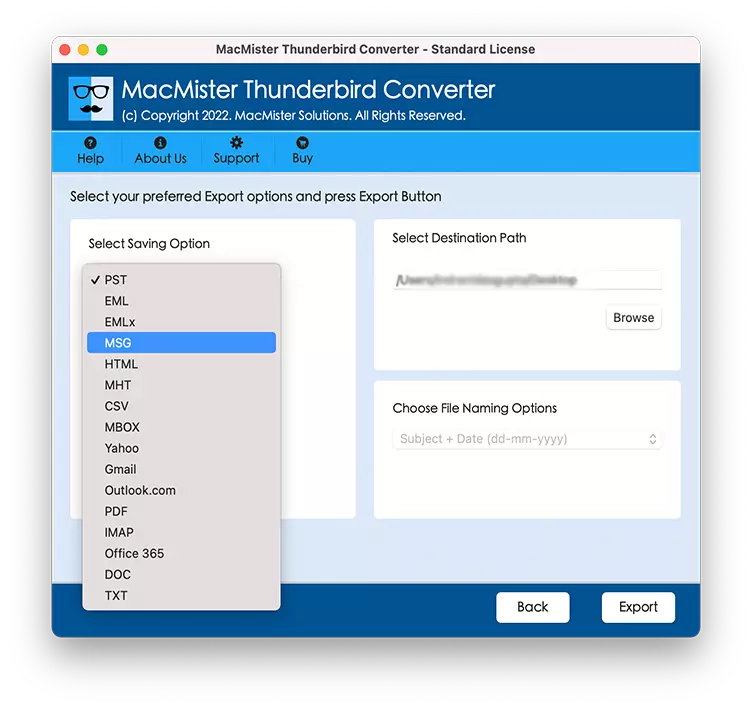
3. Pick MBOX output format for saving the Thunderbird data based on your backup or migration needs. And Choose the destination folder on your Mac
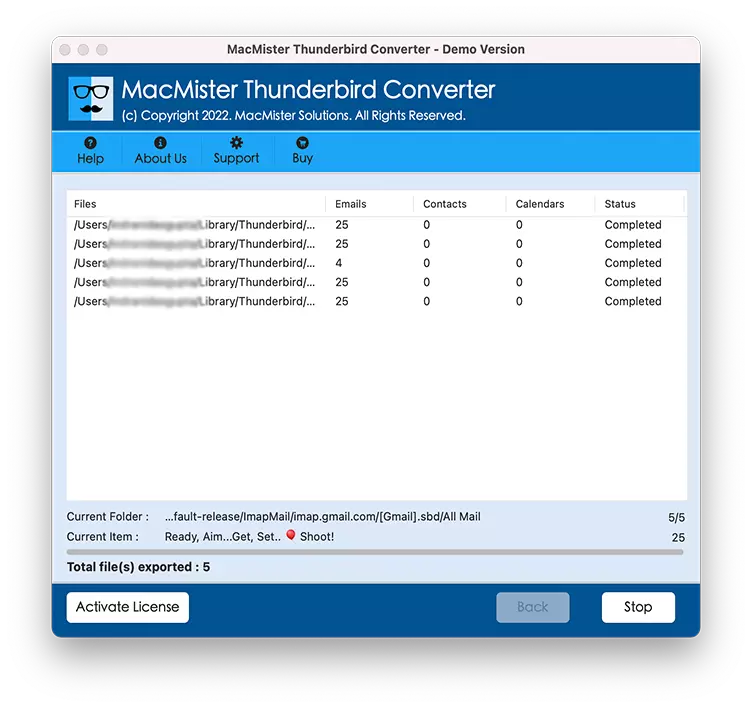
4. Click Export and save the exported mailbox data securely at your preferred location.
5. Import the backed-up data into Betterbird using the appropriate import option if your workflow requires it.
This method is especially useful when you want an additional backup before making profile changes.
Tips to Ensure a Safe Migration
Follow these recommendations before beginning the migration:
- Always create a complete profile backup.
- Close Thunderbird before copying files.
- Ensure Betterbird is not running.
- Verify available disk space and keep macOS updated.
- Avoid interrupting the copying process.
- Do not rename profile folders unnecessarily.
- Check all mailbox folders after migration.
These simple precautions greatly reduce the chances of data loss.
Know More: How to Backup Thunderbird Emails on Mac?
Why Backing Up Before Migration Matters
Even though Thunderbird and Betterbird share a similar architecture, unexpected issues such as interrupted file transfers, storage errors, or accidental deletions can occur. A complete Email Backup for Mac ensures that you can restore all your emails and settings if something goes wrong. It also provides peace of mind when making changes to your email environment.
Conclusion
Learning How to export Thunderbird emails to Betterbird on Mac without Data Loss is much easier than many users expect. Since Betterbird is built on Thunderbird’s foundation, simply transferring the correct profile can preserve your emails, contacts, calendars, account settings, and folder structure with minimal effort.
For most users, the manual profile-copying method is sufficient, provided that a complete backup is created beforehand. However, if you prefer a more controlled workflow or want an additional safeguard, creating a backup with a trusted solution like Thunderbird Backup Tool for Mac can add an extra layer of protection. Ensuring that your valuable email data remains secure and fully accessible in your new Betterbird environment.
Frequently Asked Questions Regarding
Q1. Can I use my Thunderbird profile directly in Betterbird?
Yes. Betterbird is compatible with Thunderbird profiles, making migration relatively straightforward.
Q2. Will my folders remain organized when export Thunderbird Emails to Betterbird on Mac?
Yes. If the profile is copied correctly, the original folder hierarchy is preserved.
Q3. Are contacts transferred?
Yes. Address books stored in the Thunderbird profile are migrated along with other profile data.
Q4. Can I continue using Thunderbird after migration?
Yes. Betterbird creates its own working environment, and your Thunderbird installation can remain available if you wish.