Why Are My EML Files Opening Blank? Convert Them to PDF Without Data Loss
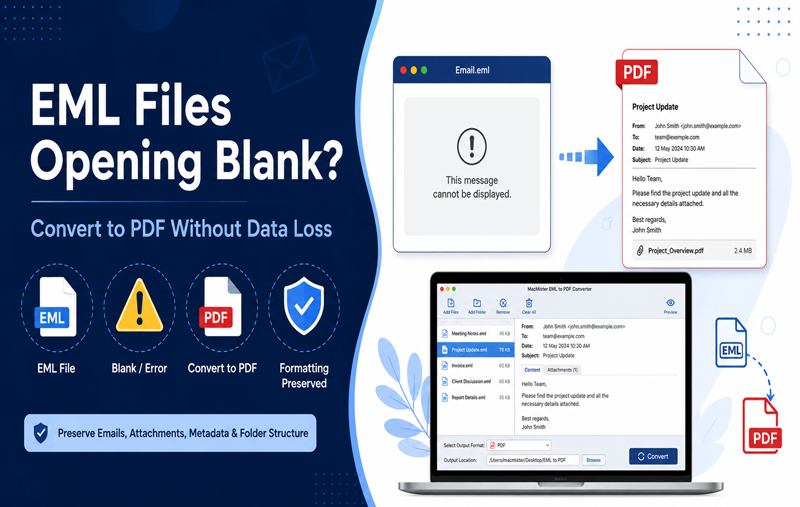
Have you ever double-clicked an EML file only to find a completely blank email window? Instead of viewing the email message, you’re left staring at an empty screen with no sender details, no subject, and no email content. This issue is more common than many users realize and can occur when EML files are opened in an unsupported email client, become partially corrupted, or contain formatting that your current application cannot interpret.
Blank EML files can become a serious problem when the emails contain legal records, business communications, invoices, contracts, or customer conversations. Losing access to this information can interrupt your workflow and even create compliance challenges if those emails must be preserved for future reference.
Fortunately, a blank EML file doesn’t always mean the email has been lost permanently. In many cases, the content still exists inside the file but cannot be rendered correctly by your email application. Understanding the reasons behind this issue is the first step toward recovering your email and preventing similar problems in the future.
Convert EML Files to PDF Before the Problem Gets Worse
If your EML files are opening blank or behaving unexpectedly, don’t wait until they become unreadable. MacMister EML to PDF Converter for Mac lets you convert single or multiple EML files into PDF documents while preserving email formatting, attachments, metadata, inline images, and folder hierarchy. Once converted, your emails can be opened on virtually any device without requiring an email client.
 |  |
In some cases, blank emails are caused by incorrect character encoding. Learn more about common EML file encoding issues and how they affect email readability.
Why Do EML Files Open Blank?
Several technical issues can prevent an email client from displaying the contents of an EML file correctly. Below are the most common causes.
1. Unsupported Email Client
Not every email application fully supports the EML format. Some programs can detect the file but fail to render its MIME structure properly. As a result, the email opens with an empty body even though the original content is still stored inside the file.
This commonly happens after changing your default email application or opening EML files in software that has limited compatibility.
2. Corrupted EML File Structure
EML files store email data using Internet message standards. If even a small portion of the file becomes corrupted during copying, downloading, or transferring between devices, the email client may fail to interpret the message correctly. Corruption can occur because of –
- Interrupted file transfers
- Bad storage sectors
- Unexpected system shutdowns
- Malware infections
- Damaged backup archives
Even a single damaged header can prevent the email body from loading.
3. Missing MIME Headers
Every EML file contains MIME headers that describe how the email should be displayed. These headers identify the content type, character encoding, attachments, and formatting.
If important MIME information is missing or damaged, your email software may detect the message but display a blank window instead of the actual email.
4. Incorrect Character Encoding
Emails exchanged between different mail servers often use various character encoding standards. If your email client cannot decode the specified encoding, it may display –
- Blank email body
- Random symbols
- Missing text
- Broken formatting
This problem is especially common when emails originate from older email applications or international mail servers.
If your email body opens but attachments are missing, check our guide on EML attachments not showing for additional troubleshooting steps.
5. Damaged HTML Content
Modern emails usually contain HTML formatting. If the HTML section becomes damaged or references missing resources, some email applications fail to load the message entirely rather than displaying the plain-text version.
6. Antivirus or Security Software Interference
Some antivirus applications scan email files before allowing them to open.
Occasionally, overly aggressive scanning may quarantine embedded scripts, attachments, or HTML elements, causing the email to appear blank even though the file itself is not completely damaged.
7. Email Client Compatibility Issues
EML files created in Thunderbird, Apple Mail, Windows Live Mail, Outlook Express, or other email applications may not always display perfectly in another client.
Although EML is a standard format, each application stores additional information differently, leading to compatibility problems.
How to Troubleshoot Blank EML Files
Before assuming the file is permanently damaged, try these troubleshooting methods.
Open the File in Another Email Client
- Try opening the same EML file using another supported email application.
- Sometimes the issue lies with the email client rather than the file itself.
Check the File Size
- If the EML file size is only a few bytes, the email may not have been saved correctly.
- A genuine email usually contains significantly more data, especially if it includes attachments.
Open Using a Text Editor
- Since EML files are text-based, open the file using a text editor.
- If you can see email headers, sender information, and readable text, the email data still exists even if your email client cannot display it properly.
Restore from Backup
If the file became corrupted after copying or transferring, restoring the original version from backup may resolve the issue.
Disable Security Software Temporarily
Temporarily disabling antivirus protection can help determine whether security software is blocking the email content.
Remember to re-enable your protection immediately after testing.
Why PDF Is a Better Format for Long-Term Email Storage
Unlike EML files, PDF documents are universally supported and remain readable without requiring an email application. Converting important emails to PDF offers several benefits.
- Universal Compatibility – PDF files open on Windows, macOS, Linux, Android, and iOS without requiring specialized email software.
- Preserved Formatting – The original email layout, colors, fonts, and embedded images remain intact.
- Easy Printing – PDF documents can be printed consistently without formatting changes.
- Secure Archiving – PDF files are widely accepted for business documentation, legal records, audits, and long-term digital preservation.
- Easy Sharing – Recipients can read PDF documents without installing an email client or importing EML files.
Convert Blank EML Files to PDF with the software for Mac
When manual troubleshooting doesn’t solve the problem, using a professional conversion tool is often the safest solution. MacMister EML Converter for Mac is designed to process EML files efficiently while preserving the integrity of your email data. The software converts EML files into high-quality PDF documents without altering the original source files.
Key Features
- Batch conversion of multiple EML files
- Maintains original email formatting
- Preserves attachments separately
- Retains sender, recipient, subject, and date information
- Supports emails from multiple email clients
- Keeps folder hierarchy intact
- Fast conversion with high accuracy
- Simple and user-friendly interface
Even if your email application struggles to display certain EML files correctly, converting them into PDF provides a reliable way to preserve and access valuable information.
Steps to Convert EML Files to PDF
Install and launch the software for Mac.
Add EML files or entire folders.
Preview the selected emails.
Choose PDF as the output format.
Select the destination folder.
Click Convert.
Within a few minutes, your emails will be available as PDF documents that can be opened anywhere.
Best Practices to Prevent Blank EML Files
You can reduce the risk of blank EML files by following these recommendations –
- Always keep backup copies of important emails.
- Avoid interrupting file transfers.
- Store email archives on healthy storage devices.
- Keep your email application updated.
- Verify downloaded EML files before deleting the originals.
- Archive important emails in PDF format for long-term access.
FAQ
Q. Why is my EML file opening blank?
Ans. A blank EML file is usually caused by corrupted MIME headers, unsupported email clients, damaged HTML content, incorrect character encoding, or partial file corruption.
Q. Can I recover a blank EML file?
Ans. Yes. If the file isn’t completely corrupted, you can try opening it in another email client, inspect it using a text editor, or convert it into PDF using a professional converter.
Q. Does converting EML files to PDF change the original email?
Ans. No. Professional conversion tools create a separate PDF copy while leaving the original EML file unchanged.
Q. Will attachments be included in the PDF?
Ans. The email content is converted into PDF, while attachments can be preserved separately depending on the conversion settings and software used.
Q. What is the safest way to archive EML files?
Ans. Converting EML files to PDF is one of the safest methods because PDF files are universally supported, preserve formatting, and are suitable for long-term storage.
Conclusion
Blank EML files are usually caused by compatibility problems, damaged MIME headers, corrupted HTML content, incorrect character encoding, or file corruption during transfer. Although the issue can be alarming, the email data is often still recoverable.
If you regularly archive business emails, legal communications, or personal records, converting EML files into PDF is one of the most reliable ways to preserve them. With EML Data to PDF Tool for Mac, you can securely convert EML files into universally accessible PDF documents while maintaining formatting, metadata, and email integrity. This ensures your important messages remain readable, shareable, and protected for years to come.